
Best Editing Software for Drone Videos: From Flight Footage to Final Cut
DaVinci Resolve Studio is an ideal choice for drone editing due to its ability to provide professional color grading tools along with the capability to decode high bitrate H.265 files and utilize AI powered stabilization and color correction tools.
DaVinci Resolve offers a free version that allows users to create professional-looking edits, but DaVinci Resolve Studio is the version that includes DaVinci Neural Engine which supports AI based tools such as Magic Mask. Magic Mask allows for automated separation of the sky and ground in drone footage allowing users to grade each element separately. So when you're looking for the best editing software for drone videos, DaVinci Resolve is the place to start.
DaVinci Resolve Studio: The Top Pick for Drone Editors
In addition to Magic Mask, DaVinci Resolve Studio also allows users to perform multiple node based color adjustments including layering color adjustments. Aerial footage often presents challenges with regards to color such as haze, variable white balance based on altitude, and varying brightness levels between the sky and ground.
DaVinci Resolve's node based grading allows users to address these issues by applying specific color adjustments to specific areas of their images. If you're cutting between aerial and ground-level B-roll from your drone, matching the color between those two very different types of footage requires this level of control.
Users of DaVinci Resolve Studio report positive experiences with the application. On B&H Photo, DaVinci Resolve Studio has been rated 4.6 stars out of 5 by 361 reviewers.
One reviewer stated, "This software is very powerful and can accomplish nearly everything in video editing," but noted that there is a significant learning curve associated with mastering the application. A second reviewer stated that the Studio version was "amazing" and he wishes he would have purchased the upgrade sooner. If you want to learn the fundamentals of DaVinci Resolve, the free version is a great place to start before deciding if the Studio upgrade is worth it.
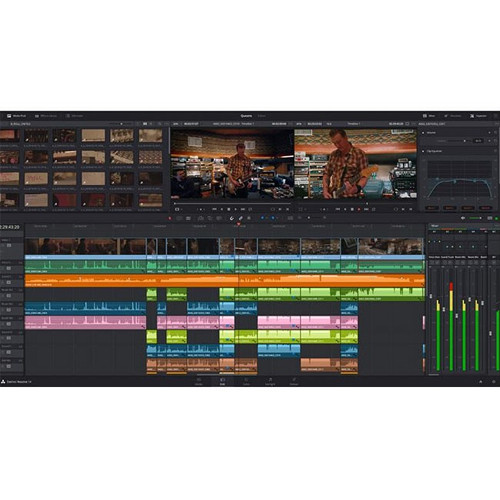
Free Options That Actually Work
Free versions of editing applications that handle drone footage exist, but the free versions of DaVinci Resolve, CapCut, and DJI LightCut all come with limitations.
DaVinci Resolve (Free Version)
DaVinci Resolve is the top-rated free editing application for drone footage. The free version of DaVinci Resolve contains native H.265 support, professional color grading capabilities, and watermark-free export at unlimited resolutions.
The limitations of the free version include lack of access to DaVinci Neural Engine (AI), advanced noise reduction, HDR grading, and some codec support. Most drone editors will find the free version of DaVinci Resolve sufficient for creating basic cuts, color correcting their footage, and exporting their content for social media platforms.
CapCut
CapCut is an extremely popular free editing application available for both mobile devices and desktops. CapCut is geared towards short-form content creation, includes pre-built templates for social media style edits, and offers built-in color correction and stabilization tools.
Many users within the drone community have recommended CapCut as a quick solution for editing drone footage intended for social media. The limitations of CapCut include being limited to social media styled edits, and having limited features when compared to a longer-form professional video production application.
DJI LightCut
DJI LightCut is a free editing application that imports DJI drone footage directly into the application. Once imported, users can select a variety of pre-designed templates and use AI-assisted editing to assemble a highlight reel of their drone footage.
As a mobile app, LightCut is geared toward creating short-form social media styled edits. Users attempting to create a multi-camera cut using drone footage combined with footage shot from other cameras, or those requiring more extensive color correction, will find LightCut to be limited in functionality.
Paid Alternatives Worth Considering
Adobe Premiere Pro
Adobe Premiere Pro is capable of handling drone footage, and offers a Warp Stabilizer tool that is widely used in the industry. When working with drone footage, the No Motion option is typically used when there is minimal movement in the shot, but slight drift occurred during the flight.
Premiere Pro also integrates seamlessly with After Effects through Dynamic Link, making it easy to add motion graphics and title overlays to aerial footage.
While Premiere Pro is capable of producing excellent results, the primary drawback is that Premiere Pro operates under a subscription model. Users are required to pay a recurring monthly fee to continue using the software. In comparison to DaVinci Resolve Studio, which is a one-time purchase, the ongoing cost may deter some users.
Additionally, while Premiere Pro's color grading tools have improved significantly over the years, they still cannot compete with the node-based Color Page found in DaVinci Resolve for complex grading of aerial footage. If you are already invested in the Adobe Creative Cloud suite, and use After Effects, Audition, and Photoshop regularly, Premiere Pro is a viable option. You can compare Adobe pricing on Amazon.
Final Cut Pro
Apple Silicon-based computers have dedicated video decode engines to assist with H.265 video, allowing for smooth playback and background rendering of drone footage. Magnetic timelines can be beneficial for drone editors working on long sequences of aerial clips because the auto-gap closes save time.
Color grading in Final Cut Pro is where the limitations exist. Final Cut Pro has color wheels, curves, and hue/saturation curves, but lacks a node-based grading system. Basic corrections and LUT application will work fine, but matching complex aerial footage shot under varying lighting conditions may require going back and forth to DaVinci Resolve.
Also, Final Cut Pro only runs on Mac, so drone editors running on Windows or Linux cannot use it.
Quick Comparison
| Software | Price | H.265 Native | Color Grading | Stabilization | Platform | Best For |
|---|---|---|---|---|---|---|
| DaVinci Resolve Studio | One-time purchase | Yes | Node-based (best) | Yes + AI | Win / Mac / Linux | Pro color + editing |
| DaVinci Resolve (Free) | Free | Yes | Node-based | Yes | Win / Mac / Linux | Best free option |
| Adobe Premiere Pro | Subscription | Yes | Lumetri (good) | Warp Stabilizer | Win / Mac | Adobe ecosystem users |
| Final Cut Pro | One-time purchase | Yes (HW accel) | Wheels + curves | Yes | Mac only | Apple Silicon users |
| CapCut | Free | Yes | Basic | Yes | Win / Mac / Mobile | Quick social media edits |
| DJI LightCut | Free | Yes (DJI only) | Basic | Auto | Mobile only | Fast DJI highlight reels |
What to Look for in Drone Editing Software
Codec Support and Timeline Performance
The NLE you choose needs to natively handle H.265 at high bitrates. All modern DJI and Autel drones shoot H.265, and if your NLE can't decode it smoothly, you'll spend the majority of your time waiting for frames to render.
Both DaVinci Resolve and Final Cut Pro handle H.265 natively. Premiere Pro also decodes H.265 natively but can benefit from proxy media for smoother scrubbing on less powerful hardware. If playback is choppy, proxy workflows allow you to edit at a lower resolution and automatically switch back to full quality for export. Make sure your computer hardware is up to the task, especially your GPU, as drone codec decoding relies heavily on GPU acceleration.
Stabilization Tools
Gimbals help reduce wind-induced vibrations and rapid directional changes, but still produce micro-vibrations that need to be cleaned up in post. A good stabilization tool should give you several modes (smooth motion vs. no motion) and properly handle horizon lines without warping them as many aggressive stabilization tools tend to do on wide aerial shots.
DaVinci Resolve, Premiere Pro and Final Cut Pro all have adequate stabilization, but the quality and speed of processing vary greatly.
LUT Support and Color Grading
If you're recording in D-Log or D-Cinelike on a DJI drone, you'll likely want NLE software that allows for LUT application and some ability to grade further than just applying a LUT. DaVinci Resolve is clearly the best in this regard. While Premiere Pro and Final Cut Pro both allow for LUTs, they don't have as robust of a grading toolset. For more detail on drone-specific software workflows, we have written a full comparison of the aerial editing capabilities of each NLE.
Social Media Export
If a large portion of your drone video goes to YouTube, TikTok or Instagram, you will want your NLE to make exporting in the correct format and aspect ratio easy. DaVinci Resolve Studio contains Smart Reframe, which uses AI to reframe horizontal footage to fit vertically formatted social media formats.
Premiere Pro also has a similar automatic reframe function. CapCut was created with social media exporting as the primary focus and excels in this area.
Frequently Asked Questions
Is the free version of DaVinci Resolve sufficient for editing drone video?
Yes. The free version of DaVinci Resolve has native 4K H.265 support, includes industry-standard color grading tools, and exports at full resolution without watermarks. Most drone editors can accomplish anything they want using the free version of DaVinci Resolve. The Studio version adds AI tools such as Magic Mask, advanced noise reduction, and HDR grading, which are nice-to-haves but not required by everyone. If you decide you want these additional tools down the line, it's a one-time purchase with a perpetual license.
What is the best editing software for DJI drone footage?
DaVinci Resolve is the best choice for handling DJI's H.265 codec natively and is the top recommendation among the drone community. DJI LightCut is a good alternative for social media-friendly edits directly from your smartphone. DaVinci Resolve is the best choice for professionals looking to color-grade and combine drone video with other video formats. You can check pricing at B&H.
Do I need to transcode my drone footage before editing?
No. DaVinci Resolve and Final Cut Pro both natively handle H.265 drone footage and generally provide smooth playback on modern hardware. Premiere Pro can also decode H.265 natively but may benefit from proxy media to improve the smoothness of playback. If playback is choppy, creating proxy files is much quicker than transcoding the entirety of your project to ProRes or DNxHR. When you are ready to export, your NLE will automatically transition back to the original files.
Can I edit drone footage on a laptop?
Yes, provided your laptop has a dedicated GPU (RTX 3060 or greater), at least 16GB of RAM, and meets the minimum requirements of the NLE you plan to use. Apple Silicon-based MacBook laptops are ideal for drone footage in Final Cut Pro and do not require proxy media for smooth playback. Store your drone footage on a fast external SSD instead of the internal drive to provide optimal playback performance and available storage space.
Is the Adobe Premiere Pro subscription worth the expense for drone video editing?
If you are currently using other Adobe apps such as After Effects and Photoshop as part of a larger creative workflow, the Adobe Creative Cloud subscription is a worthwhile investment. If drone video editing is the bulk of your work, DaVinci Resolve Studio provides similar editing capabilities and superior color grading for a one-time purchase. The cost of a Premiere Pro subscription over two to three years exceeds the one-time cost of Resolve Studio, and you own Resolve Studio outright.
Are there any mobile apps to edit drone footage on the go?
CapCut and DJI LightCut are both viable options for making quick edits of drone footage on your phone or tablet. CapCut is more geared towards creating creative social media content utilizing templates and effects. LightCut is better suited for making quick edits of drone footage with auto-suggested edits. Neither is a replacement for a desktop NLE for serious editing work, but both are great options for quickly getting your drone footage posted on social media immediately after a flight. You can also find DaVinci Resolve on Amazon if you prefer shopping there.