
Portable Video Switcher Options for Live Production
There's a reason you'll find the Blackmagic ATEM Mini Extreme ISO G2 at YouTube studios and live event rigs all over the place. Blackmagic has a ridiculous value proposition here. For the price of a decent lens you get a hardware switcher with built-in streaming and recording, audio mixing, and a control surface that really does look like broadcast equipment.
Reviewers on B&H consistently mention the short learning curve and this is consistent with the design. Big, easy-to-read illuminated buttons, clearly-labeled functions, and a layout that even those with no prior experience will understand.
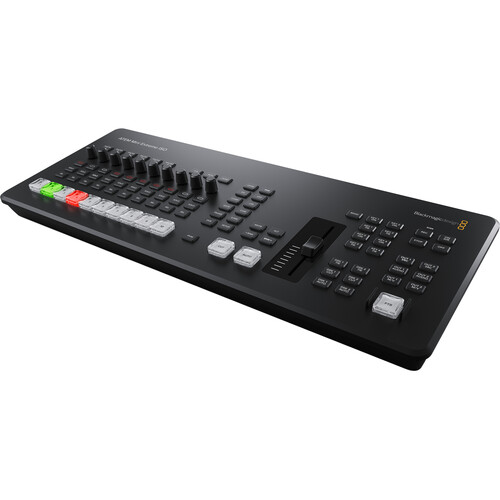
Every model in the lineup accepts HDMI inputs (up to 1080p60) and sends the signal via HDMI and USB-C for webcam use. Upstream and downstream keyers are also standard across the board, as is the ATEM Software Control app for deeper configuration. Streaming via RTMP directly over Ethernet without the need for a computer is also a key benefit for portable applications as this removes your laptop as a possible point of failure during a live stream.
Why the ATEM Mini Lineup Dominates Portable Switching
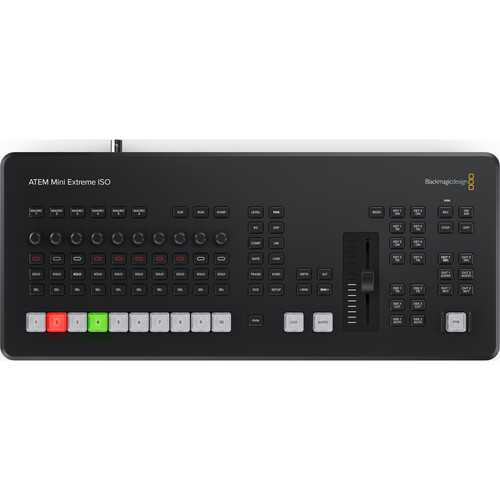
The current lineup is divided into four tiers. The base ATEM Mini Pro offers four inputs and one output for the price of a nice dinner out. The ATEM Mini Extreme jumps to eight inputs and adds SuperSource for creating picture-in-picture layouts. The Extreme ISO adds individual recording of every input. The new Extreme ISO G2 redesigns the entire control surface with a hardware fader, XLR inputs, Thunderbolt and CFexpress recording.
ATEM Mini Lineup at a Glance
| Feature | Mini Pro | Extreme | Extreme ISO | Extreme ISO G2 |
|---|---|---|---|---|
| HDMI Inputs | 4 | 8 | 8 | 8 |
| HDMI Outputs | 1 | 2 | 2 | 3 |
| ISO Recording | No | No | Yes | Yes |
| Audio Inputs | 2x 3.5mm | 2x 3.5mm | 2x 3.5mm | 2x XLR + MADI |
| SuperSource | No | Yes | Yes | Yes |
| Hardware Fader | No | No | No | Yes |
| Thunderbolt | No | No | No | Yes |
| Headphone Jack | No | No | No | Yes |
| Streaming | Yes | Yes | Yes | Yes |
| USB-C Webcam | Yes | Yes | Yes | Yes |
| Weight | ~1.2 lbs | ~2.5 lbs | ~2.5 lbs | ~4 lbs |
ATEM Mini Extreme ISO G2: The Full-Featured Option
The G2 is the newest member of the lineup and it is a significant redesign, not just a minor update. Blackmagic has reworked the control surface to include larger NKK-style source select buttons that light up red and green, dedicated knob controls, and a true hardware fader for transitions. This fader alone provides a huge improvement in doing live dissolves and providing tactile feedback instead of simply hitting an auto button.
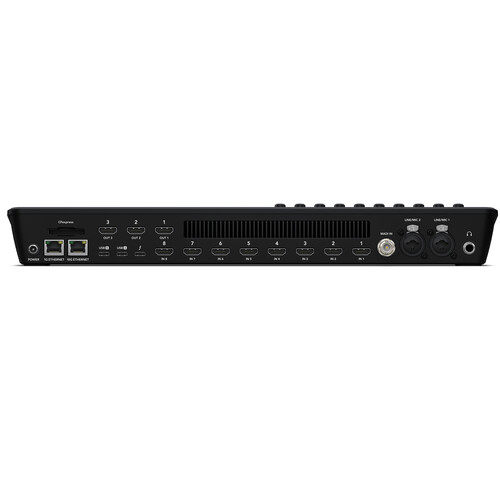
In terms of connectivity, the G2 adds items that help to create a feeling of a real broadcast tool. Two XLR inputs with truly great preamps (one B&H reviewer stated that the audio quality is better than some dedicated mixers), a MADI input via BNC, a 1/4-inch headphone jack, and a Thunderbolt 3 port. The Thunderbolt connection allows for live-action replay through DaVinci Resolve, where you can access any of the eight ISO-recorded inputs for immediate replay during sports or live events.
What Users Are Saying
The reviews on B&H paint a very interesting picture. Users praise the Thunderbolt integration (one reviewer stated that it worked flawlessly with ProPresenter for church production), the solid construction of the buttons, and the expandability that MADI provides for larger audio systems. Reviewers describe the controls as intuitive, and for users transitioning from the older Extreme models, the revised layout is an upgrade.
But there are legitimate criticisms too. Multiple users report a significant amount of fan noise, which is a genuine concern if your switcher is located near a microphone in a small studio. One reviewer on B&H called the fan noise "unacceptable" for recording environments, and the Blackmagic forums confirm this issue.
The Thunderbolt port is also more restrictive than many expected. It's designed specifically for DaVinci Resolve's replay workflow, not as a general purpose video output. At least one reviewer was disappointed with the limitations and expressed frustration about not being able to use it for graphics overlays through third-party software. And the ISO recording feature still captures all eight inputs regardless of whether any of them are connected, resulting in wasted storage with blank files.
Key Specs
The Extreme ISO G2 includes eight HDMI inputs, three HDMI outputs, dual USB-C ports, Thunderbolt 3, Ethernet (both 1G and 10G), and a CFexpress slot for internal recording. It can process up to nine M/E layers, four upstream keyers, two downstream keyers, four chroma keyers, and a 16-way multiview. The unit weighs approximately 4 pounds and is roughly 16 x 7 inches in size, making it portable but not pocket-sized. You can also check current pricing on Amazon if you want to compare.
ATEM Mini Pro: Best Value for Most Setups
One factor to consider regarding the ATEM Mini Pro that many people overlook while shopping is that for most church streams, corporate events, small studio productions, and most YouTube multicam applications, four inputs is generally sufficient. Also, at its price point, the Pro is almost laughably capable for what it costs. The Pro includes the same hardware streaming engine, the same ATEM Software Control integration, multiview output, recording to USB drives, and the same transition and keying capabilities as its more expensive counterparts.
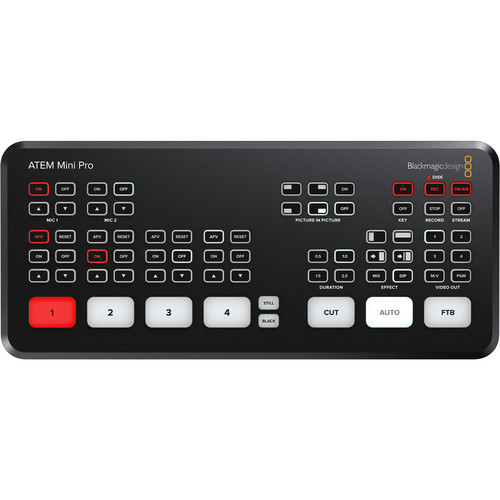
Reviewers on B&H rate the Pro a 4.6 out of 5 across nearly 500 reviews, which is quite impressive for any production-related product. Users report using the Pro for live concert streaming, instructional video production, church broadcasting, and studio switching.
Several reviewers specifically mentioned how quickly they were able to learn the system, with one reviewer stating that they had mastered the system in less than a week and performed a successful live event without encountering any major issues. The multiview function was highlighted several times as a major advantage, allowing monitoring of all four source inputs on a single display.
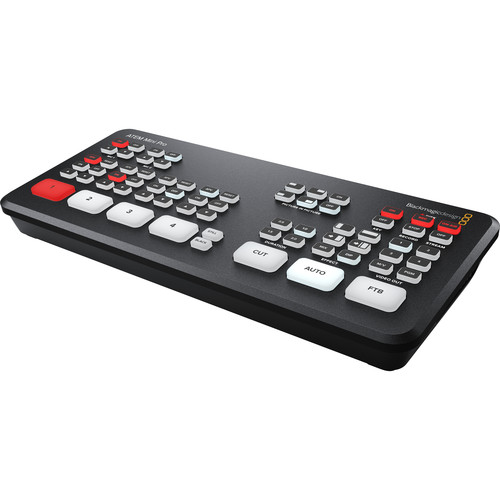
The Pro is extremely lightweight, weighing slightly more than one pound, and can fit in one hand. It also runs on a simple 12V barrel connector, making it easily transportable in a manner that the Extreme models can't match. You can put it in a camera bag along with your Rode Wireless GO mics and a couple of cameras and you'll have a complete multicam streaming setup. You can also find it on Amazon for price comparison.
When the Pro Falls Short
The Pro only has 3.5mm audio inputs, so there are no XLR inputs without adapters or an external preamp. There's only one HDMI output (the Extreme has four). But the biggest drawback that reviewers have consistently complained about is the lack of SDI support.
All models in the ATEM Mini lineup are strictly HDMI-only. If your cameras or other equipment currently utilize SDI, you'll need to purchase converters, add additional cabling, and risk introducing additional failure points. One reviewer specifically noted that their audio mixer was SDI-only, requiring a converter that complicated their setup.
There's also a reliability concern worth mentioning. At least one B&H reviewer noted that their ATEM Mini Pro ISO had died after about a year of use, whereas their older non-ISO model from 2023 was still working. That's anecdotal evidence, but it's worth considering when you're planning to use a switcher for a mission critical application and you'd like to have a backup unit on hand.
The HDMI-Only Reality
All of the ATEM Minis, regardless of whether they're the entry level Pro, the mid range Extreme, or the top-of-the-line Extreme ISO G2, have only HDMI inputs. There are no SDI inputs, and there are no SDI outputs. This may seem like an obvious thing to mention, but it is often glossed over in review articles and comparison videos because it's such a fundamental characteristic of the ATEM Mini line.
But this is a serious limitation. While HDMI cables can typically be used to connect cameras to a switcher over distances up to about 25 to 50 feet before the signal degrades (even with high-quality HDMI cables), SDI cables can handle connections over distances of 300+ feet or more without losing any signal. If you're producing a live event and the cameras need to be placed at a distance from the switcher, you'll either need to use very long active HDMI cables, or you'll need HDMI-to-SDI adapters to convert each camera's feed. Or, depending on your production requirements, you may simply need to choose a different type of switcher.
On the other hand, if you're doing studio work or working in a small space, HDMI will be perfectly acceptable. Virtually every mirrorless camera has a clean HDMI output. Blackmagic Pocket Cinema Cameras also have clean HDMI outputs. Game consoles send HDMI signals.
Computer video outputs are typically HDMI or are easily converted to HDMI. The ATEM Mini series were specifically designed for these types of applications, and they handle them quite well. But if you have any plans to produce events outside of a single room, you should be aware of the limitations of HDMI.
Alternatives Worth Considering
Roland VR-6HD
If you're looking for a portable video switcher that is most competitive with the ATEM Mini Extreme in terms of price, take a look at the Roland VR-6HD. It has six HDMI inputs, includes a built-in audio mixer with discrete faders for each channel, and can simultaneously stream video content over both USB and Ethernet. Unlike the ATEM Mini Extreme ISO G2, the VR-6HD uses a more traditional broadcast style design with physical faders and knobs for everything rather than buttons. If you prioritize having hands-on control of your audio during a live stream and don't want to use any additional software, the VR-6HD is definitely worth a closer look.
YoloLiv YoloBox and Others
At the opposite end of the spectrum are all-in-one portable video switchers and encoders such as the YoloLiv YoloBox. These units include a built-in touchscreen display, a video encoder, a video recorder, and a video switcher in one unit. They're ideal for run-and-gun situations where you need to transmit a live feed without needing to carry much equipment.
The downside of this compactness is fewer inputs (typically two or three HDMI) and less processing power for effects and chroma keying. And many users prefer the tactile feel of physical buttons versus the touchscreen controls on these units.
For larger productions that genuinely need SDI, the AVMATRIX PVS0615 is a switcher that provides a built-in 15.6-inch monitor with mixed SDI and HDMI inputs. But the PVS0615 is much more expensive than any of the ATEM Minis and is also heavier.
Picking the Right One
The decision-making process is relatively simple. If you require more than four camera inputs, or you want to record individual camera feeds as separate ISO files, or you want advanced chroma keying capabilities and SuperSource support, you'll need to go with one of the ATEM Mini Extreme units. If you only need four or fewer camera inputs and you want the most portable and cost-effective solution, the ATEM Mini Pro is a great choice and does a fantastic job.
The G2 version is worth considering if you want XLR audio, Thunderbolt replay, and a professional control surface with a hardware fader. You can compare the various models on the Blackmagic Design ATEM Mini product page and the Roland Pro A/V switcher lineup.
You should also consider pairing your switcher with a good external SSD for recording, a dedicated on-camera monitor for displaying your multiview output, and some good audio gear. The switcher is the most important piece of the live production puzzle, but it's only one piece of the overall system. And make sure you're running your setup on a solid computer if you plan to use ATEM Software Control for advanced features. You can also compare portable video switcher prices on Amazon to get a sense of the market.
Frequently Asked Questions
Can I use the ATEM Mini Pro for Zoom and Microsoft Teams calls?
Yes. Each ATEM Mini model is recognized by video conferencing apps (Zoom, Teams, Skype, Google Meet, etc.) as a standard webcam via USB-C. You can switch between multiple cameras, add graphics and overlays, and use the built-in keyers all while on a video call. Check ATEM Mini Pro availability at B&H.
Do I need a computer to live stream with the ATEM Mini?
No. All of the ATEM Mini Pro and Extreme models contain a hardware streaming engine that connects directly to your local network via Ethernet cable. You simply enter your stream settings in ATEM Software Control, and the switcher takes care of the rest independently. You can even use your smartphone as a cellular backup connection via USB tethering.
Which cameras work best with the ATEM Mini?
Any camera with a clean HDMI output. The ATEM automatically converts all formats and resolutions across all of its inputs, so you can combine 1080p, 1080i, and 720p sources at different frame rates. Blackmagic's own cameras (like the Pocket Cinema Camera 4K) get additional features such as camera control and CCU adjustments via the switcher panel. But virtually any HDMI source camera from Sony, Canon, Panasonic, and others will work fine.
Is the fan noise on the ATEM Mini Extreme ISO G2 really that bad?
That depends on your environment and the specific equipment you have nearby. B&H reviews are split on this. Some reviewers say they've never noticed any fan noise that would be distracting, while others claim it's so loud that it would be completely unacceptable in a recording environment. If you're going to put your switcher close to cameras and microphones, this is something you should test before committing. In a separate control area or large venue, it won't likely be an issue. You can see the latest G2 reviews at B&H for the most current user feedback.
Can the ATEM Mini Extreme record individual camera feeds?
The ISO versions (Extreme ISO and Extreme ISO G2) record each HDMI input as a separate MP4 file along with the program output. The switcher also creates a DaVinci Resolve project file with all of the cuts and transitions, so you can edit the entire live show as a single timeline. The non-ISO versions only record the program output. Note that all inputs are recorded (including those that aren't being used) so you'll want to budget your storage accordingly.
What's the practical difference between the ATEM Mini Pro and the Extreme ISO G2?
In addition to the jump from four to eight camera inputs, the Extreme ISO G2 includes ISO recording, SuperSource for picture-in-picture, XLR audio inputs with high-quality preamplifiers, a hardware fader, four HDMI outputs vs. one, Thunderbolt for DaVinci Resolve replay, CFexpress internal recording, MADI audio input, a headphone jack, and 16-way multiview. That's a lot of extra capability, but the Pro handles the core switching and streaming just as well for straightforward four-camera setups. Browse all ATEM Mini models at B&H to compare.