
Blackmagic Pocket Cinema Camera 4K Review: Still Worth It in 2026
The Pocket Cinema Camera 4K changed what a small budget could buy when it came out, putting RAW recording and a cinema-style image into a small, affordable body. Years later, it still turns up on wish lists and on the used market.
The question now is whether it still makes sense next to newer cameras. Its image holds up, but it has no stabilization, the battery runs down fast, and the body was never built for comfortable handheld shooting, so how you shoot decides more than the specs do.
Below are the sensor and image, the codecs, the missing stabilization, battery life and handling, and whether to buy it or step up to the 6K Pro.
The Blackmagic Pocket Cinema Camera 4K remains a legitimate cinema tool for tripod and gimbal work in 2026 because it includes a full Resolve Studio license as a post-production kit, though it lacks internal stabilization for handheld use.
While the MFT mount offers great lens variety, the battery life and ergonomics feel dated unless you add a metal cage to help with the grip. You might pick the 6K Pro if you need better thermal management or resolution, but this older model saves money for budget filmmakers who shoot from a rig.
Sensor and Image Quality
The Four Thirds sensor inside this body delivers a dynamic range of thirteen stops - Blackmagic's product page lists the full specs, while the dual gain ISO helps keep your shadows clean even when you shoot in low light.
A buyer has noted the quality is phenomenal because it captures detail that feels quite pricey. It records in BRAW, which gives you room to grade footage without losing info. You'll find that the colors stay deep, since the sensor still holds up against modern cameras.
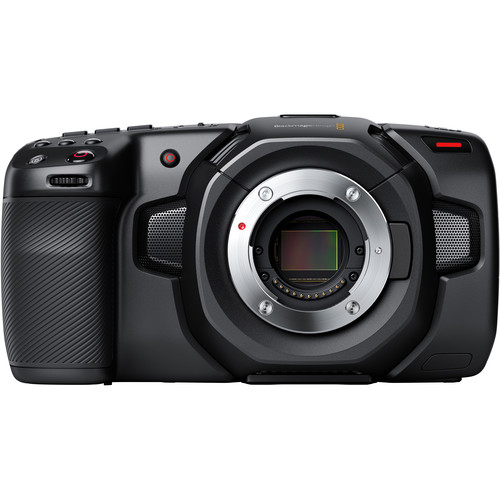
Even though newer models have come out, one user says this camera is still an amazing choice because the core performance remains high for anyone on a tight budget. The front product image shows the MFT mount, which allows you to use a wide variety of affordable glass lenses. You don't need to spend a fortune, because the sensor does the lifting.
For a cinematic look that doesn't break the bank, this sensor provides a depth that rivals many mid-range systems you can still buy today.
BRAW files mean you can push colors in Resolve, which is a plus for editors. You'll be surprised by detail in highlights, even though the sensor is old now. It stays a tool for those who value quality over the flashiest features.
Codec Options and Recording
This camera shoots in Blackmagic Raw at several bit depths, which gives you flexibility when you need to grade your footage later without worrying about losing detail.
You can pick a bit depth for each project, or drop lower when card space runs tight. It's a great tool because raw files keep data safe while you work on them in your software, and you won't lose any color info. If you don't need raw power, the camera handles ProRes, which works on any computer.
While many people use fast CFast cards for quick access, you can also plug in an external SSD via the USB-C port if you need more room.
One owner of the newer model uses a Samsung T5 to record, and it seems like that setup works well. This saves a lot of money. You won't have to buy cards when you can use a drive that holds video.
Recording in these formats means you won't get stuck with one workflow, though you should still check how much space you have left before you start a scene. You might find that high bit depths fill up fast, so you can switch to a lower setting. Those options keep you flexible when a shoot runs on a tight schedule.
The DaVinci Resolve Studio License
The box includes a full DaVinci Resolve Studio license. This pro-grade editor lets you edit your footage right away without needing to spend extra cash on separate tools or basic apps. One buyer says BRAW files work very well in the program, which makes the edit feel smooth and fast.
You don't have to worry about hidden costs because the kit already gives you everything you need to start a project.
Because the license comes in the box, you can grade with pro tools while keeping budget for lenses or a cage. If you didn't get the software included, the total price of the setup would feel much steeper for most people today. This value means that even an older model stays a smart pick, since you want high-end quality without breaking the bank.
Lens Compatibility
Since this camera uses a Micro Four Thirds mount, you can access a huge range of lenses, but you'll find that the crop factor is quite tight when you try to shoot wide landscape scenes. If you want to use full-frame glass, you'll need a speed booster to get the right field of view. These adapters help because they widen the angle, though they do add some bulk to your total setup.
The system only uses contrast-detect autofocus, which hunts noticeably more than the phase systems on newer mirrorless bodies.
Because the mount has electronic contacts, you can use modern AF lenses to see what they capture, but you'll still struggle when the camera hunts for focus while you are moving around.
You'll find that old MFT lenses are light, which makes the rig easy to carry all day. Many people love the small glass, yet they might miss the depth of field that comes with larger sensors. It's a solid tool for those who want small gear, provided they don't need to track fast.
Built-In Image Stabilization: There Is None
Since this camera lacks any internal tech to keep your shots steady, you'll find that a tripod or a gimbal is mandatory because you want to avoid shaky video in your projects.
Taking footage is almost impossible, unless you use some kind of stabilizer to help you, one owner reports.
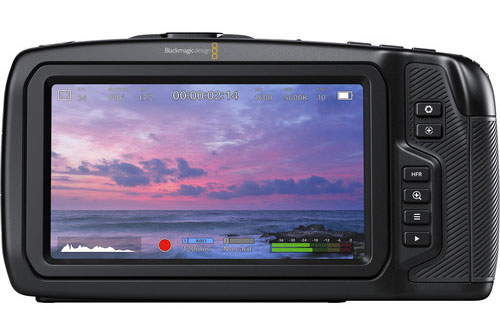
Because the body needs extra support to be usable for long shoots, you'll also need to budget for a solid metal cage that fits snugly and offers plenty of mounting points. The MagicRig cage works well because it gives you space for the gear you carry daily. One buyer wished the function buttons were easier to reach when changing settings quickly.
Battery Life and Ergonomics
This small camera uses power much faster than standard camcorders, so you'll likely need to carry extra NP-F batteries or use a USB-C power delivery bank to keep it running long. It doesn't last as long as you might hope, which means you're always hunting for an outlet. The power draw is a real problem, but spare cells and a PD bank solve it.
The body of the camera feels quite boxy in your hand, which is why many buyers use a metal cage to add a better grip and extra mounting points for their gear.
You might find the buttons hard to reach, since the frame isn't built for quick use. The internal fan makes a soft noise when it gets hot, which could mess with your audio on quiet sets. It's an odd tool, but it still gets the job done if you know its quirks.
On ports and audio, this camera includes a mini-XLR input and a 3.5mm output for your mics, while the full-size HDMI port and USB-C link ensure that you can connect monitors or external drives quite easily.
The support team answered a firmware question on the phone in about five minutes - Blackmagic posts firmware updates on its support page. That's one owner's report.
Since the body uses a full-size HDMI port, you don't have to worry about flimsy cables snapping, which is a common thing that happens with cameras that use smaller connectors instead. The USB-C port works for sending data, so you can move files to a drive without lag. These tools make the camera feel ready for pro work, even though the body itself is small and light.
Should You Buy It in 2026 - Or Step Up to the 6K Pro
For a filmmaker on a budget who shoots narrative work on a tripod or a gimbal, this older 4K model remains a solid choice. It uses the Micro Four Third mount, which means you can find many cheap lenses if you need to swap gear.
Since it lacks any internal way to keep the shot steady, you must use a rig if you plan to move while filming. One buyer says it is still an amazing choice, even years after it came out.
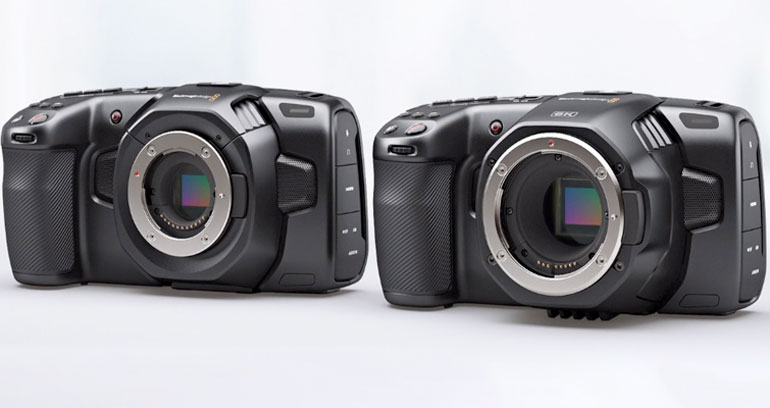
You should step up to the 6K Pro if you need 6K resolution, built-in ND filters, or a bright screen that is much easier to see in the sunlight. This newer camera runs all day without overheating, which is the main reason why one owner chose it for long events.
You can shoot opera or masterclasses in 6K, because it has digital-zoom headroom when you edit in Resolve. It records to an external Samsung T5 over USB-C, and this works very well for those who want fast workflows.
Looking at the 6K Pro/G2 comparison image, you can see how the newer body offers more tools for pros who have much more money to spend right now. The 4K pairs well with Blackmagic's ATEM Studio line if you want a professional setup without the high price tag. Pick the camera that fits your specific needs, because the extra features won't help if you only use a tripod.
Frequently Asked Questions
Is the Pocket 4K good for beginners?
It is not the right choice for a first camera - it lacks internal stabilization and demands strict manual focus discipline. It works well as a second body for someone who already knows the ropes.
How long does the battery last on this camera?
The battery life is quite short so you'll need to carry spare cells or use USB-C power delivery to keep it running during long shooting days. Always plan for frequent swaps to avoid losing important footage.
What lenses can I use with this camera?
You can use any native Micro Four Thirds lenses or adapt EF glass by using a speed-boosted adapter to get the best results on the sensor. This flexibility provides a lot of variety for your video kit setup.
What memory cards should I use for recording?
Use CFast 2.0 cards for BRAW files or connect an external SSD via USB-C if you need to record long takes without worrying about space. This setup ensures you don't run out of storage halfway through.
Should I buy the 4K or the 6K Pro?
The 6K Pro offers more resolution headroom and built-in ND filters while the 4K remains the cheapest entry for those who want to use Blackmagic RAW. Pick the 4K if you are on a tighter budget today.