
On-Camera Monitors: Atomos Shinobi II, Ninja and the Budget Field
The screen on the back of a mirrorless camera is small, hard to see in daylight and often in the wrong place once the camera is rigged on a gimbal or a shoulder mount. An on-camera monitor fixes that with a bigger, brighter view, and some of them do much more.
That's where the choice gets confusing. Some monitors only show the picture, some record better files than the camera can, and some add camera control from the touchscreen, while batteries, heat and accessories quietly add to the real cost.
Below are the monitoring default, the recording option, budget and big-screen alternatives, and the setup details nobody puts on the box.
The Atomos Shinobi II is the monitoring default for mirrorless rigs, the Atomos Ninja earns its slot when the job needs ProRes files, and the FeelWorld F6 Plus covers tight budgets. This guide ranks them on verified owner reports - batteries, heat and camera control included.
Atomos Shinobi II: The Monitoring Default
The Atomos Shinobi II is a five-inch HDR screen that hits 1500 nits of brightness, which helps you see your shot clearly even when you're working under the bright sun.
It's much thinner and lighter than the Ninja V, so it stays easy to slip into a bag when you travel. You can use the screen to focus or adjust exposure, which makes it feel like more than just a simple monitor. This tool works with many cameras, yet you should check if your specific model supports all the control features.
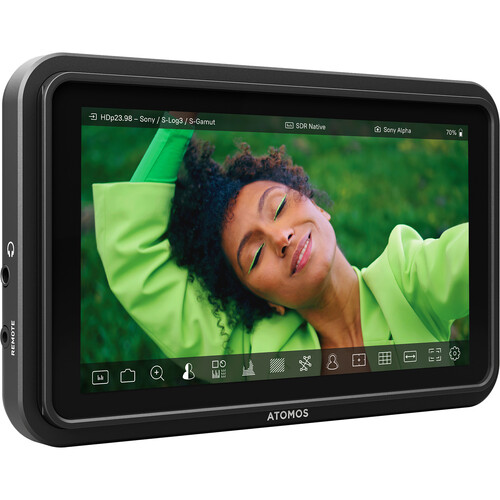
While many buyers love the price-quality balance, some people complain that the monitor doesn't include batteries or an HDMI cable, which adds up to the total production cost.
One owner has said the battery life is terrible and the unit gets very hot during long shoots. There are reports of the touch-to-focus tool failing on the FX3, even though the ads said it would work fine. The plastic bezels are quite large, and some users notice a slight latency when they try to move the image around.
To record video directly to an SSD, the Atomos Ninja is the better pick, because it has the recording tools the Shinobi lacks.
The FeelWorld F6 Plus waits in the budget tier for cost-limited builds. The Shinobi 7 provides a larger screen when the five-inch view feels cramped. That mix of strengths and gaps defines the field.
Atomos Ninja: When You Need Recording
For high-quality files instead of just a bigger screen, the Atomos Ninja is a solid choice that makes an old body like the BGH1 feel like brand new again - the kind of revival RedShark's production coverage documents across external-recorder workflows. It lets you record ProRes directly to an external SSD, which saves a lot of time during the edit.
You can load LUTs to see your final look, and even zoom while you are rolling the footage. It earns its slot when the deliverable is a graded file, not just a bigger viewfinder.
While the recording features are great, many owners report that this thing runs super hot and burns through their batteries much faster than they would expect during a long shoot day.
An owner has found they could not activate ProRes Raw, even with the latest firmware installed. The highlights on the screen also look blown out compared to the built-in display on an FX3. Support is email-only, which one buyer has called a zero-star experience while waiting on answers.
Choosing between a monitor and a recorder depends on whether you actually need to save files, or if you just want a bright screen to see your work better.
The F6 Plus remains the budget-tier answer. If you want a larger screen, the Shinobi 7 is a better path to take instead. Pick the tool that fits your workflow, so you don't struggle with features you skip.
Budget and Big-Screen Alternatives
On a tight budget, the FeelWorld F6 Plus offers a decent view, though some users wish it was much brighter for working out in the harsh sun. This budget tool works well, but it has a limit on how many LUTs you use.
You might find the screen dim, yet the price stays low for tight budgets. For pool days, B-roll rigs and second-unit work, that trade stays reasonable.
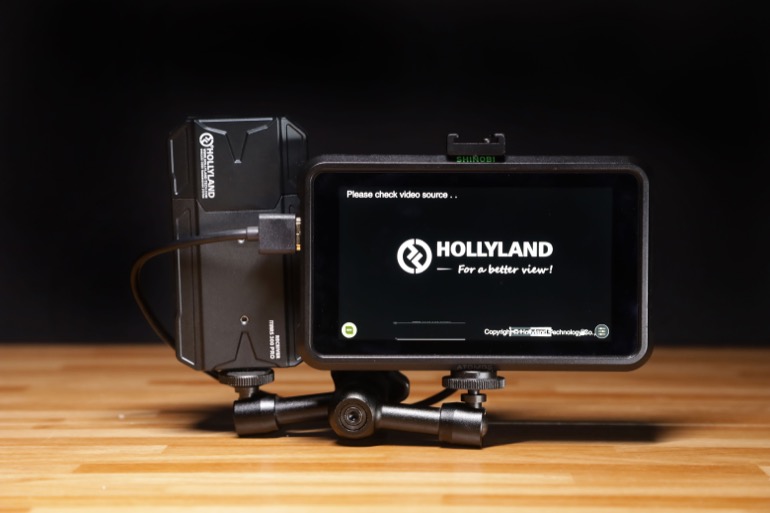
When the five-inch size feels too small for your eyes, the Shinobi 7 provides a much larger screen that helps you see every detail while you work on your film set. The Hollyland Pyro 7 adds a wireless link for director monitoring - it buys distance at the cost of latency and battery life. These tools help when you move, though they lose some of the deep control features.
Some people decide not to buy a monitor at all because their camera stays on a tripod, so the built-in screen is enough for those types of shots. If you don't move the camera often, the native LCD does the job well. You save money this way, but you lose the sharp focus tools you need.
Spend that budget on light or audio instead - it moves the footage more than a third screen would.
Setup: LUTs, Batteries and the Accessories Tax
Buying this monitor seems like a steal until you realize you have to spend another hundred twenty dollars because it doesn't come with any batteries, a charger, or even the HDMI cable you need. The sticker price hides the real kit cost.
You'll need NP-F spares to keep the screen bright, since the battery dies fast. B&H lists the full accessory chain in one place - B&H's on-camera monitor category shows the price range - and the real total lands well above the sticker. Budget it before the box arrives, not after.
While you can load LUTs to see how your footage will look, you must check if your specific camera works with the control parts before you spend your money on the box. Owners found touch-to-focus failing on a newer FX3 body after updates, so verify your exact camera on the compatibility list before the money leaves your account.
For recording, look at the Ninja instead, because this monitor only shows the image and doesn't store any files. The Shinobi stays the light-screen option in the bag - plan for spare NP-F cells, because 1500 nits drains them fast.
Frequently Asked Questions
Does the Atomos Shinobi II record video?
It monitors only - the Ninja handles ProRes recording to an external SSD. Pair the Shinobi with a recorder when the job needs files, and use the Shinobi as the bright framing screen.
What batteries are included with this monitor?
It runs NP-F batteries, and buyers confirm none come in the box. You will need to spend extra money to buy a charger and power cells for the setup. The kit price is the sticker price plus those cells.
Can I see the screen clearly in sunlight?
The 1500-nit touchscreen allows you to frame your shots effectively even in bright daylight without needing a bulky shade hood. This high brightness makes it much better for professional outdoor shoots. Visibility remains sharp even when the sun is intense.
Does this monitor control my camera settings?
Compatible bodies connect via USB-C for control, though one owner has reported that touch-to-focus failed on the FX3 after recent updates. Check the compatibility list for your specific camera model before buying. Control features vary depending on the hardware you use.
What is different about the Shinobi II?
The new version features an HDR touch screen, a thinner body, and claims an all-day battery life compared to the original. It's much easier to slip into a small gear bag during travel. The older unit needed a separate touch layer, and the II folds control into the screen itself.