
Multi-Camera Live Streaming Setup: Switchers, Cameras and Audio
Adding a second camera is where a live stream starts to feel like a production. Cutting between a wide shot and a close-up keeps viewers watching, and an event, a worship service or an interview show suddenly has somewhere to go.
It's also where the complexity jumps. Every camera needs a cable and a way into the stream, someone has to switch between them, and the audio has to stay in sync, so the first decisions, hardware or software and wired or wireless, shape everything after them.
Below is the switcher at the center of it, a simpler alternative, the cameras, capture cards and audio around it, and the software path and build order.
Multi-camera streaming lives or dies on the switcher, and the ATEM Mini Pro is the default brain: 4.7 from 1,995 buyers, with a broadcast TD among the owners who chose it for their own company. Step up to the ATEM Mini Extreme for eight inputs, or down to the Roland V-1HD+ when you want fewer buttons.
Software switching through OBS with an Elgato HD60 X covers the budget path. The verified failure story in this category belongs to wireless: a SlingStudio user who moved to wired ATEM hardware says the reliability difference alone decided it, and that wired-versus-wireless choice is the first decision in any multi-cam build.
The Switcher: The Brain of Your Multi-Cam Setup
The ATEM Mini Pro earns its 4.7 rating from 1,995 buyers the old way - years of live shows - and Blackmagic Design's ATEM pages list the full input and streaming spec.
A Grass Valley broadcast TD and a large-production professional both describe choosing it for their own companies after years in bigger facilities, and one owner reports four and a half years of reliable service across weekly streams. It streams directly to YouTube or Facebook and records to a USB drive without a computer - B&H's switcher category shows the full price ladder.
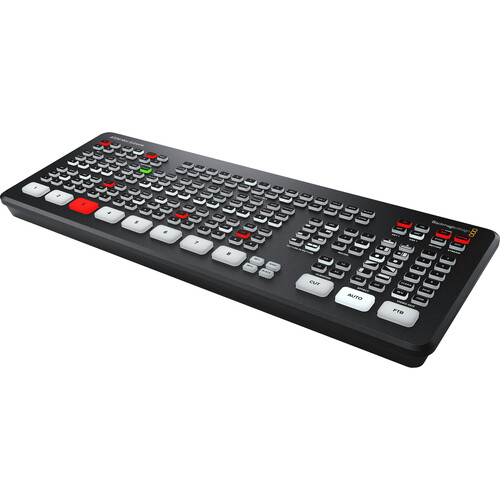
The ATEM Mini Extreme holds 4.5 from 195 buyers and adds eight inputs plus two fully independent HDMI outputs.
A verified church streams three Canon mirrorless cameras through one in a rented space, packing it away after each service. The same buyer fled SlingStudio because the wireless solution kept failing - their verdict: go wired. That is the verified pattern in this category: wireless saves cables and costs shows.
Roland V-1HD+: When You Want Fewer Buttons
For anyone who finds big switchers full of buttons they never use, this small Roland keeps the setup simple without losing speed. It uses a T-bar fader, which lets you blend between shots much more smoothly than just pressing a button.
One user calls it a compact unit with serious capability and smooth, clean switching, and another says not to buy switchers with features you will never use. That 4.8 rating comes from a small sample - 43 ratings - so treat it as a strong signal, not a guarantee. The T-bar fader gives you manual control over every transition speed, which button-based auto transitions only approximate.
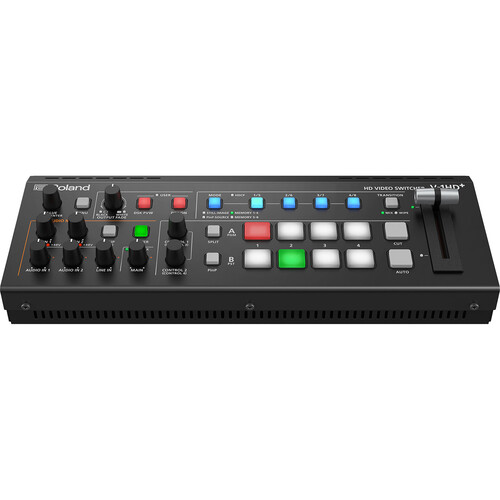
While this gear gets a high rating from its users, some people noted that the internal software makes things tricky, which might trip you up when you first start. The menus take some learning, but the switching speed pays that back quickly. Choosing this path means you value ease of use over every feature a bigger box offers.
Cameras, Capture Cards, and Audio
Every camera in the chain needs a clean HDMI output - no menus, no icons - because the switcher broadcasts exactly what the camera sends. Mirrorless bodies handle this well, so check the output settings and HDMI resolution options before you buy any camera for the chain.
Owners report the ZV-E10 works right out of the box over an ATEM chain, which saves real setup time on show day. A multiview monitor shows every input at once, so a cut to a dead camera never makes it to air. The ATEM's multiview output runs to any HDMI screen, and the preview row tells you what the next cut will show before you commit it.
To switch in OBS instead of hardware, the Elgato HD60 X is a solid pick, because it connects to your computer instantly without lag or driver headaches.
The card converts video in dedicated hardware, which keeps a solo creator's processor free for encoding - Elgato's site documents the HD60 X's app support. The HD60 X detects OBS and Streamlabs without driver installs, so the software side of a card-based build stays simple.
Feed every microphone into the switcher or one interface so sound stays locked to the picture - one clock drives the whole chain.
Mixed USB audio sources drift apart over minutes, which matches the verified audio-drift complaints on consumer capture gear. If a separate interface is already in the kit, feed its output into a switcher mic input instead of the computer. Good sound matters as much as the picture - don't skip this part of the build.
Software and the Build Order
OBS Studio handles software switching for free when you feed it capture cards, and our OBS settings guide covers the encoder setup in depth. vMix is the Windows-native pro option with replay built in, and its license price reflects that. ATEM Software Control unlocks macros, upstream keys, and macro-triggered graphics that the hardware buttons cannot reach, while the hardware itself runs standalone.
Build the rig in order: switcher first, cameras second, audio third, monitoring fourth. Skipping that order is how cables end up swapped mid-show. Wire and label everything during a rehearsal stream before the first real broadcast - the verified church crew repacks weekly, and their setup survives because the order never changes.
For a stream that's a single talking head, skip all of this, because one camera and a solid webcam setup beats a switcher you never touch. Multi-cam earns its complexity on events, interview shows with cuts, worship services, and anything with more than one person on screen.
Frequently Asked Questions
How many cameras do I need for a live stream?
Two cameras cover most solo streams - a wide and a close-up. Events earn their third and fourth angles, and the verified church setup ran three mirrorless bodies through a single switcher.
Can I stream to multiple platforms at once?
ATEM hardware streams to one service at a time. Reaching YouTube and Facebook together takes a restream service, or an OBS scene that receives the switcher's clean output via a capture card.
Do I need a computer to use an ATEM switcher?
You don't need a computer because the ATEM can stream directly to the internet or record files to a connected USB drive. That removes a computer from the chain, which removes an entire class of mid-show software crashes.
Should I use a hardware switcher or OBS with a capture card?
Hardware switchers put fewer failure points between the cameras and the platform, and the verified SlingStudio story shows what wireless costs: dropped shows. OBS with capture cards costs less and updates faster, at the price of a computer in the critical path.
How much does a basic setup cost and what cables do I need?
A basic wired setup with an ATEM Mini Pro and two used mirrorless cameras lands between two and a half and three thousand dollars, before audio.
The used EF and RF markets from our lens guides are where those camera savings come from. Use short certified HDMI cables for desk setups and active (powered) cables for runs past about 15 feet, where passive cables start dropping signal. Label both ends of every cable - the verified mobile setups repack weekly, and they survive because the labeled order never changes.