
Best Capture Card for Streaming: HD60 X, Cam Link 4K and HDMI 2.1
A capture card is the box that gets a picture into your computer from something else, whether that's a console, a second PC or a camera you want to use as a webcam. It sounds like a simple job, and most of the time it is, right up until a stream freezes halfway through or the audio slowly drifts out of sync.
The right card depends on what you're plugging in. A camera needs something different from a current console running at high frame rates, and the cards that push the most data tend to run hotter and fussier than the ones that just work.
Below are the streaming default, the camera-as-webcam pick, an HDMI 2.1 option for 4K at high frame rates, and how to choose with the ports you actually have.
The Elgato HD60 X is the default pick for streamers because it is highly reliable, while the Cam Link 4K is the best webcam tool despite a known three-year freeze pattern. If you need HDMI 2.1 power for 4K144, the AVerMedia Ultra 2.1 delivers that speed even though it runs hot and its audio can drift after twenty minutes. Match the card to what you actually stream.
Elgato HD60 X: The Streaming Default
The Elgato HD60 X has become the default for most streamers - Elgato's site documents its OBS and Streamlabs integration - because it works without finicky software.
You can play console games on your PC because you don't have to rewire your monitor setup. Since it detects the hardware instantly, you spend more time streaming and less time fighting with cables. It provides a smooth 1080p60 feed that holds up on stream.
When you're playing fast games, the near-zero lag ensures that your actions show up on screen right away which is vital if you want to win any competitive matches. This card keeps the image sharp, while it handles the heavy lifting of the video stream. Many buyers love this tool because it stays out of the way once plugged in.
The 4.6 rating from 5,326 buyers reflects years of daily broadcasts on the same hardware.
An owner has reported their unit dying at two months old - frustrating at this price, and worth registering the warranty the day it arrives. One failure in a 5,326-buyer sample is an outlier, not a pattern. For streamers who don't need 4K, it remains the default pick.
Elgato Cam Link 4K: Turn Any Camera Into a Webcam
This tool turns a high-end camera into a sharp webcam without fuss - the Sony ZV-E10 works the moment you plug it in.
Many users find that their Nikon Z6 works perfectly through a docking station, which makes how you set things up much cleaner. It makes your video calls look worlds better than the built-in laptop camera. You get a clear image that looks professional every single time you go live.
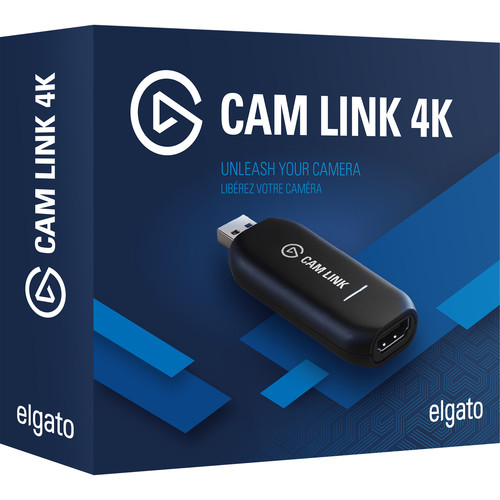
While the tool's small, the bulky dongle often blocks the ports next to it, which creates a real problem when you need to plug in other gear. You must use a dedicated USB 3.0 port, because hubs cause constant dropouts. Port spacing matters too - the dongle physically blocks its neighbors.
One buyer has noted that the tool starts to freeze after about three years of constant use, which led them to buy a spare unit just in case it fails. That matters for anyone who relies on the same dongle for daily work. Planning for the end of its life beats being surprised mid-show - a backup keeps the stream live while the main unit gives up.
AVerMedia Live Gamer Ultra 2.1: HDMI 2.1 Power With Trade-offs
For a PS5 Pro at the highest possible resolution without any lag, this card handles the heavy lifting because it supports modern HDMI 2.1 standards that older cards can't. One reviewer who stayed with the brand for over a decade says it works better than the Elgato for high-end play - AVerMedia's site lists the GC553G2's full HDMI 2.1 spec.
You'll find the image stays smooth while you push 4K at 144Hz, with HDR10 and VRR passthrough keeping the console's picture settings intact. It is a strong pick for anyone who needs maximum output from a current-gen console.
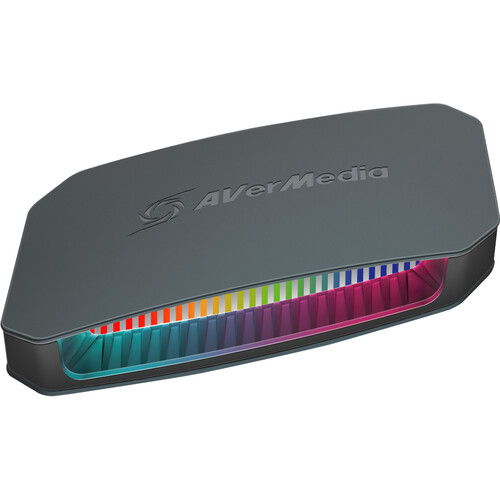
While the speed is real, the hardware runs hot enough that one owner dropped a star over the thermal design - a concern for anyone streaming many hours a day without a break. Many users report audio drift after twenty minutes - a daily battle for anyone keeping sound in sync. You might also see glitchy footage if you try to use the hardware on certain types of thin laptops.
The software that comes with the card feels lackluster to many buyers, so you may need to spend some extra time tweaking settings to get everything working just right.
You're trading some ease of use for the raw speed that this high-end hardware provides to you. Pick it if you need those top specs and can manage the heat and sync issues. It remains a choice for power users who care more about frames than simple setup.
Choosing and the Ports Problem
You need to pick a card based on whether you stream console games, turn a camera into a webcam, or capture 4K at high frame rates.
The Elgato HD60 X works well for streamers because it handles console play without rewiring - B&H's capture card category shows the full range. If your stream runs through a hardware switcher instead, our switcher guide covers the capture-card role in that chain. If you need speeds for a PS5, the AVerMedia option is the pick, though it gets hot.
Magewell is the pro-grade choice for broadcast reliability, but it costs several times more than the consumer picks here.
Using the Cam Link 4K requires a dedicated USB 3.0 port because plugging it into a hub often causes the signal to drop out or fail. One reviewer has found the bulky dongle blocks adjacent ports entirely. You shouldn't use a hub, or your video might freeze right in the middle of a show.
Pick the wrong tool and you end up with laggy audio, dropouts, or a unit that dies young. The AVerMedia card drifts out of sync after twenty minutes, which ruins long sessions. Since the Cam Link tends to freeze after three years, keep a spare ready.
Frequently Asked Questions
What does a capture card do?
A capture card converts an HDMI signal from your console or camera into USB video data that your PC can record or stream easily. This hardware converts the signal in dedicated silicon, so your processor stays free for encoding during long sessions - which is why serious streamers run one even when software-only capture exists.
Do I need one for a webcam?
You only need this hardware if you want to use a DSLR or mirrorless camera as a high-quality webcam for your professional stream. Standard USB webcams plug in and work without any extra hardware for most streamers.
What is passthrough mean?
Passthrough allows the card to show your game on a monitor at full quality while the hardware records the footage in between. This prevents the input lag that often happens when playing through a standard recording feed.
Why would my capture card start freezing?
Some users report the Cam Link freezing after three years of continuous use due to heat buildup and unstable USB power delivery. Using a dedicated USB 3.0 port instead of a hub can help prevent these dropout issues.
Magewell vs Elgato?
Magewell offers professional reliability at a higher cost while Elgato is chosen for its software ecosystem and ease of use. Choose on whether you value hardware stability or integrated streaming tools.
Do I need a capture card if OBS has a virtual camera?
A virtual camera moves software to software, but it cannot ingest an HDMI source. A DSLR, a console, or another PC still needs a hardware card to reach OBS, and the card offloads the conversion so your processor stays free for encoding.