
Portable Video Switcher: ATEM Mini Pro, Extreme ISO G2 and YoloBox
A portable switcher puts a small TV control room into a box you can carry to a gym, a church hall or a conference room. Plug in a few cameras, cut between them with a button, and send the result to a stream or a recording without a laptop full of software.
The boxes differ more than they look. Some are simple cutters, some record every camera separately for editing later, some include a screen and battery so they work as a complete station, and nearly all of them stick to HDMI, which limits how far your cameras can sit.
Below is why the ATEM Mini Pro is the default, an eight-input ISO option, an all-in-one with a catch, and the HDMI-only reality.
The ATEM Mini Pro remains the standard choice for most streamers because of its vast popularity and proven longevity over four years, while the Extreme ISO G2 offers eight inputs for those needing ISO.
You might pick the YoloBox Ultra for its convenient all-in-one design, but some users report serious hardware failures and freezing issues. The AVMatrix PVS0615 covers the built-in-screen niche with a 15.6-inch monitor on a 6-channel switcher, though its tech feels dated and owners want higher-bitrate recording. Match the box to how many cameras you run and whether you need ISO files for post.
Why the ATEM Mini Pro Is the Default
This switcher holds a 4.7 rating from nearly two thousand buyers, and Blackmagic's product page lists the full input and streaming spec. One professional director who works on Grass Valley boards in broadcast buys this box for his own small company because it stays simple. Another pro who does live video for large production companies prefers it for his own outfit.
When operators who use far costlier gear daily choose this for their own work, that tells you where the value sits. It's easy to set up, so you won't waste time before the show starts.
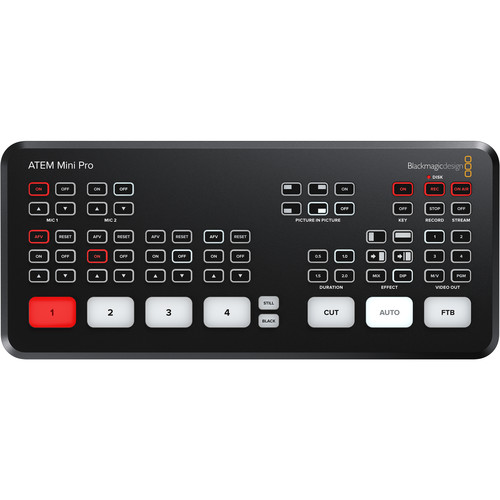
Even though newer tools like the Osee GoStream offer more small features, this ATEM still wins because it proves it can last through many years of heavy daily use.
One buyer says it has lasted four and a half years of regular streaming and still works like the day they bought it. That is the kind of track record that matters when the box sits at the center of every stream you produce. You don't have to worry about it failing mid-stream.
When you look at the top-down image of the board, you can see how the layout makes sense for an operator who needs to move fast when things get hot. It's the default choice for HDMI rigs, since the build is solid and the buttons feel very real. Most people choose it because they want a tool that won't quit when things get tough.
ATEM Mini Extreme ISO G2: Eight Inputs and ISO Recording
The ATEM Mini Extreme ISO G2 gives you eight HDMI inputs, which covers a two-podcast-desk setup plus wide and graphics without an input swap.
Most solo streamers will never fill it, but growing churches and event shooters will. You can record every input as a separate file - our ATEM Mini Pro ISO review covers that workflow in depth - so you can edit the show after the stream ends. The fader bar and macros handle audio levels and effect triggers.
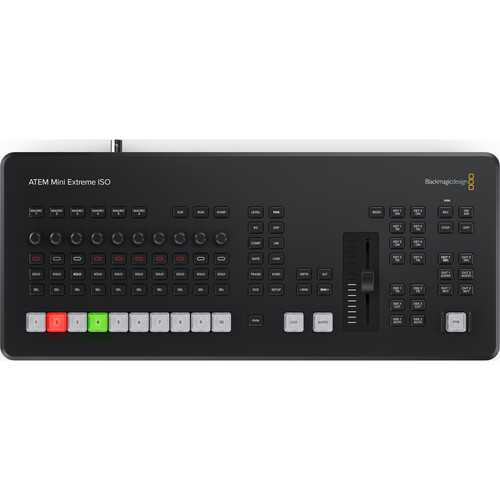
While only three people have rated this box so far, they gave it a perfect score because it handles lots of work for folks who need pro-grade tools in a portable studio setup.
Looking at the Extreme ISO top-down image, you can see how many things pack into this small box that fits on a desk. Having those ISO recordings means you won't lose any footage, even if you make a wrong switch during the live broadcast. You get the freedom to scale your show, without having to buy new gear every time you add a camera.
YoloBox Ultra: The All-in-One, With a Catch
For a compact setup that works like a complete station, the YoloBox Ultra offers a tablet-like design that packs four HDMI ports plus USB inputs, NDI and SRT streaming, and ISO recording into one battery-powered frame. For event shooters who cannot bring a laptop, that single-box promise is the whole appeal.
One buyer has called it the best tool they found after five disappointing hubs over three years, and a youth-basketball broadcaster built a complete flypack around it - cameras, stream, and monitor in one bag. It makes a flypack for local youth basketball broadcasts possible without extra gear. This portable way helps creators move fast, while keeping the whole show very simple.
While the hardware seems great for many tasks, there is a specific technical gap that might throw you off if you want to stream live to YouTube in vertical. You simply can't do YouTube vertical live streaming on this hardware, right out of the box. Check whether vertical streaming matters to you before buying - our mobile streaming gear guide covers the encoder alternatives.
The ease of use comes with a real risk regarding how it works, as one owner has reported that their machine froze, lagged, and dropped several streams during a live event. That person also noted a deformed case, and a battery that died while sitting in storage at eighty percent.
When the owner reached out for help, the manufacturer didn't respond to the message. You're betting on ease of use, against the chance of a total hardware failure later.
The HDMI-Only Reality
Since the ATEM line relies only on HDMI ports, it works great with consumer-grade cameras and mirrorless gear, but it limits you if you need pro cameras or long cable runs. You'll see four HDMI inputs on the rear-panel image, which includes a USB webcam out and a dedicated control port.
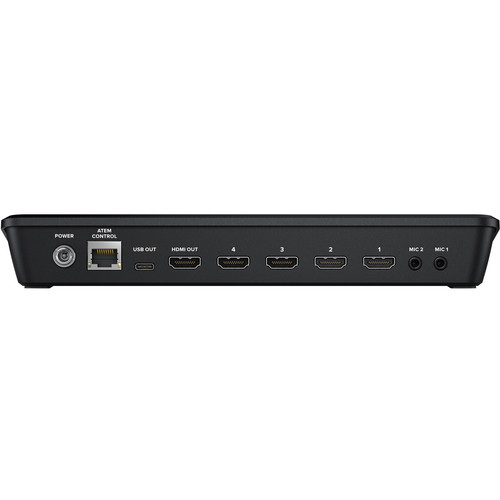
It works for small studios and fixed desks, where cables stay short and the cameras are consumer or mirrorless bodies.
HDMI degrades past about twenty-five feet, so stage runs need converters or a different switching tier. HDMI-to-SDI converters bridge the gap for short runs, but at that point a pro switcher makes more sense. If you run wires across a stage, you might find these HDMI limits a bit of a pain.
Because this switcher doesn't have SDI inputs, high-end cameras that demand professional connections won't work directly unless you buy expensive converters to bridge the gap for your setup. It suits a home rig because most people run mirrorless bodies that connect without fuss.
The rear-panel layout shows exactly what you get, so you can plan where your wires go before you start filming. You're betting on ease of use, a trade many streamers accept.
Frequently Asked Questions
ATEM vs OBS
Choosing hardware like the ATEM eliminates CPU load on your computer, whereas OBS requires a capture card per camera. That keeps your computer free for the stream itself instead of processing every camera. Our multi-camera setup guide covers the full signal chain.
What is ISO recording?
The ATEM Extreme ISO G2 records every camera input as an individual file so you can re-edit the entire production later. You can fix mistakes or swap angles after the event ends.
YoloBox vs ATEM?
The YoloBox Ultra streams directly without a computer, but the ATEM series is considered more reliable for long professional broadcasts. You gain portability with the tablet-style device, but the verified failure reports above are the trade.
Do switchers work with Zoom?
You'll use the ATEM Mini Pro as a webcam by connecting it to your computer via a very simple USB cable. The USB webcam output shows up as a camera in Zoom and Teams, so remote meetings get real multi-camera cuts without any extra software. Setup takes one cable.
HDMI or SDI?
HDMI works well under twenty-five feet, while SDI is necessary for longer cable runs and professional camera outputs. SDI keeps the signal strong across large event spaces.