Best Cameras for Church Live Streaming in 2026

The Canon Vixia HF G70, although not the only good solution, has quietly become the standard workhorse for many of America's small and mid-sized churches. We would recommend it first among other cameras for the reason that it does not cost very much, and has a solid build-quality.

However, like most things in life, it has some drawbacks. The biggest drawback of the Vixia HF G70 is its 1/2.3-inch sensor size. While great for capturing a clear image in bright conditions, it falls short in low-light situations. The image will begin to degrade quickly once you raise the gain past a certain level and will produce a lot of "noise."

Additionally, the camera lacks SDI output, and can only send a clean HDMI output. So while it may provide a reliable video signal, it will require a well-organized cabling system to prevent damage to the camera.

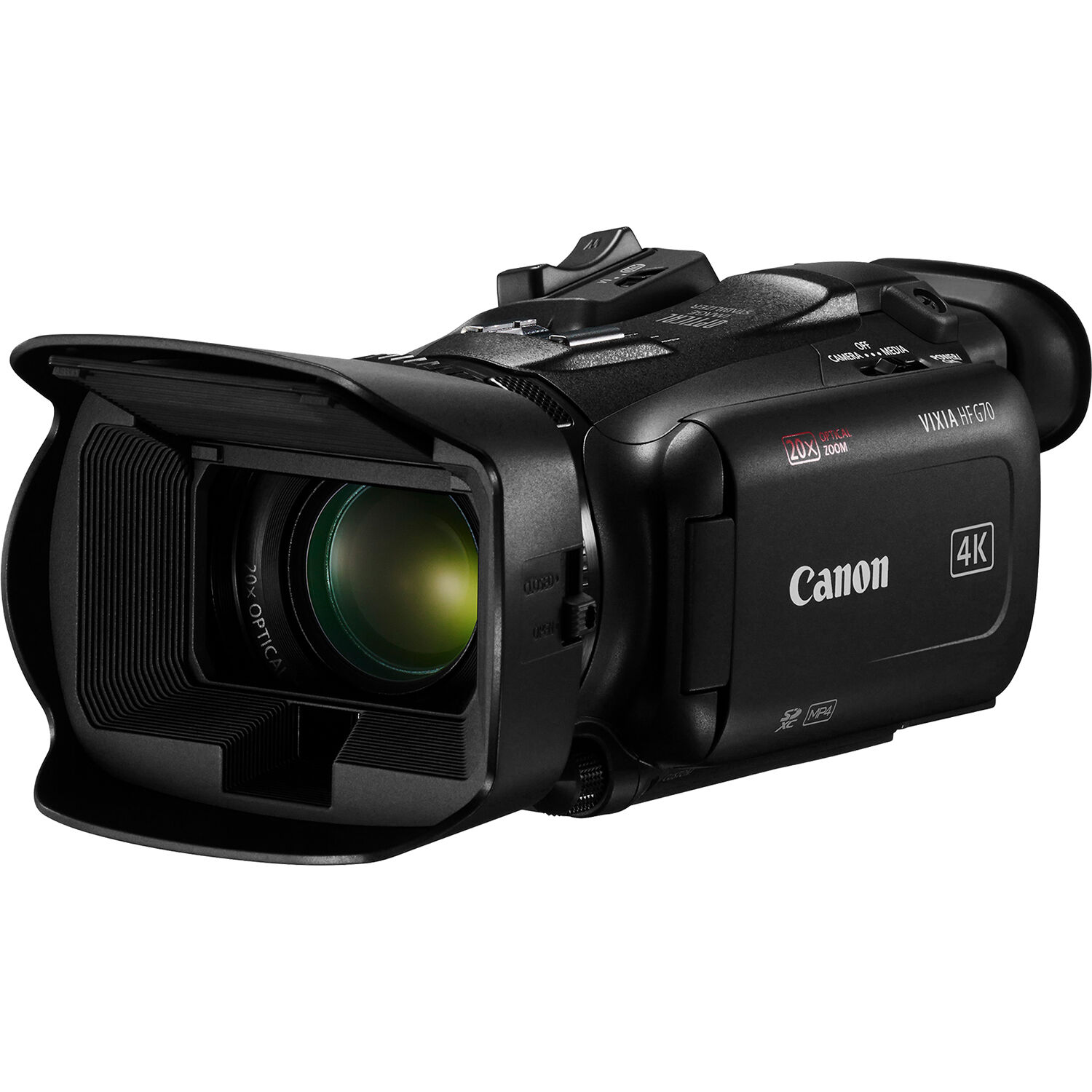
Canon Vixia HF G70 UHD 4K camcorder, the recommended pick for church live streaming

What Actually Matters for Church Stream Cameras

In terms of what actually matters for church stream cameras, I believe most churches don't need high-end, movie-quality cameras. What they really need is cameras that are capable of surviving their small volunteer crews and subpar lighting.

These are the key features that you should look for when selecting a church stream camera:

  • Clean HDMI output. Your church needs a camera that sends a clean video signal (no menus, no battery icon etc.) via HDMI or SDI to your switcher. Most consumer digital SLR cameras cannot do this for more than thirty minutes without overheating due to heat buildup within the camera housing. Dedicated camcorders are best suited for streaming. The Blackmagic ATEM Mini Pro is the switcher most churches in this budget tier are using.
  • Reliable autofocus. Volunteers cannot pull focus during a worship set. Your camera needs to be able to detect faces or eyes of your speakers and lock onto them and stay locked even when they move their heads. Modern Canon and Sony cameras far surpass lower-priced cameras in this area.
  • Low-light performance. Your sanctuary is usually pretty dim. Stage lights light up the band but blow out everything else. Cameras with 1 inch or larger sensors do a significantly better job of capturing images in these types of environments compared to the tiny sensors found in less expensive webcams or older camcorders.

Churches also need long-running reliability. There are several cameras that have a 30 minute recording limit or thermal cut-offs. For streaming purposes, churches need cameras that will operate continuously for 90 plus minutes without issues.

PTZ rigs cover one part of the church streaming picture (we covered those in our PTZ camera for church guide). This article covers the cameras that sit on sticks at the back of the room.

Recommended Setup at a Glance

Below is a recommended setup at-a-glance for a basic two-camera stream:

  • One Wide Angle Camera - To Capture the Entire Stage
  • One Tight Angle Camera - Follow the Speaker
  • Each Camera Runs HDMI Into A Switcher (Blackmagic Atem Mini Pro or Similar)
  • Streams Directly to Youtube and Facebook
  • Sound Board Audio Comes into the Switcher's Audio Input

That is the entire rig.

Top Camera Picks for Church Streaming

Canon Vixia HF G70 - The Default Choice

The Canon Vixia HF G70 is what we would purchase if we were starting fresh today with the average church AV budget. It is a UHD 4K Camcorder with a 1/2.3-inch sensor, 20x Optical Zoom and Clean HDMI Output. The 20x Optical Zoom is probably going to be the most appealing feature of this camera for churches. From one mount position at the back of your sanctuary you can shoot the entire width of the stage and then zoom in tightly on your Pastor's face without having to physically move the camera.

Canon Vixia HF G70 side view showing flip-out screen and zoom rocker

The Canon Vixia HF G70 also has dependable autofocus. Its face detection works effectively to track your Pastor as he moves left-right across the stage and side to side. Several reviewers comment positively on how effective the autofocus is on this model, along with its image stabilization. One reviewer commented that he was able to simply place it on Auto and forget about it throughout the entire service, which is exactly what you want in a streaming camera.

However, there are definitely downsides to consider. The 1/2.3-inch sensor is small. When shooting in dark areas of your sanctuary, raising the gain on this camera results in a very noisy image and you will also notice heavy crushing of the shadows behind your stage lights.

Also, it does not have SDI output. Instead it only provides mini-HDMI output. Therefore, if your camera is positioned more than a few feet away from your switcher you will need a good cable management strategy in order to prevent damage to your camera.

Several users have complained about the complexity of accessing the menu settings for new camcorder users.

You can currently find pricing information for the Vixia HF G70 on Amazon if your church purchases items through Amazon Corporate.

Vixia HF G70 vs Canon XA60

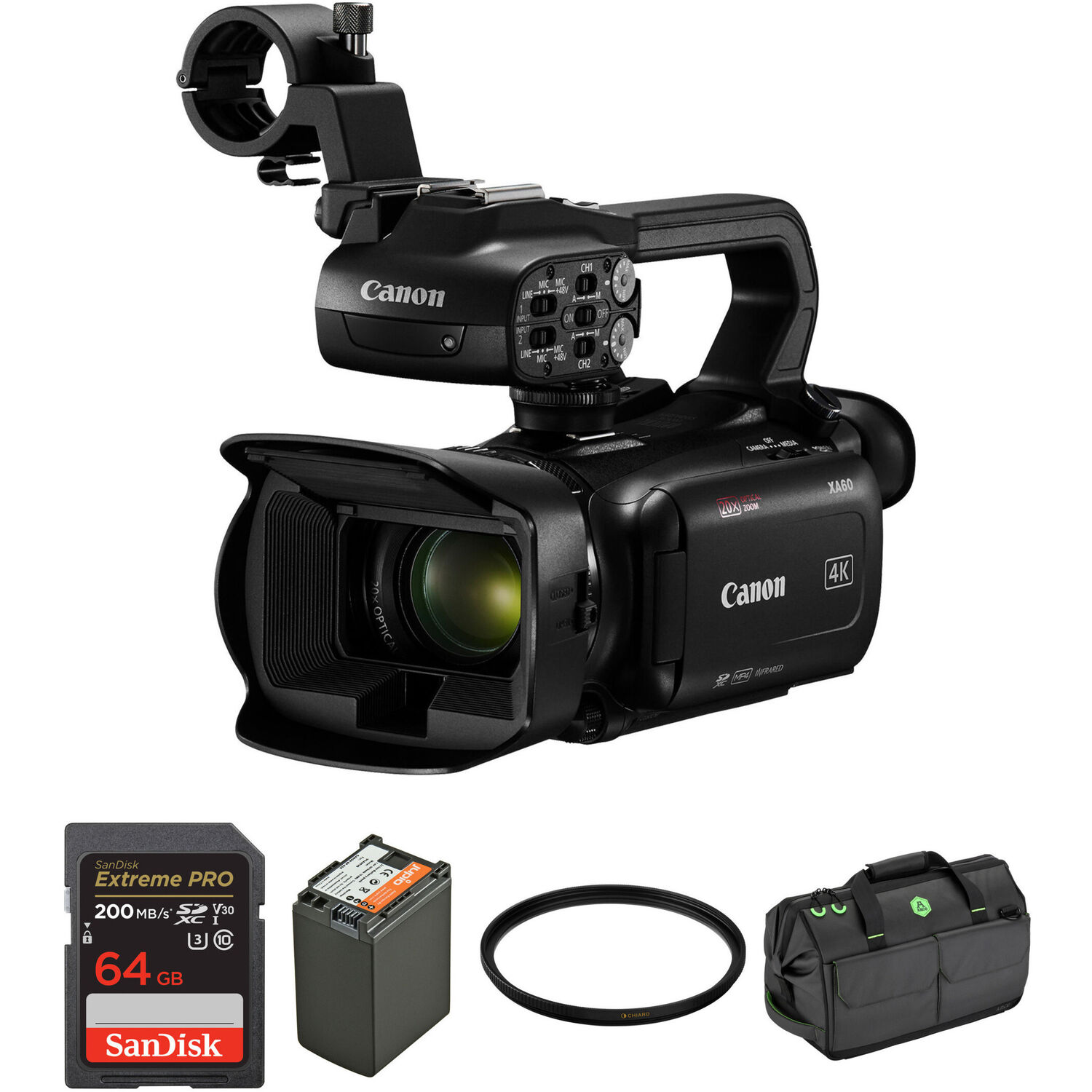
As you can probably guess based on its name, the Canon XA60 is basically identical to the G70 with the addition of built-in XLR Audio Inputs and Top Handle. If your sanctuary does not have a clean line-out from your soundboard into your switcher, you can use the XA60 to capture Sermon Audio straight from a wireless lavalier microphone into your camera. That is obviously beneficial. However, for most churches, the G70 is sufficient because you should always try to pull audio from your soundboard anyway.

Canon XA60 professional UHD 4K camcorder with top handle and XLR inputs

Sony HXR-NX800 - The Next Level of Quality

If your sanctuary truly is dark and you've had trouble with noise using smaller sensor cameras, the Sony HXR-NX800 is definitely worth stepping up to. It is an NXCAM Camcorder with a 1-inch Exmor RS sensor, AI-Powered Autofocus with Auto-Framing and 4K60 with HDR capabilities. The increased size of the sensor produces greatly improved low-light image quality and offers greater depth-of-field for more cinematic shots of your speakers' close-up views.

Sony HXR-NX800 NXCAM camcorder front view

Additionally, auto-framing could be a huge benefit for single-camera church services where someone is not controlling the camera remotely. The camera detects who is speaking and automatically frames to keep them centered as they move about the stage. Reviewers have stated that this is clearly an improvement over previous Sony Camcorders and matches whatever Canon has produced in terms of AF capability.

While it costs more money than necessary for a small church to create a simple Sunday morning stream, and is therefore certainly an overstatement of what most churches need for streaming, if you're a large church with 500+ seats that has been streaming for several years and want to take your image quality to another level, this would be the correct next step.

Logitech Mevo Start - Simple Solution for Small Churches

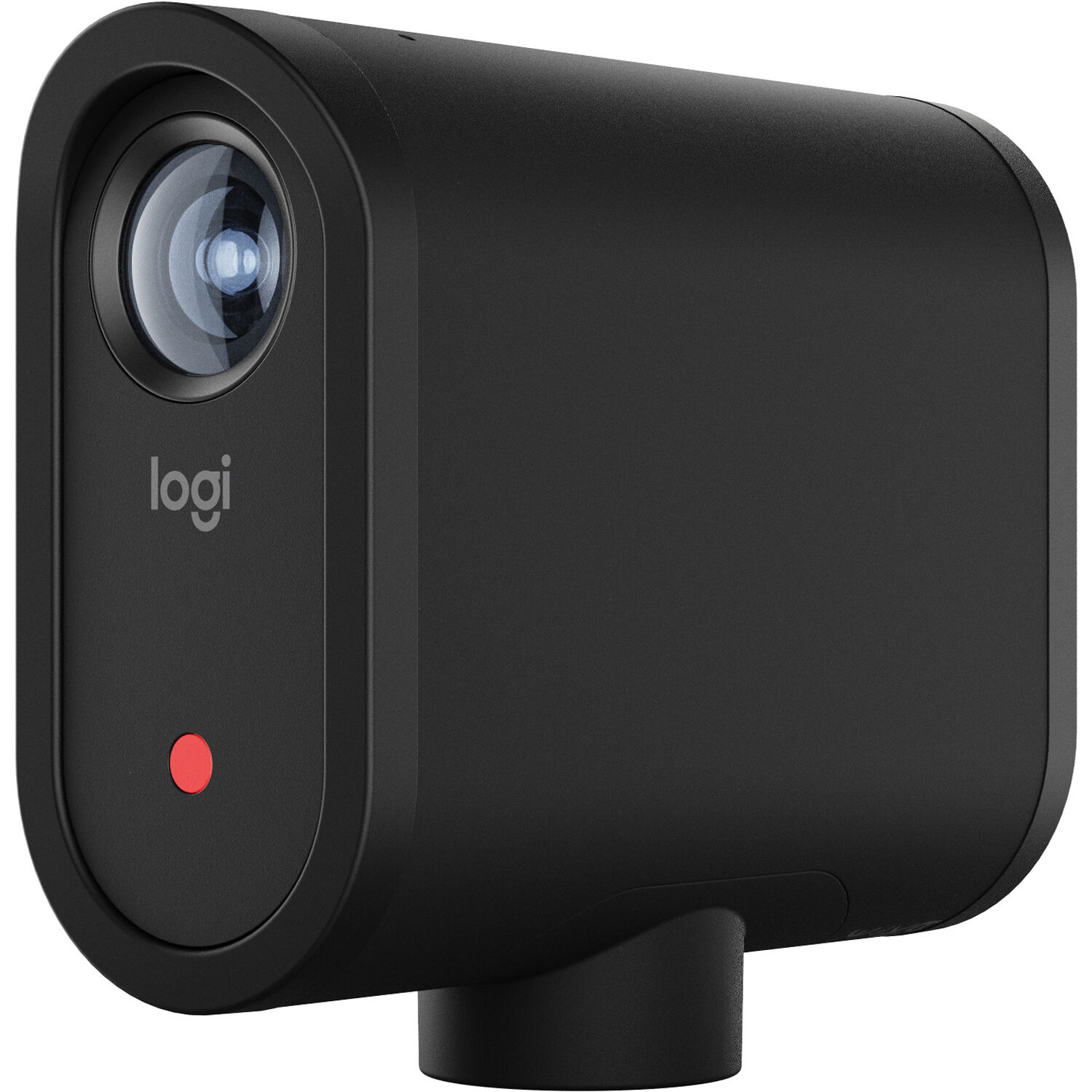
If you are part of a very small church, or an outpost/extension campus that simply needs to stand up a stream without any additional equipment, I think Logitech's Mevo Start is incredibly difficult to beat. It's a completely contained 1080p Streaming Camera that includes a built-in three-mic array, six hour battery life, and either Wi-Fi or LTE streaming capabilities. You just point it at the front of your sanctuary, fire up the Mevo App on a smartphone and start streaming.

Logitech Mevo Start all-in-one live streaming camera with three-mic array

Obviously, the image quality will never match that of a true camcorder and due to its small sensor, it will struggle with poor lighting in darker areas of your sanctuary. However, for congregations of fifty members that want to be able to stream Sunday Service without spending money on an encoder/mixer/mic system, and ultimately three separate cameras, this is likely your best option.

Consider getting three of them in a pack of three Mevo Starts if you plan to flip between multiple angles. You can switch between angles directly inside the Mevo App. Reviewers advise against relying solely on Wi-Fi connection as they often lose it on heavily used networks. They highly suggest adding an Ethernet adapter for wired connection if possible.

Hollyland VenusLiv V2 - Single Box Solution

Hollyland released their VenusLiv V2 last year as another single box solution for churches and small business streaming solutions. Several churches have adopted this technology in recent months. You receive 4K Capture, RTMP & UVC Output, 5" Touch Screen on rear of camera unit, Bluetooth & Wi-Fi connectivity and Vertical Mode Output if needed for creating highlight reels for Reels/TikTok.

Hollyland VenusLiv V2 all-in-one 4K live streaming camera

Volunteers can adjust framing and zoom from the actual camera unit itself without needing to access an app on their phone. which is easier for elderly volunteers who have difficulty accessing apps. Reviewers say that the user interface for setting up your stream will still require some time to learn but generally feel quicker than using any camcorder/encoder combination workflow. It's also available on Amazon if you want to compare.

A Note on Mirrorless Cameras

You'll find a ton of forum posts suggesting mirrorless cameras such as the Sony a7 or Canon EOS R Series as good options for church streaming. These cameras look fantastic. They have large sensors. The video quality they produce is truly cinematic.

However, these types of cameras come with drawbacks when used in a streaming environment. Many mirrorless cameras have an automatic shut off after 30 minutes (although this time frame is improving) and tend to overheat during extended periods of operation.

Additionally, while the autofocus of many of these cameras is superior for video production, the user interface was designed for someone using them to operate the camera, not for a volunteer to place on a tripod and walk away. A dedicated camcorder workflow is far easier for churches to use than a mirrorless camera, even though the specs may appear inferior. For those interested in a greater exploration of how mirrorless cameras fit into the overall landscape of camera systems suitable for film, we've created a comprehensive mirrorless camera for filmmaking guide.

Additionally, if you're going to use a mirrorless camera you'll likely need to run it on AC power via a dummy battery and utilize a clean HDMI output cable connected directly to the switcher. Avoid recording the video to the SD card within the camera. Instead allow the switcher to record the video. This tends to prevent the majority of the overheating issues associated with mirrorless cameras.

Assembling the Entire Church Streaming Chain

Cameras are just one part of the equation. As follows is what most churches typically end up with as their complete chain:

  • Two cameras (one capturing a wide view and one capturing close-ups) sending HDMI feeds to a switcher
  • An ATEM Mini Pro (or equivalent) switcher with built-in streaming encoder
  • Feed from the church's sound board into the switcher's audio input
  • Wired ethernet connection from the switcher to the church's router
  • Tally lights connected to each camera, allowing volunteers to determine which camera is active

Most churches make mistakes when it comes to their switchers. While using a laptop running OBS will technically work, adding another potential area of failure. Using a hardware switcher such as the ATEM Mini Pro is preferred because it provides reliability in a volunteer-based stream environment. To learn more about the entire switching process, our multi-camera live streaming setup guide provides further information.

Regarding audio, connect the church's main soundboard to the switcher via a clean stereo line-out. Do not rely on camera mics for anything except as a last resort. In addition to sermon audio via Bluetooth from lavalier microphones, sending audio from the soundboard is perfectly acceptable, provided your sound engineer feels comfortable routing the audio signal. ProChurchTools provides an explanation of what church streaming cameras have evolved into if you'd prefer to dive down that rabbit hole.

Frequently Asked Questions

What's the least expensive method to begin broadcasting a church service?

One Logitech Mevo Start, an iPhone running the Mevo app, and a complimentary YouTube Live account will get you online and broadcasting for the cost of a single camera. Purchase one from B&H and you could be broadcasting before the end of the month. Your congregation will likely be able to clearly understand the sermon despite subpar audio.

Will a webcam work for church live streaming?

Webcams are theoretically sufficient for smaller chapels or mid-week prayer services. Webcams rarely match the image quality and low light capabilities of true camcorders. For a detailed comparison of webcams suitable for streaming, please refer to our best webcam for streaming guide. For Sunday morning worship services, however, I would recommend using a true camcorder.

Do I require 4K resolution to broadcast my church live stream?

No. Both YouTube Live and Facebook compress 4K video to either 1080p or lower for most viewers. If you wish to create high-quality cropped clips for post-production purposes (such as sermon clip reels), then 4K capture is beneficial. however, 1080p30 is sufficient for most live streams.

How many cameras will my church need?

To effectively cover a church service, two cameras are the bare minimum: one positioned for a broad view of the stage and one positioned for a close-up of the speaker. Having three cameras would be ideal, assuming budget allows. One additional camera would provide coverage of either your worship team or an expansive congregational view. More than three cameras would quickly add complexity beyond mere volunteer staffing. PTZ (pan/tilt zoom) cameras are an alternative solution for an additional camera position, and were addressed in our PTZ camera breakdown for churches.

What about audio for my church live stream?

For churches, audio is significantly more important than video. Connect your church's soundboard via a clean audio line to your switcher. Do not depend on your camera's built-in mics. If you're utilizing a Mevo Start as your sole camera source, connecting a small wireless lav mic (into the 3.5mm input) will suffice. however, any configuration requiring multiple speakers should pull from your church's actual soundboard feed.

Canon Vixia HF G70 vs XA60 , Which Is Better for Church Use?

For all intents and purposes, yes. The G70 costs less and you only lose the XLR inputs and top handle. If your switcher accepts your soundboard feed (and it should), you no longer need XLR inputs on your camera. Take that savings and apply it toward purchasing an additional camera or upgrading your switcher. Compare both models side-by-side on B&H if you wish to explore both alternatives further.