
Wireless Follow Focus Systems: What Solo Shooters Actually Need
Pulling focus is hard enough with an assistant standing next to the lens. Solo shooters on gimbals, sliders and cranes can't reach the focus ring at all, and that's where a wireless follow focus earns its place.
The choice is wider than it looks. Some kits drive focus only, some add iris and zoom, and the motor needs enough torque for your heaviest lens, because stiff cine glass asks a lot more of it than a photo lens does.
Below is why it matters on indie shoots, the mid-range pick, the budget path, the pro upgrade and a dual-channel dark horse, with buying rules at the end.
The Tilta Nucleus Nano II fits most solo shooters and gimbals, while the SmallRig Lite serves budget focus-only needs, though the Nucleus-M handles multi-motor FIZ work and the PDMovie Remote Air Pro 3 offers dual-channel options. The Nucleus-M class handles real multi-motor FIZ work, and the wrong motor on stiff glass skips and drops focus, so match torque to your heaviest lens before you buy.
Why Wireless Follow Focus Matters for Indie Shoots
When you're using a gimbal or a shoulder rig, touching the lens directly is impractical, and since a dedicated focus puller is a luxury that most indie shoots just can't afford, the motor takes that job. It does the lifting so you keep the camera moving while the focus stays sharp.
You need a motor with torque that matches your lens, because cine glass needs more power than photo lenses. Most gear uses a 0.8 MOD gear ring, which is the standard across these systems.
While a single-channel unit only handles focus, a full FIZ system lets you control the iris and zoom as well, which is helpful when you need more cinematic looks. Range and on-set reliability matter more than spec-sheet numbers, and battery life decides whether your day needs charging breaks.
A motor that skips on the gears or a battery that dies mid-shot costs you the take. Pair and update everything before the shoot starts, so you never fight the tech on set.
Tilta Nucleus Nano II: The Best Mid-Range Pick
The Tilta Nucleus Nano II has five times the torque of the original Nucleus-N, and it includes auto-adjust torque plus active cooling for long days of heavy use.
You can use the main dial for focus, while the dampened rocker handles your zoom or iris settings. It supports up to four motors and lets you control Canon, Sony, or Blackmagic cameras via Wi-Fi or Bluetooth. Owners who got good units praise the design, the touch interface and the motor feel.
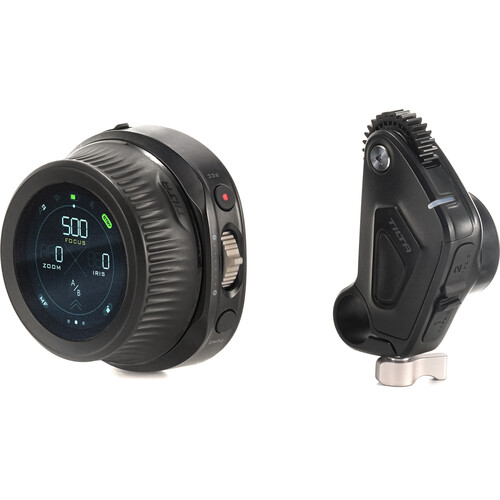
The verified complaints are specific. One owner's unit died twenty minutes into its first shoot after bench-testing fine. On a Tamron 70-180, the zoom rocker makes the motor vibrate and blink red until it is power-cycled, with no error code and no help from the documentation.
Pairing fails for some buyers out of the box, and one defective included USB cable cost an owner an entire setup session. Tilta's own warning stands: never power the hand wheel from a P-TAP port, per Tilta's own product documentation.
Building a multi-motor FIZ rig on it is riskier than the marketing suggests: firmware updates, adding motors and re-syncing hand units break even for tech-savvy owners.
A Spanish-language reviewer reports a dead motor USB-C port and Tilta redirecting them to Amazon's return process with international shipping costs. Months in, some motors skip off the lens gears under heavy glass. As a single-motor tool it works, as the base of a complex rig it is unproven.
SmallRig Wireless Follow Focus Lite: The Budget Path
To start learning how to pull focus without spending a huge amount, this SmallRig kit offers a simple way to get a motor on your lens for a low price. It uses a single-channel hand wheel and one motor, so iris and zoom stay out of reach while you shoot.
The build quality feels a bit cheaper than the Tilta gear, but it still works well for basic needs. You can find it at B&H as well as Amazon.
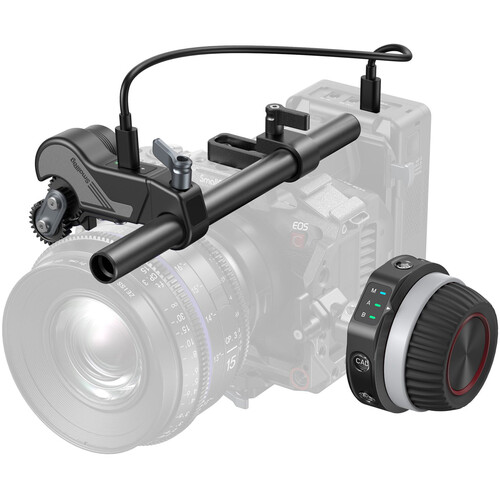
This tool is great for people who use manual glass and need their first wireless system, because they don't need the extra features that more expensive kits provide yet. Skip it if you need multiple motors or a long track record.
SmallRig's product page lists the full kit contents if you want to compare before buying. Since it only handles focus, you might find yourself limited if your work requires quick changes to aperture or focal length. It stays a solid entry point for beginners who want to master the craft before they move up to pro gear.
Tilta Nucleus-M Class: The Pro Upgrade
For a professional setup and real focus pulling, the Nucleus-M provides a full FIZ system with multiple motors, and a hand unit paired with two handgrips. This gear works well for high-end sets because it lets you control focus, iris, and zoom at once.
You'll find that it keeps up during complex shoots, where you need to move several settings quickly throughout the day. It's a proven tool.
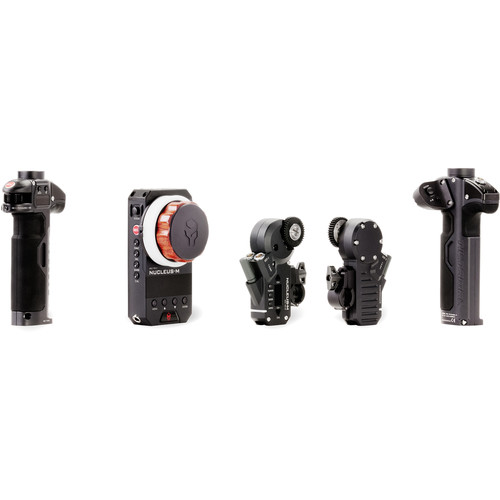
The new Nucleus-M II represents the latest generation of this system, but its early launch shows a worrying pattern where several buyers have reported cracked wooden grip panels on arrival.
Since the sample size is too small to judge the gear, you should order from a seller with easy returns and inspect the panels immediately. One buyer had the damage happen twice, which points at fragile packaging in this launch window. You should skip this class if you work solo with just one lens and a gimbal, since the Nano II is better for that.
PDMovie Remote Air Pro 3: The Dark-Horse Dual-Channel
The PDMovie Remote Air Pro 3 lets you pull focus and adjust iris or zoom at the same time, which saves you from needing to buy a third motor for your rig. It uses a straightforward interface, which keeps the connection solid while you work on a busy set.
While this gear isn't as famous as Tilta, it offers a dedicated tool for those who need quick control. You'll find it works well if you need dual-channel FIZ control, though it sits in the mid-to-high price range.
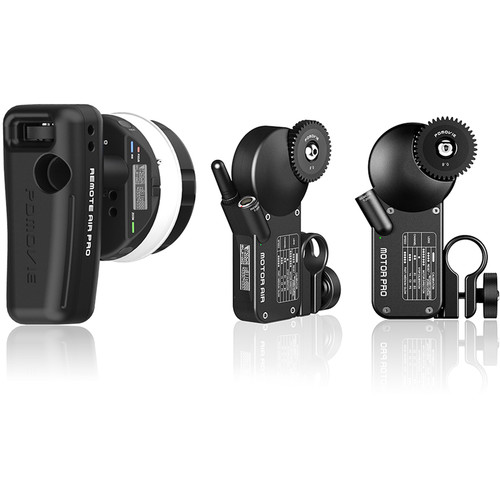
Because the ecosystem is smaller than the big brands, there aren't as many verified owner reports to help you avoid every possible bug or quirk that might show up during a shoot. This lack of data cuts both ways, and it makes the PDMovie a calculated bet. Check the specs at B&H against your camera before committing.
You should pair every piece and update the firmware before you head to the shoot, because many buyers report frustrating pairing failures when they are under a deadline. Test the included USB cable first so you don't accidentally blame the whole system for a connection glitch. A dud cable wastes less time on your desk than on set.
Match the motor torque to your stiffest lens, since a weak motor will skip or push off the gears when you try to pull heavy cinema glass.
Most setups use 0.8 MOD gears, which is the standard for most professional gear you will find. Never power the Nano II hand wheel from a P-TAP port, because Tilta warns this can cause issues. Plan batteries for a full day so no scene goes dark mid-take.
Check the return policy before you order, because at least two of these products show patterns of items arriving damaged or broken right out of the box. Inspect everything the day it arrives, because the Nucleus-M II damage reports and a defective Nano II cable both surfaced at unboxing. A return window is your cheapest insurance on gear this specialized.
Buying Rules and Frequently Asked Questions
Do I need wireless follow focus for gimbal shooting?
You need a wireless system if you're using manual glass on a gimbal because touching the lens manually ruins the balance of your shot. These tools allow you to pull focus remotely without destabilizing the camera movement during complex takes.
Can I use these motors with autofocus lenses?
You generally don't need a motor for autofocus lenses since you can control the focus directly through the camera's internal settings. Motors really shine when you are working with professional manual cinema glass on busy production sets.
What is the difference between single-channel and FIZ systems?
A single-channel system handles focus only, while a FIZ system lets you manage focus, iris, and zoom all at the same time. The more complex systems cost more and add significant weight to your camera rig.
How do I attach the motor to my lens?
Use a 15mm rod clamp to mount the motor and place a 0.8 MOD gear onto the gear ring of your camera lens. If your lens lacks gears, you must use a belt to create a mechanical connection.
Is the Nano II worth it over cheaper options?
It earns its price if you want the touch screen, the higher torque and direct camera control for Sony or Blackmagic systems. If you only need to pull focus on one manual lens, the budget path covers it.
Can I run multiple motors with the Nano II?
It accepts up to four motors on paper, but owners report firmware updates, motor additions and hand-unit re-syncs failing even for tech-savvy crews. For a real focus-iris-zoom rig, the Nucleus-M class is the safer foundation.