
Teleprompters for YouTube Videos: Do You Need One and Which to Get
A teleprompter for YouTube videos sounds like overkill until you've spent three hours trying to get through a five-minute talking head video without stumbling over your own script. If you do any kind of scripted content, tutorials with specific steps, or product reviews where accuracy matters, a prompter can cut your recording time in half and make your delivery sound way more natural.
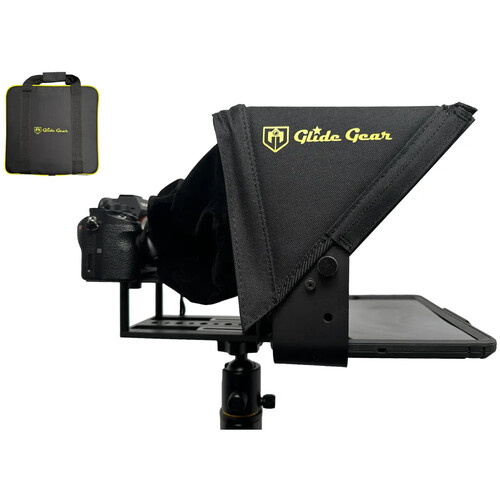
But not every YouTube creator actually needs one. And if you do need one, there's a real range from free software solutions to professional-grade hardware setups. The Glide Gear TMP-100 is probably the most popular option for YouTube creators right now because it hits the right balance between affordability and build quality. But let's figure out if you actually need one first.
When a Teleprompter Makes Sense (And When It Doesn't)
Teleprompters work best for specific types of YouTube content. If you're doing scripted talking head videos, educational content with precise terminology, news-style updates, or product reviews where you need to cite specific specs and features, a prompter genuinely improves your output. You look more confident, you nail the information on the first take, and your editing time drops dramatically.
They don't work well for casual vlogs, conversational content, reaction videos, or anything where spontaneity is the point. Reading from a teleprompter while trying to seem natural and off-the-cuff is harder than most people think. Your audience will notice if your eyes are tracking text instead of engaging with the camera.
The sweet spot for most YouTube creators is using a teleprompter for structured segments (intros, key points, product specs) while ad-libbing the conversational parts. This hybrid approach gives you the accuracy of scripted content with the energy of natural delivery.
Best Budget Option: Glide Gear TMP-100
The Glide Gear TMP-100 is the teleprompter you'll see recommended in almost every YouTube creator forum, and for good reason. It's a collapsible beam-splitter style prompter that works with iPads and smartphones up to about 10.5 x 8 inches.
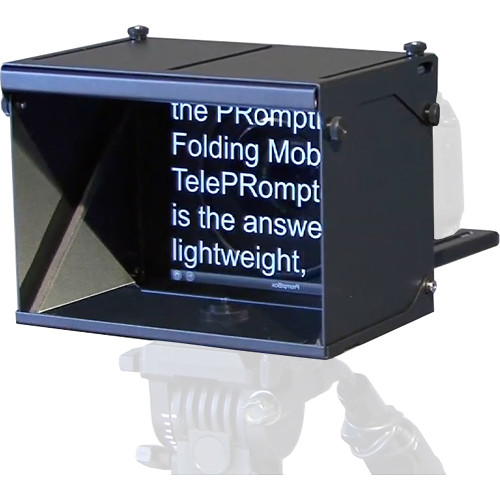
The beam-splitter glass sits at a 45-degree angle in front of your camera lens, reflecting text from a tablet mounted below. Your camera shoots through the glass while you read the reflected text. The result is that you're looking directly into the lens while reading your script, which looks completely natural to viewers.
B&H reviewers note the TMP-100 has a reading range of up to 10 feet, which is more than enough for typical YouTube studio setups. It folds flat for storage and travel, mounts on standard tripods, and the build quality holds up well for the price. The 70/30 beam-splitter glass means 70% of light passes through to the camera and 30% reflects the text, which is the standard ratio for this type of prompter.
What You Need to Know Before Buying
The TMP-100 doesn't come with software. You'll need a teleprompter app on your iPad or phone (more on that below). You'll also need to reverse your script text since the beam-splitter mirrors the image. Most teleprompter apps handle this automatically.
The other thing to consider is that your camera needs to physically fit behind the glass. Compact mirrorless cameras and webcams work great. Larger cinema cameras might need a bigger prompter like the TMP-750 or TMP-1000.
Professional Options for Serious Creators
If you're running a studio setup or producing content professionally, the entry-level prompters have limitations. Bigger channels and corporate video producers typically step up to dedicated teleprompter systems that offer larger glass, wider reading distances, and sturdier construction.
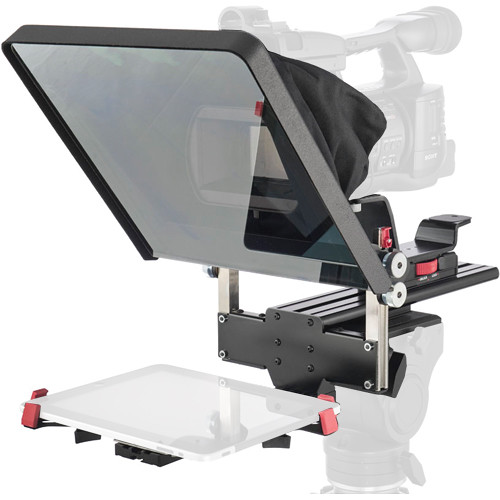
The Prompter People Proline is a solid mid-range professional option that supports iPad and Android tablets. It's built with a metal frame rather than plastic, which translates to less vibration and wobble when you're adjusting your script speed.
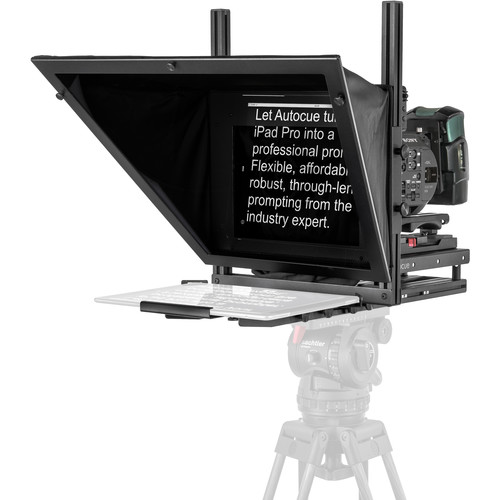
For larger studio setups, the Autocue Studio Teleprompter System transforms an iPad Pro into a full studio-grade prompter with reading distances up to 15 feet. It's what you see on professional news desks and corporate video sets, scaled down for iPad use.
The Mirror Image IP-10 Pro
The Mirror Image IP-10 Pro deserves a mention for creators who need a lightweight, all-metal iPad teleprompter. It supports the iPad Pro and other large tablets with reading distances up to 12 feet. The all-metal construction is noticeably more stable than the plastic prompters, which matters if you're adjusting during takes.
Teleprompter Software and Apps
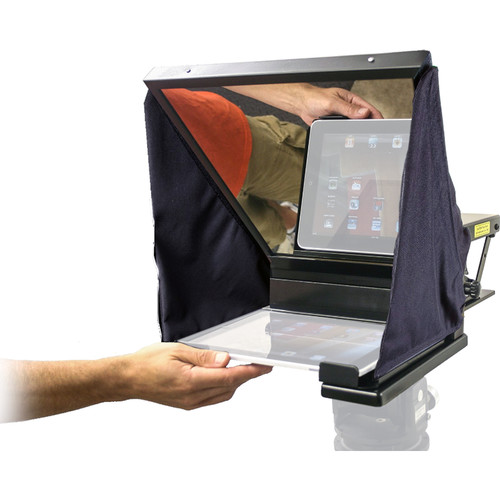
The hardware is only half the equation. You need software to display and scroll your script at the right speed. Fortunately, there are several solid options ranging from completely free to subscription-based.
PromptSmart Pro is one of the more popular paid options because it uses voice recognition to automatically scroll the text as you speak. This means the script follows your natural pacing rather than scrolling at a fixed speed. If you pause to ad-lib, the script waits. It's genuinely useful and eliminates the need for a separate person or foot pedal to control scroll speed.
CuePrompter is a free browser-based option that turns any device into a basic teleprompter. You paste your script, set the speed, and it scrolls. No frills, but it works in a pinch. The free tool at cueprompter.com requires zero installation and runs in any browser.
BigVu and Teleprompter Premium are popular mobile app options that combine script display with video recording. You can read your script and record simultaneously through the same device, which eliminates the need for separate camera hardware entirely. This works well for quick social media content but isn't ideal for higher-quality YouTube production where you want a proper camera setup.
Free vs Paid Apps
For most YouTube creators, a free or low-cost teleprompter app is more than sufficient. The key features you need are adjustable scroll speed, text mirroring (for beam-splitter prompters), and the ability to import scripts. Paid apps add voice-following, remote control support, and recording integration. The voice-following feature alone is worth the upgrade if you find yourself constantly adjusting scroll speed.
How to Read a Teleprompter Without Looking Robotic
This is where most YouTube creators struggle. Having a teleprompter doesn't automatically make your delivery better. In fact, bad teleprompter reading is more obvious and more distracting than simply stumbling through a memorized script.
Write the way you talk. Don't write formal prose and try to read it naturally. Write in your speaking voice with contractions, fragments, and casual phrasing. Read your script out loud before recording and revise anything that feels stiff.
Use the prompter as a guide, not a word-for-word crutch. The best teleprompter users glance at key phrases and bullet points rather than reading every single word. This keeps their delivery conversational rather than recitative.
Practice your peripheral vision. With a beam-splitter prompter, the text is right in front of the lens, so your eye movements are minimal. But you still need to practice reading without your eyes visibly tracking left to right. Increasing the font size and using shorter line lengths helps.
Vary your pacing deliberately. Monotone teleprompter reading is the dead giveaway. Build pauses, emphasis changes, and speed variations into your script. Some creators add cues in their scripts like "[slow down]" or "[look away briefly]" to remind themselves to break up the delivery.
Good lighting also helps mask teleprompter use. When your face is well-lit, small eye movements are less noticeable than when you're lit from the side with harsh shadows.
Setting Up Your Teleprompter Properly
Placement is everything. The text needs to be as close to the center of your lens as physically possible. If the prompter glass is positioned too high or too low relative to the lens, your eye line will be visibly off-center, and viewers will notice something feels wrong even if they can't identify what.
For beam-splitter prompters, make sure your camera focus is set to your face, not the glass. The glass should be completely invisible in your footage. If you're seeing reflections or text ghosting in your video, the glass isn't angled correctly or the room behind the prompter isn't dark enough.
Script display settings matter too. Use a large font size (bigger than you think you need), high contrast text (white on black works best), and keep your line width narrow so your eyes don't have to sweep across the full width of the tablet. Most teleprompter apps let you adjust all of these settings.
For your video editing workflow, a teleprompter also simplifies post-production. Fewer flubbed takes means less cutting, and consistent delivery throughout a session means your audio levels and tone stay more even across the edit.
Frequently Asked Questions
What is the best teleprompter for YouTube beginners?
The Glide Gear TMP-100 paired with any iPad teleprompter app is the most practical starting point. It's affordable, portable, works with tablets and smartphones, and uses the same beam-splitter technology as professional prompters. For creators who want to test the concept before investing in hardware, free browser tools like CuePrompter or a basic mobile app can be used with any screen positioned near the camera.
Can I use my phone as a teleprompter?
Yes, but with limitations. A phone screen is small, which means you need to be close to the camera for the text to be readable. For simple talking-head videos at close range, a phone on a small tripod mount behind your lens works surprisingly well. For anything at greater distance or with a larger camera rig, you'll want a tablet-sized screen for comfortable reading.
Do professional YouTubers use teleprompters?
Many do, especially for educational, review, and news-style content. Channels that produce scripted tutorials, product comparisons, and informational content frequently use beam-splitter teleprompters. Creators who focus on personality-driven, conversational content tend to use bullet-point outlines rather than full scripts. The best creators combine both approaches, using the prompter for structured segments and going off-script for natural reactions.
How do I avoid looking like I'm reading a teleprompter?
Write conversationally (not formally), increase font size so you're not squinting, use short line widths, and practice looking away from the text periodically. The biggest mistake is reading word-for-word. Treat your script as a guide and paraphrase naturally where it feels right. Good lighting reduces visible eye movement, and proper prompter placement (centered on the lens) minimizes eye tracking.
What teleprompter app should I use with my iPad?
PromptSmart Pro is the top paid choice because of its voice-following scroll feature. For free options, CuePrompter works in any browser without installation. Teleprompter Premium and BigVu are solid paid mobile apps that combine prompting with video recording. Most apps offer a free trial, so test a few before committing to one.