
The Live Streaming Pro's Gear Guide: ATEM, Key Light, MV7+ and the Arm That Disappears
Viewers decide in a few seconds whether a stream looks and sounds professional, and most of that impression comes from things that aren't the camera. A face lit by a monitor, a mic that echoes, or a boom arm cutting across the frame all read as amateur, even with an expensive camera.
The streamers who look polished usually have the same few boxes on the desk: something to switch between sources, a light that's easy to control, a good microphone and a way to keep it out of the shot.
Below are the switcher, the light, the audio chain and what to buy first when the budget is tight.
A professional streaming setup comes down to four boxes: the ATEM Mini Pro switcher, the Elgato Key Light paired with a Stream Deck, the Shure MV7+, and the Wave Mic Arm LP that keeps hardware out of frame. Each earns its slot on verified owner experience rather than spec sheets, and the buy-first order at the end tells you what matters when the budget is tight.
The Switcher: ATEM Mini Pro
One reviewer who does live video for large production companies calls it 'by far the best small switcher' they've used professionally, and Blackmagic's own pages document the input layout. It handles multiple inputs without drama, and the build survives hours of button-pushing without feeling cheap - the buttons have the click of hardware meant to be touched live, not gingerly, and the input layout is printed right on the face so a guest operator can run it too.
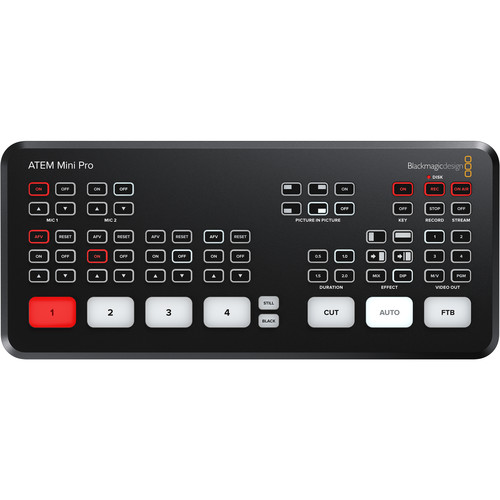
A pro technical director who directs shows on Grass Valley, Sony, and Tricaster switchers rates this gear highly because it holds up under heavy daily use. This person has used it for four and a half years and it still works just as well as the day they bought it. You won't have to worry about it crashing when you're halfway through a major event.
The body stays solid while the show runs - the hardware is not the thing you think about.
The point of a switcher this stable is simple: nobody troubleshoots on camera. The audience never finds out the hardware exists - and when the show grows past one camera, the ISO model records every feed separately.
The Light: Elgato Key Light and Key Light Air
Many folks try to build DIY rigs using daylight bulbs and canvas to get good light for their stream, but the Elgato Key Light replaces that messy process with a much cleaner setup.
One reviewer says pairing this light with a Stream Deck is worth every penny because it makes control easy. It mounts cleanly to the desk edge with the clamp - no floor space, no light stand in the corner of the frame, no cables crossing the shot. You won't struggle with loose bulbs and canvas rigs again - the gear stays assembled, dialed, and out of the way.
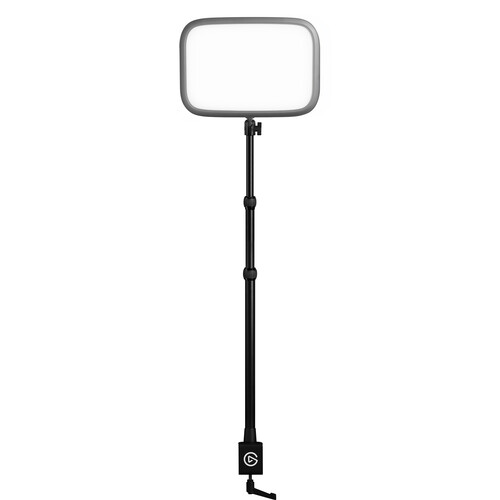
The first version of the Air had major flaws where it would constantly not be seen by the computer, making it feel unreliable for anyone who needed it to work steadily.
The new MK.2 fixed it - one owner who ran three mk1 units alongside a full-size Key Light says the small ones 'would constantly not be seen and just down right unreliable,' while the mk2 units 'are so much more reliable, always appearing' on 5GHz Wi-Fi. Running more than one light makes that reliability note the whole decision.
The light is perfectly diffused - one owner notes it 'doesn't bother my eyes during back to back meetings,' which is the endurance test that matters.
Harsh lamps carve deep shadows while the diffused panel doesn't. Soft, even light is what separates a professional frame from a webcam in a dark room - the same problem the church streaming kits solve every Sunday, just on a desk instead of a sanctuary.
The Audio Chain: Shure MV7+ and Wave Mic Arm LP
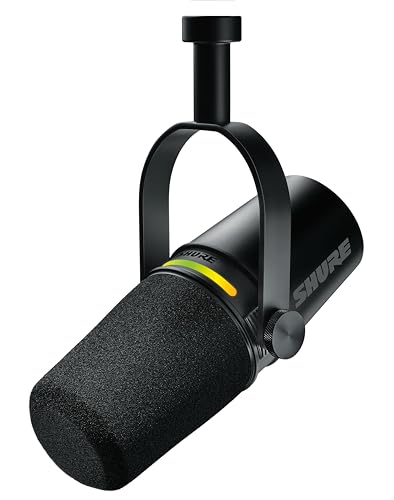
The Shure MV7+ provides great sound straight out of the box, and owners have found the voice clarity outstanding and background noise greatly reduced, while Shure's product page documents the USB-C and XLR dual path. It's a huge upgrade from the Fifine AM8T, since that older mic was really bad.
Pair it with a RodeCaster for more channels when the setup grows - one owner runs the 'SM7B setting' through one and calls the result a level up.
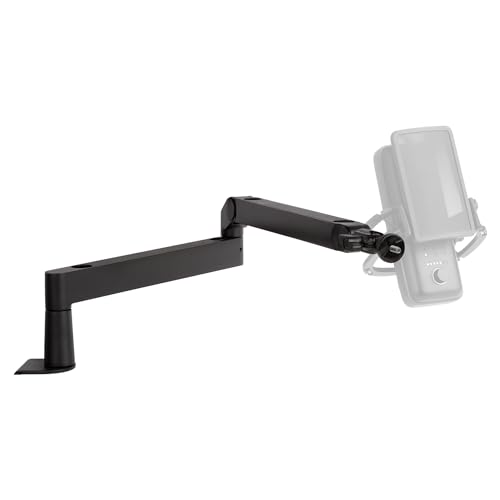
The Elgato Wave Mic Arm LP keeps the whole arm out of the camera frame, while it still puts the mic right where it needs to be for you now.
This arm blows away any cheap scissor arm because it is mostly metal, and it feels much more sturdy on your desk. It runs mid-range money, mostly metal, and built to outlast the desk it clamps to - the one nitpick being cable covers that can bend the cable over years of repositioning.
Together they are the audio chain, and the arm is what keeps the shot clean - nothing says amateur like a boom arm crossing the frame mid-sentence.
What to Buy First on a Budget
On a tight budget, start with lighting, because a clear image makes a cheap camera look better than an expensive one in a dark room. The Key Light earns its slot first because the Stream Deck pairing turns light level into a one-button preset. Next focus on audio with the Shure MV7+ since it sounds clear and it cuts out background noise without any extra work.
The Wave Mic Arm LP keeps the mic out of frame so the shot stays clean, and the Fifine-to-MV7+ upgrade story in the reviews shows why the audio step is worth taking early.
Once your light and sound are set up, the ATEM Mini Pro is the best small switcher you can find if you want to manage multiple video feeds with ease.
The Key Light Air MK.2 is a solid choice for those on budgets because the new version keeps working much better now. A good webcam often beats a poor camera while you're learning - the easiest gear is the gear that runs every day. Don't buy a second camera until you have the basics right, because mismatched footage will ruin your professional look.
Frequently Asked Questions
Do I need a switcher for one camera?
You don't need a dedicated switcher like the ATEM Mini Pro if you're only running one camera because software handles that task just fine. This hardware becomes useful once you want to switch between multiple video sources without taxing your computer.
Key Light vs Key Light Air?
The original Key Light offers deep control through Stream Deck integration, while the Air MK.2 fixes reliability issues found in the older model. You'll find the newer version much more consistent during long back to back video meetings.
MV7+ vs SM7B?
The MV7+ provides outstanding voice clarity right out of the box, but you can mimic the SM7B sound if you pair it with a professional audio mixer. This setup helps reduce background noise while keeping your audio crisp and very professional.
Arm vs desk stand?
Using the Wave Mic Arm LP allows you to keep the microphone out of the camera frame while positioning it exactly where you need it. This metal arm performs much better than a standard scissor-style stand and saves your valuable desk space.
What does the pro kit cost?
Assembling the full pro kit takes a mid-range budget, because switcher, light, mic and arm all land at once - though each box can be bought in the order above. You should prioritize your lighting first if you're working with a tighter set of funds.