
Best Video Camera Camcorder: Canon Vixia HF G70 and the Pro Tier
Camcorders were supposed to disappear once phones and mirrorless cameras got good at video, but plenty of people still want one. Events, school plays, sports and long interviews all reward a camera that zooms a long way, records for hours and is ready the moment you press the button.
Choosing one is harder now that there are fewer of them. The consumer models and the pro models look similar on a shelf, but they differ in zoom reach, low-light performance, stabilization and even which region's video standard they're built for.
Below is the bang-for-buck pick, a zoom and stabilization machine, and the small details owners keep mentioning.
The Canon Vixia HF G70 proves that camcorders aren't dead, since one owner has called it worth every penny and the video quality stays outstanding for anyone needing professional results.
While the Panasonic X1500 offers a pro-tier step up with its great stabilization and zoom, this G70 feels more accessible. You might consider the Canon XA75 for its night vision if you need specialized gear, but the G70 handles most needs - including the ones that used to be mirrorless-only.
Canon Vixia HF G70: The Bang-for-Buck Argument
Plenty of YouTube creators know what horrible footage looks like, and one has said theirs looked that way until they got this camera.
You need to be patient if you aren't a pro, because learning how to use this gear takes time. The footage is worth every penny, since it looks much better than what most cheap cameras can actually produce. It makes it easier to create content that looks professional to your viewers watching at home.
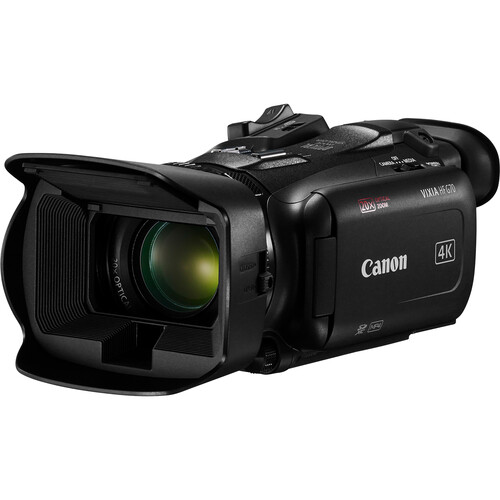
One owner who has owned it since 2022 has praised the bright, sharp screen, the sharp zoom even wide open, and the exposure compensation knob just below the lens. Two years of ownership is the kind of sample that outlasts launch-window hype.
Older cameras often had a thirty-minute record limit, which was a royal pain during long shoots. It doesn't have that limit. You can record for hours without worrying about the file cutting off in the middle of a great scene.
This camcorder is a great fit for a podcast, and one owner who uses it that way has found the autofocus excellent, even in fairly low light.
Where many small cameras fail to capture fine detail, this one holds. The camcorder-tier logic rhymes: buy for the job you have. PetaPixel's camera coverage reads the same debate from the photo side.
While the Panasonic X1500 keeps the shot steady, this gear offers more value for those on a budget. It fills the gap before the pro-tier Canon XA75, which costs much more for most home users. The results arrive without a fortune attached, and owners have found it worth every penny.
Panasonic X1500: The Zoom and Stabilization Machine
You might pick this tool if you need a lens that reaches far away, because the zoom is deep and the image stays steady while you move. It keeps the shot steady, so shaky hands stop being the problem, and one owner who compared it against a gimbal has found the stabilization works very well with no visible loss in image quality. This helps when you are running, because you need a clear frame without extra gear.
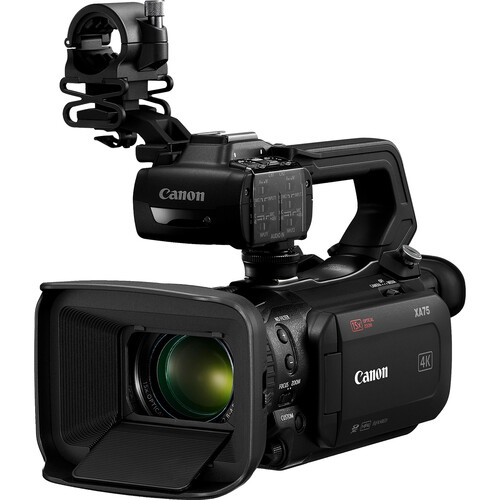
One buyer has said they didn't get this camera to film night-time cave-diving, since the low light performance is not the best for those types of shots.
The quality is great when the sun is out, but it struggles when the light goes down fast. It works well in the day. A reviewer has noted the image is great in full daylight, even though the small chip does limit what it can do.
You can stream your video straight to YouTube without needing a computer, which is a huge plus for those who work on the go every day. This makes it great for reports or daily life, when you need to share clips fast.
The dials take time to learn - 'A few things need some time with the manual,' per the professional owner - but the features hold the right look once set. Long lens, steady body, no computer in the loop. The Spanish reviewer's math agrees: 'los resultados son excelentes, aun en la resolucion MP4 y 50Mbps.'
The Small Details Owners Keep Mentioning
While the G70 records sharp 4K video, you'll find that the HDMI out and USB webcam mode are limited to 1080p, which might bother those who need sharp images.
The owner gave a low rating for registering the warranty, because the serial number shows it wasn't meant for sale in the USA
The camera works. The paperwork doesn't.
Frequently Asked Questions
Camcorder or mirrorless?
Different tools. One owner who moved from a Canon M50 has wondered why so many people are against camcorders, since the M50 had its flaws, starting with constant manual focusing, and they've stayed with the camcorder.
Camcorders power on and stay on. Mirrorless shoots stills. PetaPixel's camera coverage reads the same debate from the photo side.
How is the low light?
Honest across the board: the G70 works 'good even in lowish light' but is not a night camera. The X1500's 3-star owner called the daylight image 'incredible' and drew the same line. Buy lights if your shoots run dark - the lighting-kit guide starts cheaper than a new camera.
Can they stream?
The X1500 'streams straight to YouTube without needing a computer.' The G70's USB webcam mode works but tops at 1080.
For streaming-first workflows, check the output spec before the sensor spec - the storage-side math matters just as much once you record 4K for hours.
'Bem embalada. Uma excelente aquisicao' - well packaged, an excellent acquisition, the Portuguese review adds. Buy the fast card with the camera. The pairing matters more than either alone, and the owners who bought both never regret it - the sample is unanimous on that point, which is unusual for a sample this size.
What do they cost?
The G70 sits mid-range, the X1500 above it, the XA75 above that. One owner has called the value excellent, and that's how the value conversation sounds from owners.
Which one should I buy?
Podcast and long-record work: G70. Zoom and stabilization with YouTube streaming: X1500. Night vision and XLR audio: XA75 - and check the region code first.
Those are the small details owners keep mentioning.
The Panasonic X1500 isn't a simple point and shoot camera, so you'll need to spend some time with the manual to learn how all the pro features work.
A buyer, a professional, has stressed that it isn't a point-and-shoot camera
The night vision itself earns the praise: 'Everything is nice and smooth from the focus and iris.' Check B&H's camcorder stock for US-warranty units - the region code is the first thing to verify, and the receipt is the second.