
Best Free Screenwriting Software for Filmmakers (2026)
Free screenwriting software has gotten genuinely good in the last few years. Good enough that paying for Final Draft isn't the obvious move it used to be. Whether you're writing your first short film or you're deep into a feature draft and your Final Draft license expired, there are solid free tools that handle proper screenplay formatting without cutting corners on the stuff that actually matters.
The catch, of course, is that "free" means different things depending on the tool. Some are completely open source with no strings attached. Others give you a limited free tier that's designed to push you toward a paid plan. And a few offer free trials that eventually lock you out. So let's break down what you actually get without spending anything.
WriterSolo: The Best Truly Free Option
If you want a full-featured screenwriting tool that costs absolutely nothing, WriterSolo is where you should start. It's made by the same team behind WriterDuet, and it's essentially the offline version of their professional cloud platform, available as a pay-what-you-want download. You can pay zero and still get everything.
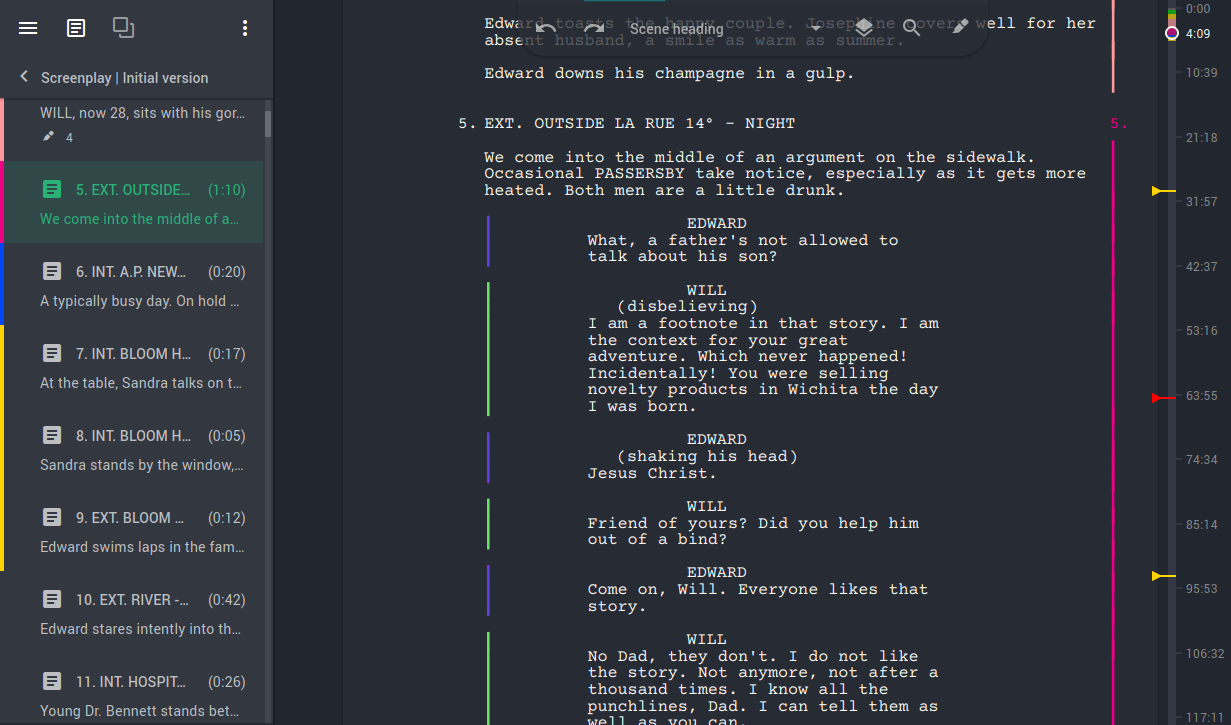
What makes WriterSolo stand out is that it includes basically all of WriterDuet Pro's features minus the real-time collaboration stuff. You get a proper visual editor with predictive styling, autocomplete suggestions, a scene navigator with color coding, private notes, and a proofing suite that catches spelling and grammar issues. It even has a passive voice detector, which is honestly more useful than it sounds when you're tightening up dialogue.
The tool exports to all the standard formats, including .fdx (Final Draft's format), Fountain, and PDF. You can also sync with Google Drive, Dropbox, and OneDrive if you want cloud backup without the cloud-first workflow.
Who WriterSolo Is For
Writers who want professional features without subscriptions or internet requirements. It's desktop and web based, works offline, and doesn't nag you to upgrade. If you're coming from Final Draft and don't need collaboration features, this is probably your closest free equivalent.
KIT Scenarist and Story Architect
KIT Scenarist is free, open source screenwriting software that runs on Windows, Mac, and Linux. The desktop version is completely free with no watermarks, no project limits, and no trial period. It's the real deal.
The software is built around four modules: research (for storing character info, location lists, and reference materials), cards (a visual corkboard for organizing scenes), the actual script editor (with automatic industry-standard formatting), and statistics (real-time character counts, page counts, scene dynamics). That statistics module alone is worth checking out, it gives you detailed breakdowns of character activity and scene structure that most free tools don't bother with.

Import and export support is solid. You can bring in files from Final Draft (.fdx), Fountain, Celtx, and even Trelby. Exports go out as PDF, .fdx, Fountain, and .docx.
One important note: the KIT Scenarist team has been transitioning to a newer product called Story Architect, which is the next generation of the same tool. If you're starting fresh, it's worth checking out Story Architect directly. But KIT Scenarist still works and remains free.
The Open Source Advantage
Because KIT Scenarist is open source, there's no risk of the company pulling features behind a paywall or shutting down the product. Over 10,000 active users and regular updates mean the community is keeping it alive. For Linux users especially, this is one of the only options that runs natively without workarounds.
WriterDuet: Best Free Collaboration Tool
WriterDuet is built around real-time collaboration, and even the free tier gives you enough to work with. You get three active projects with no watermarks and no page limits. That's a meaningful free offering, not just a demo.
The web-based editor works across devices, and the formatting engine handles industry-standard screenplay layout reliably. You get editing history, version backups, and Google Drive/Dropbox export even on the free plan. The interface is clean and modern, which makes a difference when you're staring at it for hours during a writing session.
The collaboration features are actually where WriterDuet separates itself from everything else on this list. Real-time co-writing, commenting, and in-app chat are available on the paid plans. But even on free, you can export and share scripts easily.
The Paid Upgrade Path
If you outgrow the three-project limit, WriterDuet Plus runs a reasonable monthly cost billed annually. But honestly, three projects is enough for most writers who aren't juggling multiple active assignments. You can always archive and start new ones.
Other Free Options Worth Trying
Highland Pro: The Mac Writer's Choice
Highland was created by screenwriter John August (Big Fish, Charlie's Angels), and the design philosophy reflects that pedigree. It uses a plain-text approach called Fountain format, which means your screenplay files are just text files that get formatted automatically. No proprietary file formats, no lock-in.
The free version through the Mac App Store gives you full screenwriting capability but adds a watermark to exported pages. For drafting and development, that watermark doesn't matter at all. You're writing, not sending final deliverables. When you do need clean exports, Highland Pro runs an annual subscription fee.
Highland is Mac-only (with iPad and iPhone apps on the paid plan), which limits its audience. But if you're in the Apple ecosystem and you value a minimal, distraction-free writing environment, it's hard to beat. The interface strips away everything except the writing, which some people love and others find too sparse.
Celtx: Free Screenwriting with Production Tools
Celtx has been around for a long time in the indie filmmaking world, and their free tier still gives you one active project with basic script editing and PDF export. That's limited, but it's enough to write a complete screenplay from start to finish if you're only working on one thing at a time.
What sets Celtx apart is the integrated production planning that comes with their paid tiers. Storyboarding, scheduling, call sheets, and budgeting tools are all baked into the same platform. If you're a filmmaker who writes their own scripts and also handles pre-production, the paid upgrade path makes more sense here than with a pure screenwriting tool.
The student discount is significant, and they offer a seven day free trial of the full platform if you want to test everything before committing.
Paid Alternatives and What You Lose Without Final Draft
Fade In: Not Free, But Worth Mentioning
Fade In isn't free, but it deserves a mention because of how it's priced. You pay once (a mid-range price, with student pricing available even cheaper), and you get all future updates and upgrades included forever. No subscription, no annual renewal. That one-time purchase model is increasingly rare in software.
The trial version is unrestricted in features and has no time limit, so you can actually test everything before deciding. It runs on Windows, Mac, and Linux, making it the most cross-platform option in the paid category.
For writers who can afford a one-time investment, Fade In represents better long-term value than most subscription-based tools. After a year or two of monthly payments elsewhere, Fade In has already paid for itself.
Final Draft and Industry Standards
Final Draft still dominates the professional film and television industry. Studios and production companies often require scripts in .fdx format, and while other tools can export to .fdx, the formatting doesn't always translate perfectly. If you're submitting scripts to established production companies, agents, or studios, you should be aware that Final Draft compatibility matters.
That said, for indie filmmakers, short films, web series, and personal projects, the formatting differences between these free tools and Final Draft are negligible. A properly formatted screenplay is a properly formatted screenplay. The software that produced it is irrelevant if the format is correct.
If you're working on video editing and need screenwriting capability as part of a larger production workflow, the all-in-one tools like Celtx make the most practical sense. If you're purely a writer, WriterSolo or KIT Scenarist give you the most features for zero dollars.
Hardware Considerations
Your screenwriting software is only as comfortable as the setup you're running it on. A good laptop with a comfortable keyboard and decent screen makes marathon writing sessions much more bearable. An external monitor for your workstation can also help if you like having reference materials visible alongside your script.
Frequently Asked Questions
What is the best completely free screenwriting software?
WriterSolo is the strongest option if you want professional features at no cost whatsoever. It's pay-what-you-want (including zero), runs offline, and includes most of the features found in paid screenwriting tools. KIT Scenarist is another excellent choice, especially if you're on Windows or Linux, since it's fully open source with no limitations on the desktop version.
Can free screenwriting software produce properly formatted screenplays?
Yes. Every tool on this list produces industry-standard screenplay formatting, including proper margins, character cues, dialogue spacing, and scene headings. The differences between free and paid tools are typically in collaboration features, cloud storage, and production planning, not in the quality of the formatting itself. A screenplay written in WriterSolo or KIT Scenarist looks identical to one written in Final Draft when exported to PDF.
Is Final Draft still necessary for professional screenwriters?
For writers submitting to major studios, agencies, and established production companies, Final Draft remains the expected standard. Some production pipelines specifically require .fdx files that import cleanly into Final Draft. However, many independent productions and streaming projects are less rigid about software requirements. If you're writing specs, personal projects, or content for indie production, free alternatives work perfectly fine.
Which free screenwriting software works on both Mac and Windows?
WriterDuet (web-based, works everywhere), KIT Scenarist (native apps for Mac, Windows, and Linux), and WriterSolo (desktop app for both platforms) all work cross-platform. Highland is the notable exception, as it's Mac-only. If cross-platform compatibility matters to you, KIT Scenarist offers the broadest native support since it also covers Linux.
Can I collaborate with other writers using free screenwriting software?
WriterDuet's free tier allows basic collaboration through shared exports, though real-time co-writing requires the paid plan. KIT Scenarist doesn't have built-in collaboration but you can share project files through cloud storage. For serious real-time collaboration on a budget, WriterDuet's paid plans are the most practical option, as this is their core strength.
What file formats should free screenwriting software support?
At minimum, look for PDF export (for sharing and submission) and .fdx support (for Final Draft compatibility). Fountain format is also valuable since it's plain text and works with multiple editors. Most of the tools on this list support all three, along with .docx and other common formats. Import capability matters too, especially if you're switching from another tool, so check that the software can bring in your existing scripts without formatting issues.