
A Review of the Apple Pro Display XDR: The 6K Reference Monitor, Five Years On
Apple's Pro Display XDR came out in 2019 as a reference monitor for people who grade and finish video. Five years on, the question isn't whether it's good, it's whether the price still makes sense for a display that's no longer new.
The sticker price is only the start. You pay extra for the stand, the nano-texture glass adds more on top, and the only way in is Thunderbolt, which matters the moment you want to plug in anything that isn't a Mac.
Here's what makes the 576-LED panel different, how its reference modes hold up for color work, the stand problem, and who should still buy one in 2026.
This 6K monitor represents an engineering landmark with its 576-LED local dimming and 1600-nit HDR brightness, but the cost climbs significantly when you add the mandatory stand or the expensive nano-texture glass option.
Paying a heavy premium for a display alone stings more when the base connectivity stops at Thunderbolt 3. The lack of an HDMI port makes the hardware feel dated for modern workflows - and the real price with the stand sits well past six thousand dollars - the number the reference-mode spec sheet never leads with.
What Makes the Pro Display XDR Different: the 576-LED Array
This monitor packs a deep 6K resolution into a thirty-two inch frame, which provides a level of detail that professional editors need to see every pixel clearly without having to zoom in. It uses the P3 wide color space, so colors look vibrant and real when you work on video projects.
Because the density is so high, you won't see pixels even when you sit close - the front-on shot shows how clean the panel stays edge to edge.
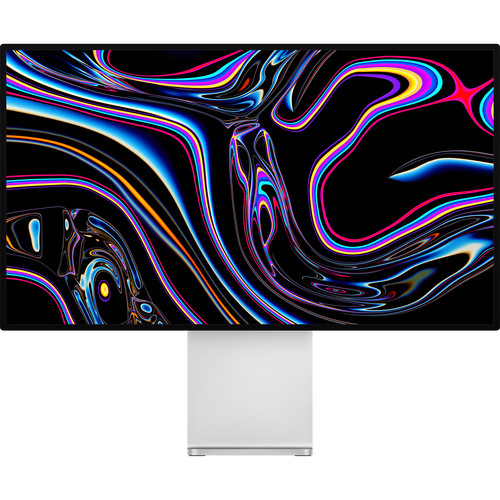
The real magic happens through the array of five hundred and seventy-six LEDs, which allows the screen to dim specific areas while keeping other parts very bright for high-contrast work. It hits a peak brightness of sixteen hundred nits in HDR mode, which makes highlights pop with real life. This level of light is rare.
Since the backlight controls these zones so well, you get deep blacks that don't look like gray.
When this arrived in 2019, it set a whole new standard for what a reference monitor could do because it brought studio-grade specs to a desktop that anyone could use at home.
Even though years have passed, the hardware remains a tool for those who need accurate color. You can't find another display that matches this exact mix of resolution, brightness and color - the backlight engineering is why it still gets specified.
Reference Modes and Color Accuracy
While most people just want a bright screen, pros in broadcast need the reference modes this display ships with to ensure that what they see is exactly what shows up on the final film.
These modes let the display match what the industry sets, which helps when you're grading color for big screens. If you don't work with video, these features feel like a waste of your budget. It's a tool for people who can't afford to be wrong on a shade of red.
The screen uses a P3 wide color space and an array of LEDs to hit brightness levels, which means the deep blacks and bright highlights stay sharp without losing any detail in the shadows. You can calibrate the panel so it stays right, which matters for anyone matching other displays - without that, your grade shifts the moment it lands on a different screen.
Because this monitor costs so much money, you have to decide if how you work requires how sharp it is, or if a cheaper screen would work. If you're just editing family photos, you're likely paying for tech that you'll never really use, because you don't need it. But for editors who live in color, how well it looks is why they justify the price tag.
Build, Connectivity and the Stand Situation
The monitor has a heavy aluminum chassis that feels solid, but standing it up costs extra, and the stand is where the real price climbs. Check B&H's Pro Display XDR pricing before assuming Apple's price is the floor.
The Pro Stand costs around a thousand dollars, which is a lot for a piece of metal that holds a screen. If you prefer a different way, you can grab a VESA mount for a few hundred dollars and save some money. It's odd that the base price doesn't include anything at all.
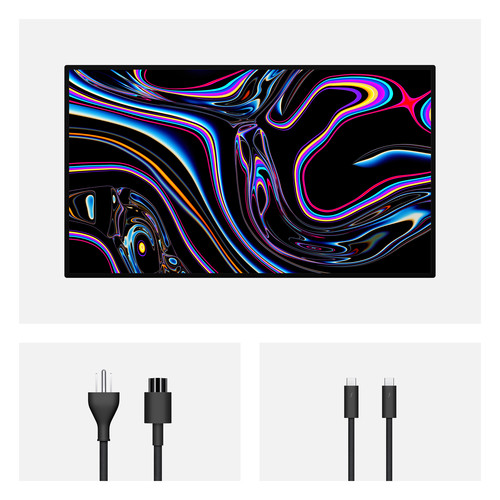
This display only uses Thunderbolt 3 ports for everything, which means you can't use a standard HDMI cable to link it to most modern computers or even gaming consoles. You can plug in your Mac directly, but you'll need special adapters if you want to connect to anything else. No other ports turns machine-switching into adapter-swapping - a real tax in multi-computer suites.
You can opt for nano-texture glass to stop glare, but adding that glass adds another thousand dollars to the total cost which most folks will find very hard to justify.
The glass cuts glare, though it makes the image look slightly less sharp than the standard option. Buying this screen costs a lot, especially since the price keeps going up as you add these extra parts. You'll need to think twice before you spend that much money on one single tool.
Who Should Buy One in 2026 - and Who Should Not
In a professional grading suite where every pixel counts, this 6K monitor is still a serious tool because it hits strict color targets with ease.
Pros need these specific reference modes, which ensure their work looks right when it hits a high-end cinema screen. It keeps the image bright and deep, which helps editors see the tiny details in very dark scenes. It's for those who need the colors to be perfect above all other things.
Most people don't need to spend this much, since plenty of 5K and 6K screens do the daily work for a fraction of the cost - see our filmmaker camera guide for the capture side of that kit.
Newer cheaper models offer great value for daily tasks, like photo editing or basic video cut work. You'll save a lot of cash if you pick a more modern panel that fits your needs better. Buying this is a waste if you don't grade professionally every single day.
The film industry relies on these high-end monitors for final checks, but most creators will find the price and the extra stand far too high for a home studio. If you aren't a dedicated colorist, you're paying for features you may never touch - a sharp 5K panel at a third of the price does the daily work, and the documentary-audio kit shows where the rest of that budget goes instead.
Frequently Asked Questions
Is the Apple Pro Display XDR still worth buying in 2026?
This monitor remains relevant only for professionals who require extreme color-critical accuracy and high brightness levels for demanding video grading or design workflows. Most users won't find these specific features justify such an investment for daily tasks.
Should I buy the Pro Stand or use a VESA mount?
Choosing the official stand adds a significant cost, but the VESA option saves money if you already own a mounting arm - the mount wins for anyone who wants to customize the desk setup.
What cables do I need to connect this monitor?
You can only use Thunderbolt 3 cables to connect this display because the hardware lacks an HDMI port or any other standard video inputs. You'll need specific adapters or docks if your computer uses older or different ports.
Is the nano-texture glass worth the extra money?
This upgrade depends entirely on whether your workspace has heavy glare from overhead lights that causes distracting reflections. It helps in bright rooms but slightly softens the image - the same trade-off crews weigh when picking monitors for color work.
What is the best alternative to the XDR?
Other high-end 6K monitors offer similar resolution for a lower cost, though they often lack the specific peak brightness levels found here. You might find better value elsewhere if you don't need those extreme HDR specs.