
Viltrox EF-EOS M2 Speed Booster Review for the Canon M50
Canon's M50 is a small, capable camera with one awkward trait for anyone who already owns Canon EF lenses: its APS-C sensor crops them. A wide zoom stops being wide, and a fast prime gets longer than you want it to be.
A speed booster fixes both problems at once. It sits between the EF lens and the EF-M mount, shrinks the image onto the smaller sensor, and gives back close to the full-frame field of view plus about a stop of light. The question is whether a budget adapter does that well enough to trust on a shoot.
Below is what the adapter does, which lenses work with it, how the Micro Four Thirds version compares, and where it fails.
The Viltrox EF-EOS M2 is the obvious choice for Canon M50 users with EF glass. This tool provides a full-frame field of view for various EF lenses since it reduces the crop factor and increases aperture for better results.
The EF-M2 II serves the M43 crowd the same way, and both undercut Metabones by more than half, with one owner calling it a Metabones alternative for a third of the price.
What the Speed Booster Does
One buyer got it for a full-frame-equivalent field of view with EF lenses on the M50 and hasn't been disappointed. Another has said Viltrox's products have changed the way they use their cameras, and the image shows how the angle shifts.
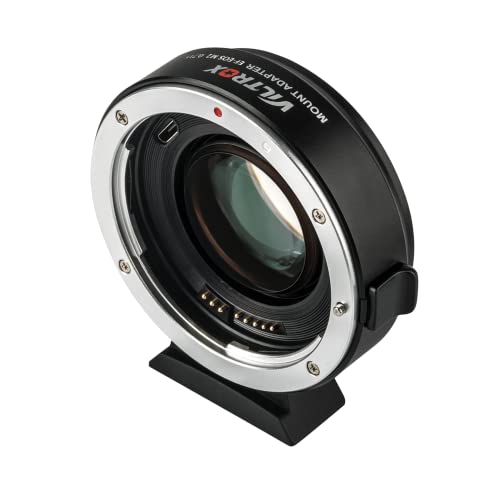
One owner has found it turned their 50mm f/1.8 into an f/1.2. Another has used it with several EF zooms: the 20-35mm f/3.5-4.5 USM, the 28-135mm f/3.5-5.6 IS USM, the 28-105mm f/3.5-4.5 USM and the 100-300mm.
One EF-M2 II owner has called it an excellent alternative to the Metabones for a third of the price, with a tight fit against body and lens, though you may need to adjust infinity or back focus. Another owner has tried both the plain EF-EOS M adapter and this EF-EOS M2 speed booster, and the speed booster wins in all respects.
Lens Combinations That Work
Those zooms show the range: 20-35mm, 28-135mm, 28-105mm and 100-300mm, all run through the reducer on the M50 with no complaint from that owner. The 50mm f1.8 becomes the 1.2, which tells the low-light story in one number: a stop and a third of light the M50's small sensor cannot get any other way, and the reason the adapter pays for itself before the first rental of a faster lens.
While EF glass works great, most EF-S lenses won't work here without heavy vignetting, and they might even damage the glass element if you try. You should be careful with those crop-only lenses because the dark corners will ruin frames. The EF-M2 II is the M43 sibling, and its price read lives in the next section.
The adapter question comes down to which body you own. The EF-EOS M2 is for the Canon M50 and its EF-M siblings, the EF-M2 II is for Micro Four Thirds bodies like the OM-1 MkII and the GH6, and the choice inside each family is Viltrox versus Metabones versus nothing.
One GH6 owner has found it one of the few among many similar adapters that works correctly, and an OM-1 MkII owner bought it hoping to keep using their favorite Canon macro lens, the 180mm f/3.5L.
The EF-M2 II Side by Side
The Viltrox EF-M2 II is a smart choice over Metabones because it costs about a third of the money.
One M43 owner has found it sells for about half the price of other adapters and still delivers the same optical quality. You'll need to rotate the element inside the glass to get the infinity focus right when you're shooting. The adapter fits tight against the body and the lens, so it stays stable during heavy use.
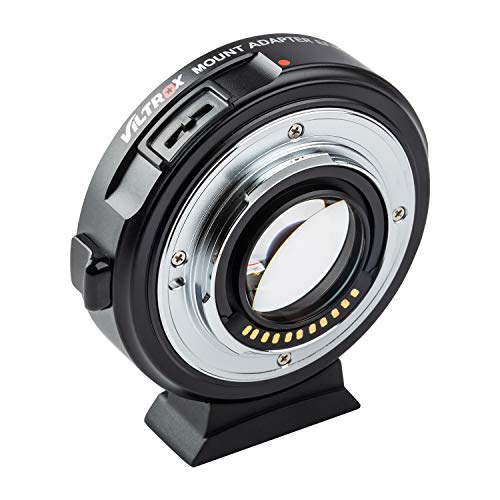
Update the firmware and set the infinity focus first, and one owner has found instructions online and done both in about 5 minutes. The autofocus failures come from a 1-star report where the camera reads F-.
Where It Fails
Some users find that the camera constantly displays an F- error while the autofocus completely fails to work, which can be incredibly frustrating when you're trying to capture a fast moment.
One E-M1X owner has found it sometimes disconnects, so you have to make sure it's securely connected. Seat the mount, and the link holds. Leave it loose, and the mid-take drop is on you - a two-second check before every take, the same discipline the battery-swap crowd already runs.
One unhappy buyer ordered a speed booster, received a plain mount adapter and asked if it's the same. The answer is no: without the reducer glass, there's no field-of-view gain and no f-stop shift.
That question is the whole quality-control problem, and the listing photo is the only defense a buyer has. Match the image to the box before the return window closes. The reducer's glass is visible through the mount in the product photo - the plain adapter is not, and that difference is the whole order check.
The other face of the same coin: one owner's unit worked properly for a single day, and a repair would likely cost more than a new one.
Frequently Asked Questions
Does it work on the M50?
The buyer has put it plainly: it lets you use EF lenses on Canon M-series cameras, and it works well
Can I use EF-S lenses?
Most EF-S lenses won't work without heavy vignetting and might damage the glass element. That's one owner's warning.
Does the autofocus work?
Autofocus generally works, and the failure mode is specific: in one 1-star report the camera reads F- and autofocus stops, a lens-communication drop rather than a focus-motor problem. The firmware update cleared it for the owners who ran it.
How does it compare to Metabones?
The EF-M2 II owner's headline is a Metabones alternative for a third of the price, and another owner can't imagine how the Metabones could be better for the money. The head-to-head with the plain EF-EOS M reads the same, with the speed booster winning in all respects.
Is there a firmware update needed?
The setup is the same as above: update the firmware and set the infinity focus first. Skip it and the infinity stop wanders. Run it once and the adapter disappears into the kit.
The maintenance story is the same five minutes. The adapter-tier comparison holds the Metabones side, the gimbal field guide covers the stabilization rig, and the R50's page is the alternative body without an adapter.
PetaPixel's adapter coverage reads the mount-adapter market from the photo side, and No Film School's lens guides explain the focal-reducer math. Check B&H's adapter stock before ordering, so the wrong-mount surprise never reaches your door.