
Multi Camera Live Streaming Setup: Gear, Software, and How to Make It Work
Why Multi-Camera Live Streaming Makes the Pain of Setting Up Multiple Cameras Worth It
Transitioning from using a single camera stream to setting up a multi-camera live streaming environment dramatically changes every aspect of your production. With more choices, you can cut to a wide shot during a panel, zoom in for a close-up when someone says something significant, or display a graphic or a pre-recorded video without making the entire production look like a college lecture from 1997.
The difference in quality of the production itself is simply unbelievable, and your audience will notice it instantly, even if they cannot explain why.
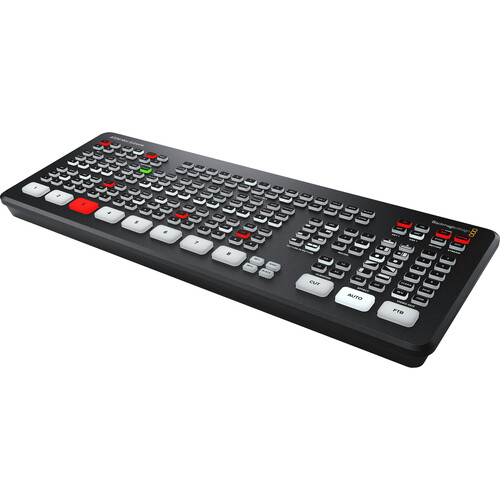
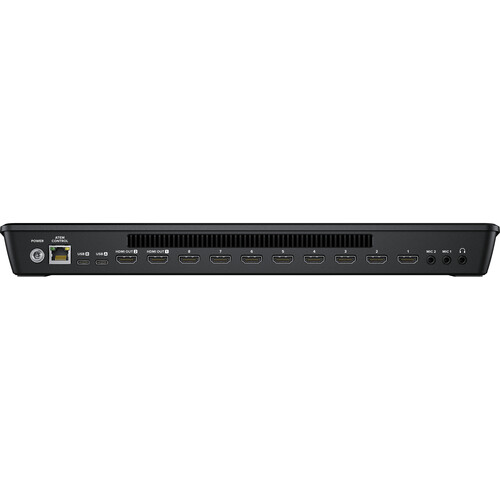
Fortunately, the equipment necessary to make a multi-camera live streaming environment possible has become incredibly affordable. The Blackmagic ATEM Mini Extreme can take eight HDMI inputs and has built-in streaming capabilities, plus built-in recording capabilities, and a physical control surface to control the equipment.
Just a few years ago, to accomplish what the ATEM Mini Extreme does, would have required a large rack of equipment and a full-time technical director.
However, getting all of the different components to communicate effectively with each other, including cameras to switchers, audio routing to ensure that audio is properly routed, software that doesn't choke during a live broadcast, requires some serious planning. Therefore, we are going to review the entire production environment piece-by-piece.
The Switcher: The Brain of Your Multi-Cam Environment
Hardware Switchers vs. Software Switching
Your options are essentially two-fold. You have a dedicated hardware switcher like the Blackmagic ATEM Mini Extreme, or the Roland V-1HD+, that contains all of the functionality of your multi-camera setup. In a hardware switcher, you connect your cameras, press a button, and it produces a switched program feed.
The alternative is software based switching through OBS Studio or vMix, where you input multiple camera feeds into your computer via capture cards and perform all of the switching on screen.
Hardware switchers are generally more reliable for live applications. They include no computer to fail, no conflicting drivers, and no worry about whether your CPU can process the encode while simultaneously switching four different camera feeds.
B&H reviewers have repeatedly stated how simple the ATEM Mini Extreme was to configure, and how quickly they were able to begin streaming. One reviewer described it as the best purchase their church has ever made, and churches do a tremendous amount of multi-camera streaming, so that is a substantial endorsement.
OBS Studio provides greater flexibility with regards to overlaying, creating scenes, and developing advanced graphics. However, you require a powerful computer and at least one capture card per camera input.
If you're planning to operate a multi-camera live streaming setup, particularly if you'll be operating it without the assistance of a full time technical staff, a hardware switcher will likely be the easier and more reliable option to choose from.
Why the Blackmagic ATEM Mini Extreme is the Choice of Many
The Blackmagic ATEM Mini Extreme can handle up to eight different HDMI sources at resolutions of 1080p60. That's a lot of inputs. Most multi-camera live streaming productions typically utilize three to four cameras, so you'll have plenty of room to add a laptop feed, a media player, or additional camera feeds in the future.
The Blackmagic ATEM Mini Extreme can stream directly via RTMP over Ethernet, and it can also show up as a USB webcam. As such, it supports usage with virtually any platform that accepts a webcam input, including Zoom, Teams, Skype, etc.
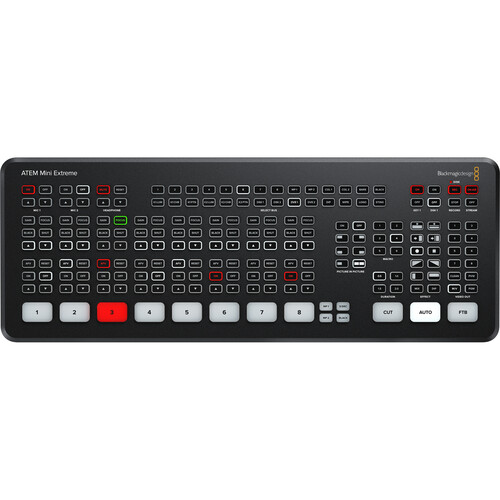
SuperSource is another major benefit. SuperSource used to be exclusive to Blackmagic's top-of-the-line, expensive broadcast switchers. Users report that combining SuperSource with the MixEffect Pro App on an iPad completely revolutionizes the production workflow, allowing users to easily develop picture-in-picture layouts and complex compositions by simply selecting predefined presets on a tablet.
The two independent HDMI outputs allow you to send a program to one monitor and a 16-way multiview to a second monitor for viewing all of your sources at once.
Built-in recording is included too. Plug a USB drive into one of the two USB-C ports and record your program feed as MP4 while simultaneously streaming. The second USB-C port can provide a webcam feed to your computer.
B&H reviewers have praised the reliability and quiet operation, with several noting they've used the device for over two years without a single hardware failure.
On the downside, some reviewers have reported HDMI compatibility quirks with certain matrix switchers and converters. A recent firmware update also broke direct streaming to Restream.io for some users, though routing the output through OBS as a webcam source resolved it.
A Budget Option: The Blackmagic ATEM Mini Pro
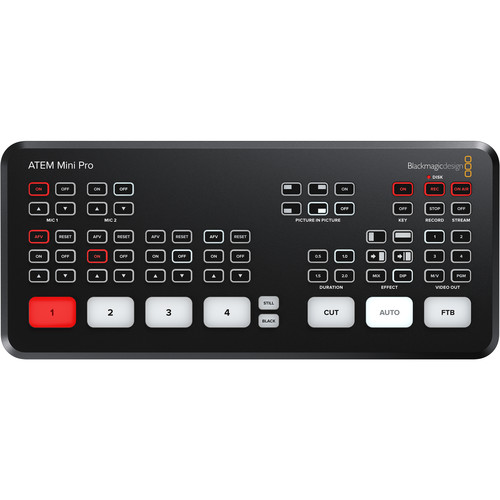
If eight inputs is overkill and your budget is tighter, the Blackmagic ATEM Mini Pro gives you four HDMI inputs, one HDMI output, direct streaming, and recording. You lose SuperSource and the second HDMI output, but for a three-camera church service, podcast, or small event stream, it covers the basics at a much lower price point. It's also available on Amazon for price comparison.
Cameras and Capture Cards
Choosing Cameras for Multi-Cam Streaming
This is where people tend to overthink things. You do not need to match your cinema cameras for a live stream. What you need are cameras with clean HDMI output that can run for hours without overheating.
Mirrorless consumer cameras are perfectly fine for this. The Sony a6400, for example, has clean HDMI output, good auto focus, and can run for indefinite periods on dummy battery power. The Blackmagic Pocket Cinema Cameras are also popular due to the fact that they can be controlled by the ATEM switchers using the HDMI connection.
The key factor to consistency across all of your sources is to match your white balance and exposure. You can do this manually before the stream begins.
While the ATEM does convert formats between your camera feeds (so you can have 1080p30 and 1080p60 sources), your color and exposure should be consistent, otherwise the cuts will look jarring.
When setting up three cameras for a basic multi-camera live streaming application, consider a wide shot for your establishing shot, a medium shot of the primary speaker, and either a tight close-up of the speaker or a secondary angle.
This provides your switcher operator (or you, if you're handling all of the duties yourself) with sufficient variety to maintain a visually appealing and engaging stream, without requiring constant switching between various angles.
Capture Cards When Necessary
If you decide to go the software route with OBS or vMix, you will need to acquire capture cards to receive your camera feeds into the computer. The Elgato HD60 X is a reliable USB capture card that allows for 1080p60 passthrough and is compatible with both Macs and PCs.
You will need one capture card for each camera, which can start to eat into your USB bandwidth, and can become expensive. For more than two cameras, an internal PCIe capture card that has multiple inputs will be more suitable, or you can simply opt for a hardware switcher and avoid the headache altogether.
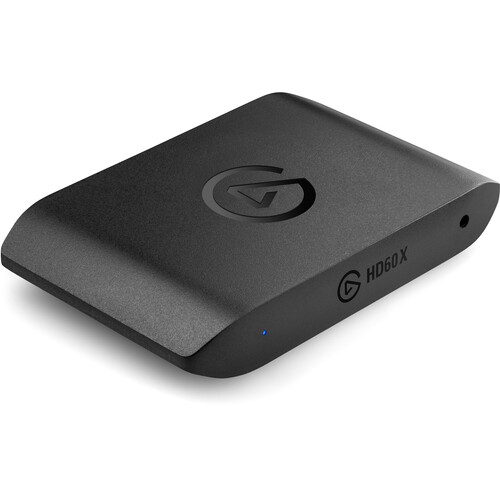
Capture cards do provide greater control over individual source processing within your software. However, for reliability during a live broadcast, having all of your switching occur in dedicated hardware prior to reaching the computer is difficult to beat.
Audio, Monitoring, and the Stuff People Forget
Getting Audio Right
Audio is usually where most multi-camera streaming fails. Beautiful multi-angle video means nothing if the audio is weak, hollow sounding or not consistent across all the different camera sources, nobody will watch for more than 30 seconds.
The ATEM Mini Extreme has two 3.5mm stereo inputs and an additional input with embedded audio for every HDMI input, so you have options. You simply need to plan your audio routing before you begin streaming.
Use a dedicated wireless lavalier mic in either the ATEM's two audio inputs or through a very small mixer for a talk head or interview style. Do not count on camera mounted shotgun mics for your main audio in a multi-camera situation. Each camera's audio will vary when you cut to the next camera due to varying mic placement. Use a consistent source of audio based upon the camera you are viewing.
The built in audio mixer of the ATEM is very simple, however, it can perform basic functions such as adjusting levels per input, adding a slight EQ and monitoring through the headphone jack. If you require more advanced audio capabilities, consider a stand-alone audio mixer or recorder and connect the output of the mixed audio to the ATEM.
Watching All Your Inputs During Streaming
You will need to view all of your camera feeds simultaneously while you are streaming. The 16-way multiview function of the ATEM Mini Extreme will meet this requirement. Simply plug a monitor into the second HDMI port and you will be able to view every input, your program output and preview all at once on the same screen. Any on-camera monitor or even a standard PC monitor will work well as a multiview display.
If you are running a software-based solution, OBS and vMix both have multiview functionality. vMix is quite effective at providing multiview displays of all inputs along with tally indicators, allowing you to know which inputs are currently live.
Software: OBS, vMix, and ATEM Software Control
Even with a hardware switcher, you'll likely still use software. The ATEM Software Control Panel runs on Mac and Windows and gives you access to features the hardware buttons can't reach, including the media pool, macro programming, audio mixing, and camera control for supported Blackmagic cameras.
OBS Studio is free and works great as a streaming encoder. Connect the ATEM's USB webcam output to your computer, then use OBS to add overlays, lower-thirds, and pre-recorded video on top of the switched feed. Many users run the ATEM as their primary switcher and use OBS solely for encoding, which is a great combination.
vMix is the paid alternative popular with professional live streamers. It handles multi-camera switching, streaming, recording, and graphics in one application. If you're going purely software-based with capture cards, vMix is the more capable choice, though OBS is hard to argue with at free.
For cameras that can't be hardwired, wireless video transmission products like the Hollyland Mars series let you send HDMI wirelessly to your switcher. Wireless does introduce latency though, so test before going live.
Roland V-1HD+ as an Alternative
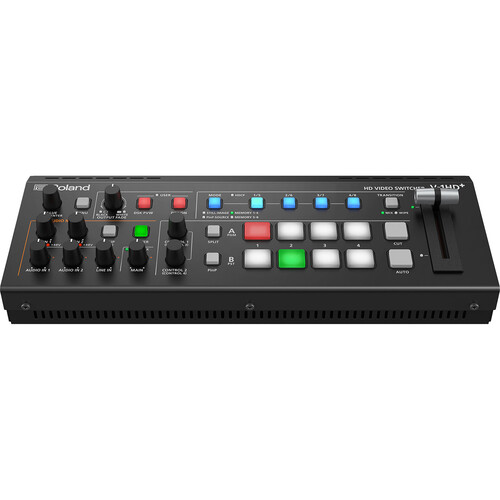
The Roland V-1HD+ is a four-input HDMI switcher that competes with the ATEM Mini Pro. Roland builds high-quality audio processing into their switchers, so if your live stream includes significant audio mixing (live music or multiple microphone inputs), the V-1HD+ may be a better fit. However, it doesn't have built-in streaming, so you'll need a separate encoder or capture device. For more options, check out our roundup of portable video switchers.
Frequently Asked Questions
How many cameras should I use for a multi camera live stream?
While the ideal number of cameras is subjective, most multi-camera live streaming configurations utilize three cameras. Three cameras typically provide sufficient variety to engage the viewer without making it difficult for the operator to switch between them. While you can certainly begin with two cameras and add more later, the ATEM Mini Extreme supports up to eight cameras, leaving plenty of room to expand your configuration.
Will the ATEM Mini Extreme allow me to stream to YouTube and Facebook simultaneously?
The ATEM Mini Extreme can stream to one RTMP destination. However, you can use services such as Restream.io or Castr, which distribute content to multiple platforms simultaneously. Alternatively, you can use OBS and its multi-platform streaming plugins to route the USB webcam output to multiple destinations. Either way, it is possible to stream to multiple platforms at the same time, although you will need to configure your setup accordingly.
Do I need to use a computer to live stream with a hardware switcher?
No. The ATEM Mini Extreme can stream directly via Ethernet and record to USB without a computer involved at all. It even supports tethering to a phone for cellular connectivity on location.
Is a hardware switcher or OBS with capture cards a better option for streaming?
From a reliability standpoint, the hardware switcher is the clear winner. There are no driver issues, CPU bottlenecks, or software crashes to worry about during a live event. However, software-based solutions such as OBS offer greater flexibility in terms of creating custom scenes, overlay graphics and other complex elements. Many users choose to use a hybrid approach, with the hardware switcher handling camera switching and the software-based solution handling encoding and graphics.
How much does a basic multi camera streaming setup cost?
Starting from zero, expect to spend a moderate amount. The switcher is the biggest single expense (the ATEM Mini Pro being the most affordable serious option). Add two to three cameras with clean HDMI output, HDMI cables, a couple of wireless microphones, and a monitor for multiview. You can bring costs down by using cameras you already own. The ATEM switchers work with basically anything that outputs HDMI, including GoPros, webcams, and game consoles.
What HDMI cables should I use for a multi camera setup?
Standard high-speed HDMI cables work fine for 1080p streaming. Keep your cable runs under 25 feet for passive cables, or use active HDMI cables or HDMI-over-Ethernet extenders for longer distances. Label every cable. Seriously. When you're troubleshooting a black input five minutes before going live, knowing which cable goes where saves your sanity.