
Best Video Projectors for Home Theater (What to Look for in 2026)
Finding the best video projector for home theater comes down to a few things that spec sheets don't always make obvious. Resolution matters, sure. But throw distance, contrast ratio, and light source technology are what actually determine whether your living room looks like a proper cinema or a washed-out corporate conference room. And the difference between a good projector and a great one isn't always about spending more money.
The BenQ HT4550i sits right at the sweet spot for most home theater setups in 2026. It delivers genuine 4K resolution, covers 100% of the DCI-P3 color gamut, and pushes 3,200 lumens, which is enough brightness to handle rooms that aren't completely blacked out. But it's not the only option worth considering, and depending on your room size and budget, there are alternatives that might make more sense.
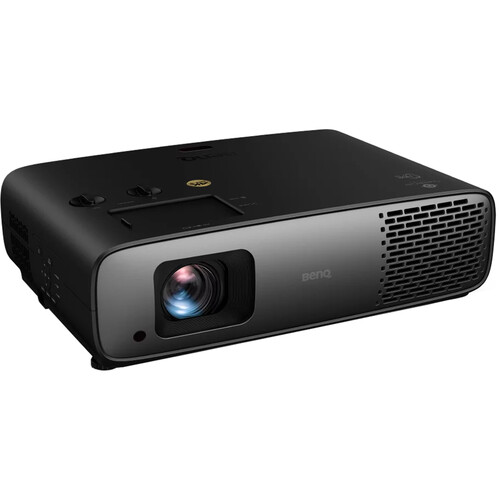
Our Top Pick: BenQ HT4550i
The BenQ HT4550i earned its reputation as one of the best home theater projectors you can get without crossing into truly absurd pricing territory. It uses DLP technology with a high-end LED light source that's rated for over 20,000 hours of use. That means you're looking at roughly a decade of regular movie watching before the light source needs attention.
What really sets this projector apart is the color accuracy. It's ISF and THX certified, which means the factory calibration is actually trustworthy out of the box. Most projectors in this price range claim wide color gamut support but need extensive calibration to look right. The HT4550i genuinely delivers on its 100% DCI-P3 and Rec.709 coverage without you needing to hire a calibration technician.
B&H reviewers consistently praise the image quality and color accuracy. Users report that movies look natural and film-like rather than over-saturated, which is what you want for serious home cinema viewing. The Filmmaker Mode and 24p playback support mean your Blu-rays and streaming content display at the correct frame rate without judder.
Key Specs Worth Knowing
The 1.3x zoom and 2D lens shift give you solid flexibility for placement. The throw ratio sits between 1.15:1 and 1.5:1, meaning you'll need about 10-13 feet of distance for a 100-inch screen. It includes an Android TV dongle for smart features, dual HDMI 2.0b inputs, and passthrough for 7.1-channel and Dolby Atmos audio.
The main downside according to reviews is the fan noise. Some users note it's audible in quiet scenes, especially in smaller rooms. The lack of HDMI 2.1 also means no 4K/120Hz for gaming, which matters if you plan to use this for both movies and console gaming.
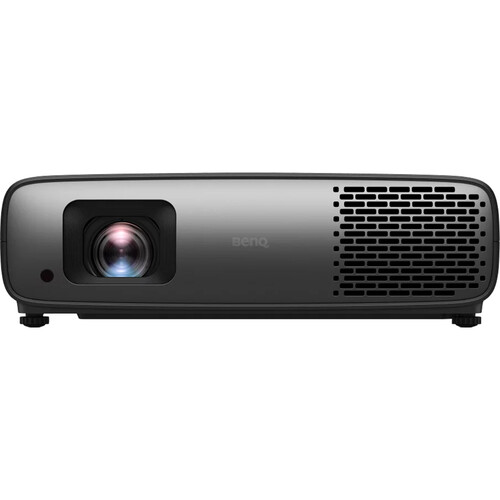
Laser vs Lamp vs LED: Why It Matters
Before diving into alternatives, you need to understand the three main light source technologies. This is probably the single most important spec when choosing a home theater projector.
Lamp projectors use traditional high-pressure mercury bulbs. They're the cheapest option upfront, but bulbs need replacement every 3,000-5,000 hours and replacements cost real money. For occasional movie nights, that's fine. For daily use, it adds up fast.
Laser projectors use solid-state laser light sources that last 20,000+ hours with virtually no brightness degradation over time. They also tend to produce deeper blacks and more consistent color. The trade-off is higher upfront cost.
LED projectors (like the BenQ HT4550i) sit between the two. Long lifespan similar to laser, good color accuracy, but typically lower peak brightness compared to laser. For light-controlled rooms, LED is excellent. For rooms with ambient light, laser's brightness advantage matters more.
Best Alternative: Epson Home Cinema LS11000
The Epson Home Cinema LS11000 takes a different approach from the BenQ. It uses 3LCD laser technology, which means no rainbow effect (a DLP issue some viewers are sensitive to) and exceptional color uniformity across the entire image.
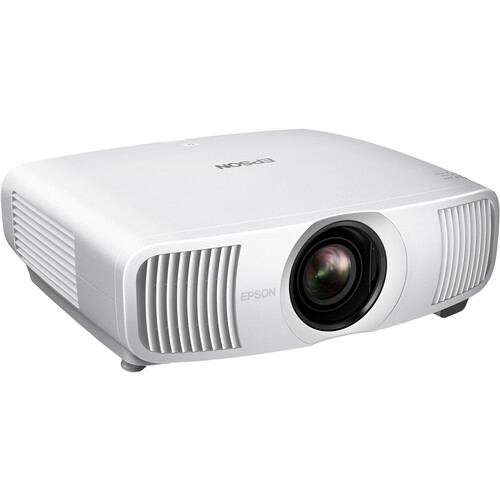
The LS11000 pushes 2,500 lumens with its laser light source and supports both HDR10+ and HLG. It has HDMI 2.1 inputs, which gives it an edge for gaming with 4K/120Hz and 1080p/240Hz support. If you're building a dual-purpose setup for movies and gaming, this is a significant advantage over the BenQ.
B&H users report the image is remarkably natural with excellent shadow detail. The 3LCD technology eliminates the color wheel artifacts that some people notice on DLP projectors, especially in dark scenes. It's pricier than the HT4550i, but the laser light source and gaming capabilities justify the premium for the right buyer.
The trade-off is that 2,500 lumens is noticeably less bright than the BenQ's 3,200 lumens. In a fully dark room, both look fantastic. But if your room has any ambient light, the BenQ handles it better.
Ultra-Short Throw: When Space Is Limited
If you don't have 10+ feet of throw distance available, ultra-short throw (UST) projectors are the answer. These sit just inches from the wall and project upward onto a screen, which means no shadow issues when people walk in front and no ceiling mount required.
The Epson EpiqVision Ultra LS800 is one of the better UST options. It pushes 4,000 lumens (much brighter than standard throw projectors) and can project up to 150 inches from just a few inches away. It runs Android TV natively, so smart features are built right in.
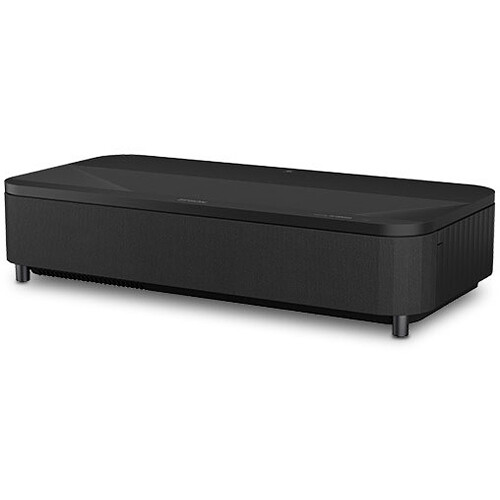
UST projectors are more expensive per lumen of brightness compared to traditional models. You also need a specialized ambient light rejecting (ALR) screen to get the best image quality, which adds cost. But for apartments, media rooms with limited depth, or situations where ceiling mounting isn't possible, UST is the only practical option.
What Specs Actually Matter for Home Theater
Native Resolution
Go 4K or go home. The price gap between 1080p and 4K projectors has shrunk enough that there's no good reason to buy a 1080p model for a dedicated home theater setup in 2026. Even budget 4K projectors deliver noticeably sharper images, especially on screens over 100 inches where individual pixels become visible at 1080p.
That said, "4K" on projector spec sheets can mean either native 4K (true 3840 x 2160 resolution) or pixel-shift 4K (which uses a lower-resolution chip and shifts pixels rapidly to simulate 4K). Both look good, but native 4K is sharper if you're sitting close or using a very large screen. The BenQ HT4550i uses DLP pixel-shift, while Epson models typically use 3LCD pixel-shift. True native 4K projectors exist but cost significantly more.
Contrast Ratio
This is where cheap projectors fall apart. Contrast ratio determines how deep your blacks are and how much shadow detail you can see. A projector with weak contrast makes dark scenes look gray and lifeless, which ruins the cinematic experience.
Manufacturer contrast ratio specs are notoriously inflated. Look for reviews that measure actual on/off contrast rather than the "dynamic contrast" numbers that manufacturers love to advertise. The BenQ HT4550i's local zone contrast adjustment helps improve perceived contrast, but it's not the same as native contrast.
HDR Support
HDR on projectors is complicated. Even the best projectors can't match the peak brightness of HDR TVs, which means HDR content rarely looks as punchy on a projector as it does on a good monitor. That said, HDR-capable projectors still produce better color depth and dynamic range than SDR-only models. Just don't expect the eye-searing highlights you see on OLED screens.
Look for projectors that support HDR10 at minimum. HDR10+ and HLG support are nice bonuses. Dolby Vision support on projectors is still rare.
Budget Options Worth Considering
Not everyone needs a premium home theater projector. If you're building your first setup, a budget 4K projector paired with a decent screen can deliver a genuinely impressive movie experience for a fraction of what the BenQ or Epson cost.
The BenQ W2720i and similar mid-range options deliver sharp, detailed images with good color at a more accessible price point. You give up some brightness, contrast performance, and build quality compared to flagship models, but the core movie-watching experience is still excellent.
For video editing workstations where color accuracy during playback review is important, a calibrated projector can actually be a useful tool if you want to see how your work looks on a large screen before delivery.
Setting Up Your Home Theater Projector
Getting the projector is only half the equation. Room setup has as much impact on image quality as the projector itself.
Light control is the single biggest factor. Even a projector with great brightness will look washed out in a room full of ambient light. Blackout curtains, dark colored walls and ceiling near the screen, and controlled lighting make more difference than upgrading from a mid-range to a premium projector.
Screen selection matters more than most people realize. A white wall works in a pinch, but a proper projector screen with appropriate gain (1.0 for dark rooms, higher for rooms with some ambient light) dramatically improves contrast and color uniformity.
Audio deserves its own budget line. The built-in speakers on home theater projectors are universally terrible. Budget for a soundbar at minimum, or ideally a proper surround system. The BenQ HT4550i's Dolby Atmos passthrough makes it easy to integrate with a receiver, but you still need the speakers to make it work.
Quality screens and mounting accessories are also available on Amazon at competitive prices.
Frequently Asked Questions
What is the best video projector for a home theater under a reasonable budget?
The BenQ HT4550i offers the best combination of image quality, features, and value for most home theater setups. If you need to spend less, the BenQ W2720i delivers solid 4K performance at a lower price point. For the absolute tightest budgets, look at 1080p laser projectors which offer long lamp life without the ongoing bulb replacement costs, though you sacrifice resolution.
Is a projector better than a TV for home theater?
For screen sizes over 85 inches, projectors offer dramatically better value than equivalent-sized TVs. A 120-inch projected image costs a fraction of what a 100-inch TV would. The trade-off is that TVs produce brighter images, deeper blacks (especially OLED), and don't require a dark room. If your room has good light control and you want a truly cinematic experience, a projector wins on immersion. If your room is bright and casual viewing is the priority, a large TV might be more practical.
How far away does a projector need to be from the screen?
Standard throw projectors typically need 10-15 feet for a 100-inch screen (exact distance depends on the throw ratio). Short-throw models need 4-8 feet, and ultra-short throw projectors can sit just 6-12 inches from the wall. Check the specific throw ratio on B&H product pages, as this varies significantly between models. The BenQ HT4550i needs roughly 10-13 feet for a 100-inch image.
Do I need a special screen for a home theater projector?
You don't strictly need one, but a proper screen makes a significant difference. A white wall works for casual viewing, but screens provide uniform reflectance, better contrast, and proper borders that frame the image. For UST projectors, an ambient light rejecting screen is essentially mandatory. For traditional projectors in dark rooms, a 1.0 gain matte white screen offers the best color accuracy. Quality screens are available at every price point from major retailers.
Laser vs lamp projector: which should I choose?
If you plan to use the projector regularly (more than a few times per week), go laser or LED. The long lifespan (20,000+ hours vs 3,000-5,000 for lamps) and consistent brightness over time justify the higher upfront cost. Lamp projectors make sense only if you're on a tight budget and won't use the projector heavily. The cost of replacement lamps over 5-7 years often exceeds the price difference between lamp and laser models.
Can I use a home theater projector for gaming?
Yes, but check the input lag and refresh rate specs carefully. The Epson LS11000 with HDMI 2.1 supports 4K/120Hz, making it an excellent choice for gaming. The BenQ HT4550i lacks HDMI 2.1, so you're limited to 4K/60Hz. For casual gaming, either works fine. For competitive gaming where response time matters, look specifically for projectors that advertise low input lag modes, and compare options to find models with the fastest response times.