
Best Teleprompter for Video Production: Tablet Rigs to 17-Inch Glass
Reading a script on camera sounds simple until you watch the footage back. Without a prompter, eyes drift off the lens to notes, lines come out stiff, and every flubbed take adds time to the shoot.
A teleprompter fixes that by putting the words right over the lens, but the right one depends on how far the reader stands from the camera. We've had good luck with tablet prompters on corporate shoots, and the bigger questions are usually glass size, text size and how much weight ends up on the front of the tripod.
Below is how reading distance decides the glass, two tablet rigs, a big-glass option for a host standing back, and prompters with their own built-in screens.
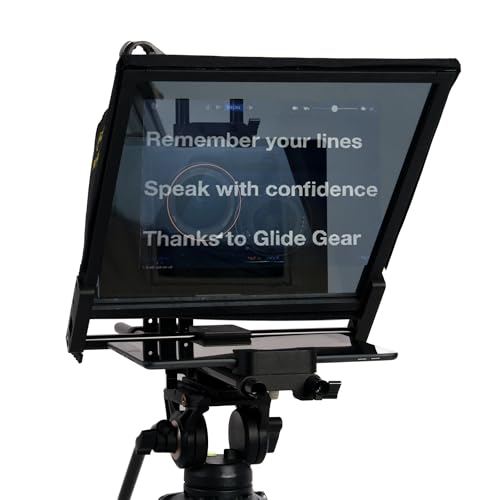
For mirrorless or cinema cameras, the Glide Gear TMP 100 with a tablet is a proven budget rig with thousands of ratings, while the NEEWER X12B is a cheap option for those who don't need premium gear.
The TMP 750 earns its higher price and fiddly setup when talent stands several feet back because the bigger glass is necessary. You should practice your scroll speed before the shoot starts as we warned in our 2016 guide, because a small change in scroll speed can ruin a performance.
Reading Distance Decides the Glass
The distance between the presenter and the prompter decides how much glass you need, because a small screen forces the presenter to squint when they're standing several feet away.
A desk presenter sitting at a table can easily manage a tablet on 12-inch glass, but a host standing six to eight feet back needs a larger surface to keep the script legible. If you use a small rig at that range, you'll end up missing lines, which ruins the natural flow of the delivery.
Larger units like the Glide Gear TMP 750 use an 11 by 12 inch beam splitter that stays readable up to 15 feet, but the listing title says 17-inch glass, and one buyer's '17-inch version' holds a 17-inch screen lengthways, so check which version you get.
Bigger glass allows you to use larger text, which means there are fewer words on the screen at once for the eyes to track. You have to be careful with wide lenses, because they might see the edges of the hood if the camera isn't moved close enough to the glass.
Light transmission also affects how well the image looks, since a 70/30 or 75% transmission rating means some light reaches the camera while the rest reflects for the reader.
This trade-off makes the shot slightly dimmer, so you may need to raise your exposure a little. If the glass isn't the right size for the space, the presenter will struggle to maintain eye contact with the lens. It's better to overspend on glass size than to try and read a tiny script from across the room.
Glide Gear TMP 100 and NEEWER X12B for Tablets
The Glide Gear TMP 100 uses 12-inch 70/30 beam splitter glass and holds tablets up to 10.5 by 8 inches, so it works with any app that mirrors text.
Since the rig is top-heavy, you'll need a decent tripod to keep the setup steady while you are filming. The accessory screws loosen easily because they use a single 1/4-inch knob, which can be annoying during a shoot. One studio owner keeps two set up permanently, and another buyer bought a second for multicam shoots.
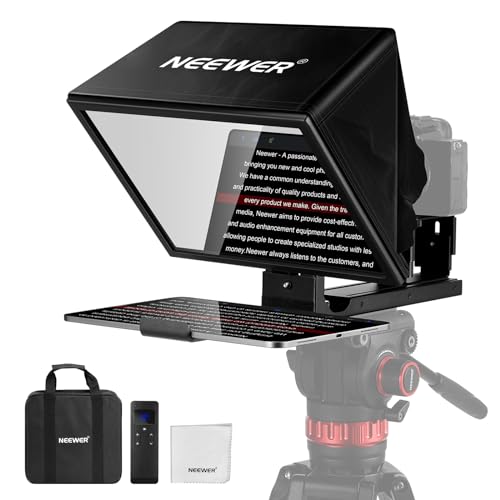
The NEEWER X12B is a cheap option that features 12-inch glass with 75% transmission and requires no assembly because it folds flat for easy travel or home storage.
You can adjust the base height, the distance to the glass, and the tilt to fit your setup. It includes a Bluetooth remote, and NEEWER says it is not for shooting with a phone. One buyer's remote failed after light use, and another unit arrived with screen damage and Bluetooth trouble.
In our 2016 guide, we wrote that we had great luck with the Pad Prompter, built for the 9.7-inch iPad, and we tried it with a 12-inch iPad Pro for more script space.
We recommended using the ProPrompter Studio app on the iPad while using an iPhone as the remote. You should always practice before the first shoot, because a small change in scroll speed can ruin the performance. Using a tablet is better than a phone because the screen space is necessary for reading scripts.
Glide Gear TMP 750 for a Host Standing Back
This mid-priced rig uses 15mm rails to hold an iPad Pro, a foldable laptop, or even a mirroring monitor like the Lilliput A12 while you film from a distance. A studio once bought two of these units because the large glass and rigid hood work well for hosts who stand six to eight feet away. You need a sturdy tripod because the setup gets top-heavy once you mount the gear.
The glass angle lacks a stop, so it can drop into the holder and crack if you aren't careful. You will likely need pliers to tighten the two thumb screws that hold the glass, and the instructions are so poor that one buyer nearly broke the glass while trying to set it up. It is a tricky process.
A training department currently uses a 12.9-inch iPad Pro with PromptSmart to run their scripts. The included case is quite flimsy, so you shouldn't ship the rig inside it if you want to keep it safe. Take the first setup slowly.
Built-In Screens: Elgato Prompter and NEEWER X11
Because the Elgato Prompter uses its own screen as a computer display, you can simply drag a script window or a Zoom call onto the glass while you look into the lens. It requires the DisplayLink driver to work, though one enterprise buyer rejected it because the software didn't fit their IT rules.
One Mac user had to turn on several privacy settings to get it running, and says setup is easier on a PC.
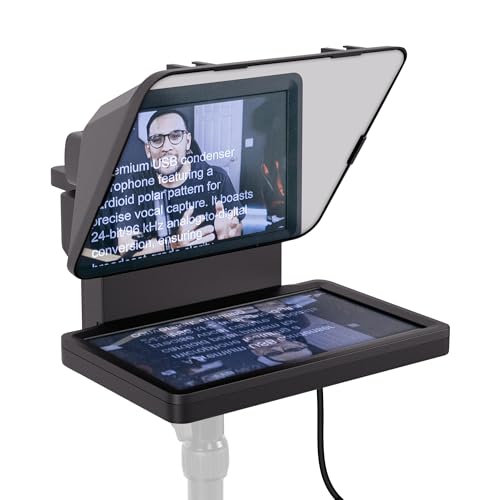
The NEEWER X11 offers a 9-inch screen that connects over USB-C, but you need a driver if you want to use HDMI. One reviewer has noted that the hood's zipper lets light leak in from behind, and the tray doesn't clamp down on a moving rig. These units are best for a desk near a computer rather than for a busy location shoot.
The Desview T3 works well for small cameras, though someone using a Sony ZV-1 had to use a separate lens adapter. You can find more details in our YouTube teleprompter guide. Using a built-in screen keeps your rig clean since you don't have to mount a heavy tablet or phone to the front of the camera.
Frequently Asked Questions
Can I use a teleprompter with a DSLR or mirrorless camera?
Yes, you can because the camera sits directly behind the glass on the base of the teleprompter rig. Check that a wide lens doesn't see the edges of the hood.
What app do I need to run the script?
You can use any app that mirrors the text onto your tablet or phone screen. We previously used ProPrompter Studio with an iPhone remote, but brands like NEEWER and Desview offer their own dedicated software.
Do I need a special tripod for this setup?
You need a sturdier tripod because the entire rig becomes very front-heavy once everything is mounted. A cheap stand might tip or vibrate under the weight of the glass and camera.
What glass size do I need for my setup?
A 12-inch glass is usually enough if the presenter is sitting at a desk. You will need larger glass if the talent has to stand several feet back from the lens.
Who runs the text scroll during the video?
An operator or a remote control usually handles the scrolling while the talent performs. It is vital to rehearse the speed and font size before you start shooting to avoid a failed performance.