
Best Low Cost Drones for Aerial Video on a Budget
You Don't Need an Expensive Drone to Get Usable Aerial Footage
There's a huge gap between toy drones and professional filmmaking rigs, and somewhere in that gap are the best low cost drones that actually produce footage you can use. The trick is figuring out which budget drones cross the line from "fun gadget" into "legitimate production tool" and which ones are going to waste your money.
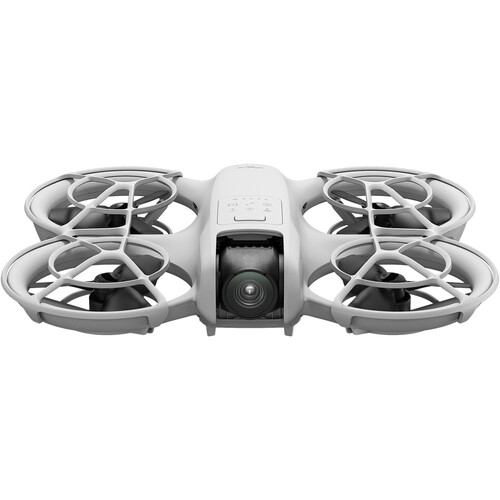
The DJI Neo is our top pick for shooters who need aerial footage without spending serious cash. It's compact, stabilized, and shoots 4K video that you can actually cut into a project without embarrassment.
But let's be upfront about what you're getting into. Budget drones come with real compromises. Smaller sensors, shorter flight times, limited transmission range, and fewer intelligent flight modes are all part of the deal. The question isn't whether cheap drones are as good as the Mavic 4 Pro or Air 3S. They're not.
The question is whether they can give you shots that are good enough for your project, and several of them absolutely can. If you're working on a YouTube channel, social content, or even some real estate work, a low cost drone might be all you need to get started with aerial video production.
What You Sacrifice at the Budget Tier
Sensor Size and Image Quality
The biggest compromise with budget drones is the sensor. Where mid-range drones like the Air 3S use a 1-inch type sensor, most affordable drones use a 1/2-inch or smaller sensor. This means less dynamic range, more noise in low light, and footage that falls apart faster when you try to push it in post.
You're also typically limited to 8-bit color, which gives you far less room to color grade compared to the 10-bit D-Log profiles available on pricier drones. If you're planning to do heavy color work in DaVinci Resolve or Premiere, you'll feel the limitations quickly.
Flight Time and Range
Budget drones generally top out around 15 to 20 minutes of real-world flight time per battery. Compare that to 35 or 40 minutes on mid-range options. The transmission range is also shorter, sometimes significantly so.
The DJI Neo maxes out at about 6 miles with the optional controller, but without it you're limited to phone-based Wi-Fi control with a much shorter range. This means you need to plan your shots more carefully and work faster once you're in the air. Having extra batteries is basically mandatory.
Stabilization and Wind Handling
Cheap drones are lighter, and lighter drones get pushed around by wind more easily. Most budget drones struggle in anything above moderate wind conditions, producing shaky footage or triggering automatic return-to-home features. The DJI Neo does have electronic image stabilization (EIS), which helps smooth things out, but it's not the same as a full 3-axis mechanical gimbal. B&H reviewers mention that the Neo handles light breezes well but can struggle on windier days, which is a pretty common limitation across all drones in this price range.
Our Top Pick: DJI Neo
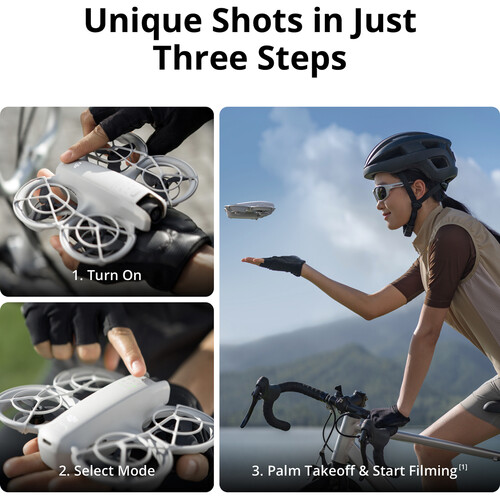
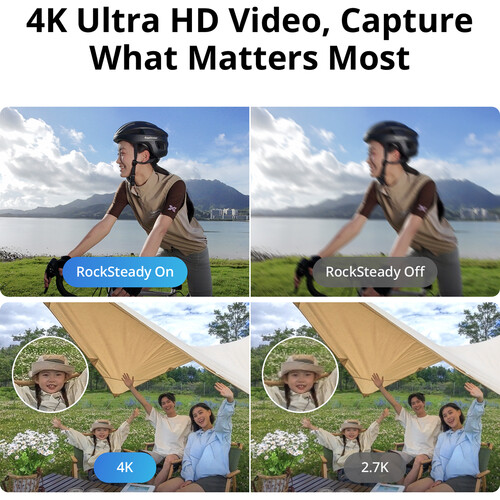
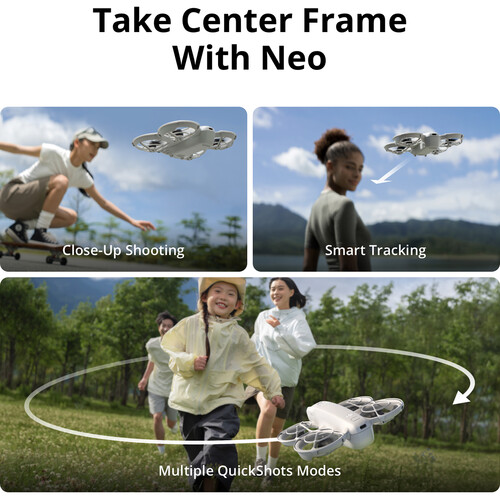
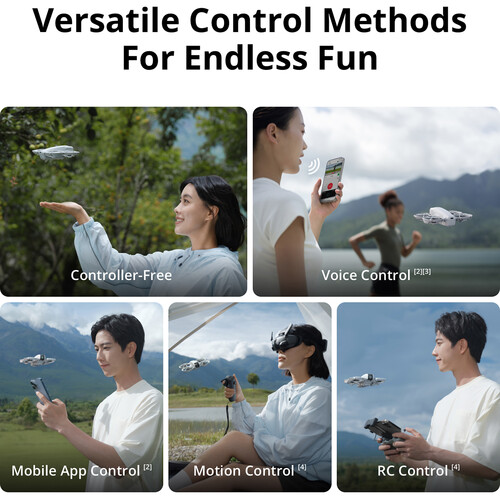
The DJI Neo is the standout choice for budget aerial video. It weighs under 135 grams, which means no FAA registration required, and it's small enough to literally launch from your palm. Despite its size, it records 4K30 video with electronic stabilization and offers several intelligent flight modes including Dronie, Rocket, Circle, and Spotlight. You can fly it with just your phone, with voice commands, or with the optional DJI RC Motion 3 controller for more precise control.
B&H reviewers consistently praise the Neo for how easy it is to get airborne. Multiple users report that the palm launch feature works reliably and that the QuickShots modes produce surprisingly cinematic-looking results for such a small drone.
Several users who purchased the Neo as their first drone noted that they were capturing usable B-roll within minutes of opening the box. Users also report that the 4K footage looks clean in good lighting conditions, though it does show its limitations once the sun starts going down.
Where the Neo Falls Short
The Neo's biggest limitation is its battery life. You're looking at roughly 15 to 18 minutes of actual flying time, which goes fast when you're trying to nail a shot. The lack of a mechanical gimbal means the electronic stabilization can only do so much, and you'll notice micro-jitters in the footage if you look closely. There's also no obstacle avoidance, so you need to be careful where you fly.
Several B&H reviewers noted that while the video quality is excellent for the price, the short battery life means you'll want at least two or three extra batteries for any real shoot day. The Neo is also available on Amazon if you want to compare pricing.
Key Specs
- Video: 4K30, 1080p60
- Stabilization: Electronic Image Stabilization (EIS)
- Weight: 135g (no FAA registration needed)
- Flight time: Up to 18 minutes
- Range: Up to 6 miles (with RC Motion 3), Wi-Fi range with phone
- Intelligent modes: QuickShots (Dronie, Rocket, Circle, Spotlight)
- Storage: microSD up to 256GB
- Control options: Phone, voice, gesture, RC Motion 3
The DJI Neo 2: A Worthwhile Step Up
If you can stretch your budget slightly, the DJI Neo 2 addresses several of the original Neo's shortcomings. The Neo 2 adds a 3-axis mechanical gimbal, which is a massive improvement for video quality. You also get 4K60 recording, longer flight time, and improved stabilization that makes the footage dramatically smoother. It still weighs under 249 grams, keeping you under the FAA registration threshold, and the overall form factor remains compact and portable.
Users on B&H have praised the Neo 2's gimbal as a substantial upgrade, with several noting that the footage quality jumps significantly compared to the original Neo. The 3-axis gimbal eliminates most of the micro-jitter issues and provides a much more cinematic feel to the video.
If you're specifically looking for a budget drone to shoot video (rather than just casual flying), the Neo 2's mechanical gimbal makes a noticeable difference that you'll appreciate every time you sit down to edit.
When to Spend More: The DJI Mini 4 Pro
At some point, stretching a budget becomes just buying a mid-range drone, and that's okay. The DJI Mini 4 Pro sits right at the boundary between budget and mid-range, and for filmmakers who need more capable footage, it's worth the extra investment. You get a 1/1.3-inch sensor, 4K100 recording, 10-bit color depth, and omnidirectional obstacle avoidance. It still weighs under 249 grams, so no FAA registration. The image quality is in a completely different league compared to budget drones.
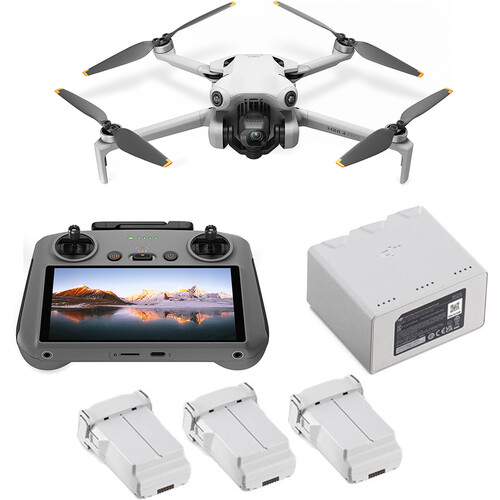
If you're doing any work that requires color grading or if you're cutting drone footage alongside camera footage from a decent mirrorless body, the Mini 4 Pro will match far better than any true budget drone. The 10-bit D-Log M profile gives you the latitude to actually work with the footage in post without it breaking down. For anyone serious about using drones for filmmaking, the Mini 4 Pro is the minimum you should consider.
Budget Drone Comparison
| Drone | Video | Stabilization | Flight Time | Weight | Obstacle Avoidance | Best For |
|---|---|---|---|---|---|---|
| DJI Neo | 4K30 | EIS | 18 min | 135g | None | Cheapest usable aerial video |
| DJI Neo 2 | 4K60 | 3-axis gimbal | ~24 min | <249g | Basic | Best value for video quality |
| DJI Mini 4 Pro | 4K100 | 3-axis gimbal | 34 min | 249g | Omnidirectional | Step-up pick for serious work |
What to Avoid in Cheap Drones
Not all budget drones are worth buying, and there are a few red flags that should steer you away from a purchase. Any drone that advertises "4K" but uses digital zoom or software upscaling is going to produce garbage footage. If the listing doesn't mention the actual sensor size, that's usually a bad sign.
Drones without any form of stabilization (no gimbal, no EIS) will produce footage so shaky that it's essentially unusable for anything beyond novelty. You'll also want to avoid any drone that doesn't support a log or flat color profile if you plan on doing any post-production color work, though at the true budget tier, this feature is rare.
Another thing to watch out for is drones from unknown brands that promise specs that sound too good to be true. A no-name drone claiming 4K60 with a 3-axis gimbal for almost nothing is either lying about the specs or cutting corners somewhere that matters. Stick with established manufacturers.
DJI dominates the budget drone space for good reason. Their software, build quality, and customer support are consistently better than the competition. If you're considering learning to fly a drone for video work, starting with a known brand reduces the chances of a frustrating first experience.
Frequently Asked Questions
Can you shoot professional video with a budget drone?
It depends on what "professional" means for your project. For social media content, YouTube videos, real estate walkthroughs, and B-roll inserts, budget drones like the DJI Neo can produce perfectly acceptable footage. For broadcast work, narrative filmmaking, or anything requiring extensive color grading, you'll want to step up to at least the Mini 4 Pro or an Air 3S. The key limitation is sensor size and color depth, both of which directly affect how much you can manipulate the footage in post.
Do I need FAA registration for a budget drone?
Most budget drones worth buying weigh under 249 grams, which exempts them from FAA registration for recreational use. The DJI Neo at 135 grams and the Neo 2 under 249 grams both fall under this threshold. Keep in mind that if you're flying commercially (getting paid for the footage), you still need a Part 107 Remote Pilot Certificate regardless of the drone's weight.
How much flight time should I expect from a budget drone?
Real-world flight time on budget drones is typically 15 to 20 minutes per battery, sometimes less if conditions are windy. The manufacturer's listed flight time is always optimistic, so subtract about 20 percent for realistic expectations. Plan on purchasing at least two extra batteries if you want to do any meaningful shooting. B&H reviewers frequently mention battery life as the biggest limitation of budget drones.
Is the DJI Neo good enough for real estate video?
For basic real estate flyovers and establishing shots, the DJI Neo can work. The 4K30 footage looks clean in daylight, and the QuickShots modes can produce smooth orbiting and reveal shots around a property. However, real estate agents who want interior-to-exterior transitions or who need to fly in tighter spaces might benefit from the Neo 2's gimbal or the Mini 4 Pro's obstacle avoidance. Several B&H users report using the Neo successfully for casual real estate content.
What accessories do I need for a budget drone?
Extra batteries are the number one priority. Beyond that, a carrying case, microSD card (64GB minimum), and potentially ND filters if you're shooting video in bright conditions. ND filters help you maintain proper shutter speed for cinematic motion blur. For the DJI Neo specifically, the RC Motion 3 controller is a strong upgrade over phone-only control, giving you better range and more responsive handling. The DJI Neo and accessories are available at B&H as individual items or in combo kits.
Should I buy a used mid-range drone instead of a new budget drone?
This is a reasonable approach if you can find a reliable seller. A used DJI Mini 4 Pro or even an older Air 2S will outperform any new budget drone in terms of sensor quality and stabilization. The risk with used drones is battery degradation, potential crash damage that isn't visible, and no warranty coverage. If you go this route, buy from a reputable source and check the battery cycle count before purchasing. For many shooters, though, a new budget drone with a warranty and fresh batteries is the safer bet.