
Best Entry Level Video Drones That Actually Shoot Usable Footage
The DJI Air 3S Is the Best Entry-Level Drone Right Now
You've decided to start doing aerial video. You've seen those silky-smooth landscape flyovers, and now you're ready to buy your first serious video drone. The problem is, "entry-level" means completely different things depending on who you ask, and many drones marketed towards beginners won't produce the quality of footage you'd actually want to use.
Currently, the best drone for most people starting to do aerial video is the DJI Air 3S. This drone has replaced the Air 3 (no longer available) and made several notable improvements, including the inclusion of a forward-facing LiDAR sensor for nighttime or difficult environments, which makes using the obstacle avoidance systems significantly less worrisome. Many of the B&H reviewers stated that the obstacle avoidance system provides an incredible amount of peace-of-mind when flying this drone as a complete beginner. One reviewer who purchased the Air 3S and upgraded from his Air 2S stated that the new cameras are a huge step forward and greatly improve battery life.
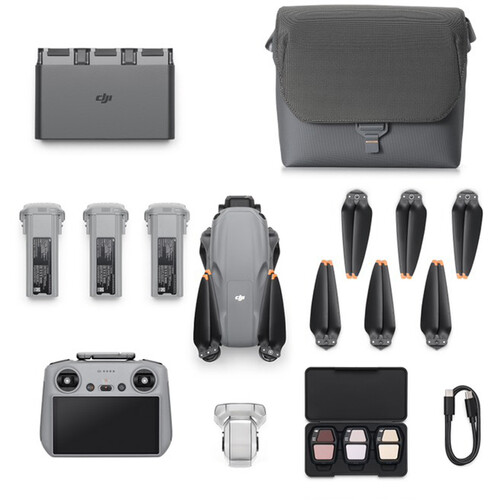
However, the Air 3S is certainly not the only drone to consider for your first serious video drone. Your budget and what you actually need will dictate whether you should purchase the DJI Mini 4 Pro, or possibly the brand-new DJI Flip. If you are watching your wallet very closely, the DJI Mini 3 is still a great option at a relatively low price point. We'll detail what actually matters when selecting your first video drone below.
What Makes A Good First Video Drone
Quality Camera for Video
When it comes to drone cameras, the fact that almost every drone available today records in 4K isn't a useful specification by itself. While most every drone will record in 4K, what makes the difference between good usable footage and mediocre footage is the sensor size, bit depth, and color profile. The Air 3S uses a 1-inch type CMOS sensor on the wide-angle camera (50MP) and a 1/1.3-inch sensor on the 70mm telephoto (48MP). Both cameras record 4K at speeds of up to 120 frames per second, providing you with excellent slow-motion capabilities for your dramatic reveals and transitions. You also get 10-bit D-Log M and HLG color modes, giving you plenty of room to color grade your footage in post-production without losing any detail. In comparison to lower-cost drones that record in 8-bit, you will notice a world of difference in terms of the number of colors available to you once you attempt to manipulate the color in your editing software.
Flight Time and Range
Battery life is one of those specifications that sounds dull until you are out in the field and your drone suddenly dies after just 20 minutes of flight time. The Air 3S will provide you with a maximum of 45 minutes of flight time per charge, which is extremely impressive. With the included Fly More Combo, you get additional batteries. You will be able to achieve well over two hours of total flight time before needing to recharge any of your batteries. When it comes to range, the Air 3S tops out at 12.4 miles, utilizing the OcuSync 4.0 transmission system that sends back 1080p60 video to the controller. You will not fly that far (you will need to stay within your line of sight), but you can rest assured that your signal will remain strong even with obstacles between you and the drone.
Obstacle Detection for New Pilots
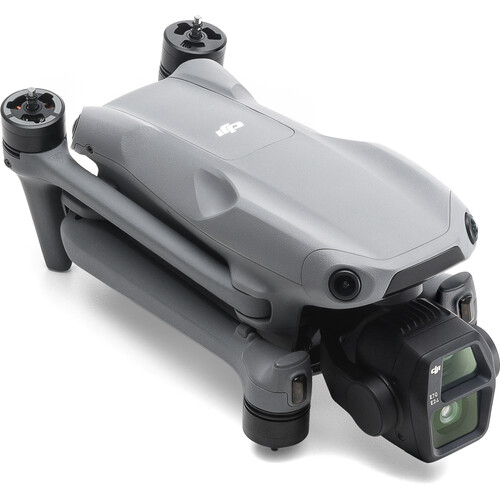
The Air 3S truly shines when it comes to obstacle detection for new pilots. The omnidirectional obstacle sensing system detects obstacles in every direction, and the LiDAR sensor located on the front of the drone is the first on the Air line. The LiDAR sensor allows for obstacle detection in complete darkness, meaning the return-to-home functionality is able to detect obstacles such as trees and structures even when flying at night. Users have reported that the obstacle detection system makes piloting the Air 3S incredibly easy and gives them the confidence to fly in areas they would normally avoid. One first-time drone pilot stated that it is far superior to anything a US-based company currently offers at this price point.
Key Specifications
Below are the key specifications you receive with the Air 3S:
- Cameras: Dual-camera system with 24mm f/1.8 wide angle and 70mm f/2.8 telephoto lenses
- Video: 4K120, 4K60 HDR, 1080p240, 2.7K vertical video
- Color: 10-bit D-Log M and 10-bit HLG
- Sensor: 1-inch type wide angle camera and 1/1.3-inch type telephoto camera
- Flight time: Up to 45 minutes
- Speed: 47 mph max
- Weight: 1.6 lbs (724g) at takeoff
- Storage: 42GB internal + microSD up to 512GB
- Obstacle sensing: Omnidirectional with LiDAR sensor enhancements
- Transmission: OcuSync 4.0, 1080p60 up to 12.4 miles
- Controller: RC 2 with 5.5-inch touchscreen (Fly More Combo)
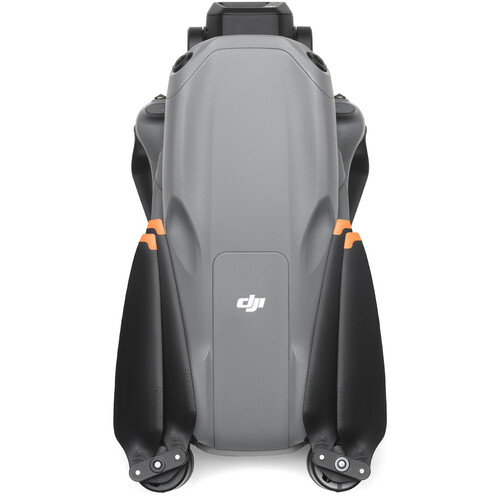
The dual-camera system is likely the largest selling point for video production. The 3x optical zoom on the telephoto lens allows you to capture tighter shots without flying too close, and you can switch between both cameras during a single flight. Both cameras also support 2.7K vertical recording for social media content.
Reviewers' Thoughts on the DJI Air 3S
The DJI Air 3S averages a rating of 4.6 stars based upon 26 reviews on B&H, with 23 of those reviews resulting in a perfect 5-star rating. While the overall opinion is quite positive, there are some points raised by the reviewers that may help you determine whether or not the Air 3S is the correct drone for your needs.
The Positives
Multiple reviewers praised the dual-camera system, particularly the zoom capability of the telephoto lens. One reviewer, who has previously owned three other DJI drones, mentioned that the zoom capability was a massive upgrade and that he loved the nighttime flying capabilities. Several reviewers who had previously flown the Mini Pro line of drones mentioned the increased resolution and added features as significant upgrades. Multiple reviewers praised the obstacle avoidance system as a source of confidence and security when flying the Air 3S, even as a first-time flyer. Several reviewers also pointed out the increase in battery life compared to previous Air models as another major advantage of the Air 3S.
The Downside
The majority of complaints were related to a learning curve for the video and photo options. One reviewer mentioned that while the drone made flying simple, mastering the camera settings required time. The Air 3S is larger and heavier than the Mini series of drones, which means you will require FAA registration (any drone weighing 250 grams or greater must be registered). The Fly More Combo is also more expensive than the base Air 3S model with the RC-N3 controller. You are essentially paying for the second camera and LiDAR sensor on the Air 3S.
Alternatives Worth Considering
The DJI Air 3S is my number one pick, but it is not the only alternative for the right scenario. Here are the alternatives that could be viable based on your needs.
DJI Mini 4 Pro
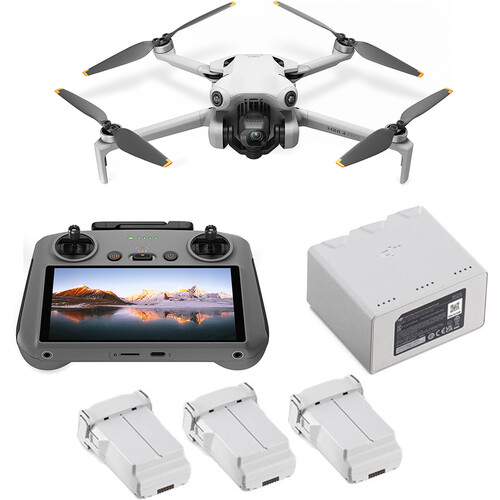
The DJI Mini 4 Pro weighs only 8.8 ounces, which is below the FAA's 249g limit, so you don't have to register it. While you don't get the dual camera setup, the 4K at 100fps with omnidirectional obstacle avoidance, and the 48MP camera, the Mini 4 Pro still has plenty of power. The RC 2 combo is priced very similarly to the Air 3S base model.
DJI Flip
The DJI Flip is the newest low-end option from DJI that comes with built-in full-coverage propeller guards. The Flip captures 4K60 and 2.7K vertical video, and due to its compact folding design, the Flip is by far the most portable option we reviewed. This is a good option for people who are nervous about flying close to people or objects as the prop guard allows you to bump into things without damaging your propellers or injuring people.
DJI Mini 3
While the DJI Mini 3 is the least expensive option in this review, it still provides a decent result for the price. It records 4K30 with a rotating gimbal for vertical capture and up to 38 minutes of flight time. It is available with the RC-N1 controller for a price that is budget friendly. Compared to the Air 3S (no obstacle avoidance, lower frame rates, single camera), you're losing a lot of functionality, however, if you simply want to get airborne and start capturing B-Roll for your project, it works fine. If you plan on using your drone to shoot film professionally, you may want to consider stepping up to either the Air 3S or Mini 4 Pro for better camera specifications.
Drone Comparison
| Drone | Sensor | 4K Max | Flight Time | Weight | Obstacle Avoidance | FAA Registration | Best For |
|---|---|---|---|---|---|---|---|
| DJI Air 3S | 1-inch + 1/1.3-inch | 4K120 | 45 min | 724g | Omni + LiDAR | Yes | Best overall for video |
| DJI Mini 4 Pro | 1/1.3-inch | 4K100 | 34 min | 249g | Omnidirectional | No | No registration needed |
| DJI Flip | 1/1.3-inch | 4K60 | ~31 min | <249g | Prop guards | No | Safest for beginners |
| DJI Mini 3 | 1/1.3-inch | 4K30 | 38 min | 248g | None | No | Budget-friendly entry |
Other Options Outside of DJI
The Potensic Atom is a significant value for 3-axis gimbal stabilization and 4K30 video. As a beginner drone, it lacks a lot of the features that other drones offer, but the gimbal stabilization gives it an edge over a lot of toy drones in the same price point. Another option is the Skyrover S1, which has a 48MP Sony sensor and 4K60 video recording at less than 8.8 oz. While it is not DJI, the specs appear to be comparable to the cost.
Things to Know Before You Buy Your First Drone
FAA Registration
All drones that weigh more than 249 grams (or .55 pounds) require FAA registration. The process is a one-time payment, approximately five minutes long and performed online. Since the DJI Air 3S weighs 724g, it requires FAA registration. If this is a showstopper for you, consider purchasing the Mini 4 Pro or Mini 3. Both are under the FAA's 249g weight limit and therefore exempt from registration. Plus, the registration process is relatively painless. Don't allow it to stop you from buying a better drone.
You Need ND Filters
Unless you are shooting static images or slow motion video, you'll need an ND filter to shoot video with a drone. Without an ND filter, you won't be able to adjust your shutter speed properly and your footage will look jerky and too harsh. The traditional guideline is to set your shutter speed to twice your frame rate. For example, at 4K30, the shutter speed should be 1/60. At 4K60, the shutter speed should be 1/120. On a sunny day, you won't be able to achieve these shutter speeds without an ND filter clamping onto the lens. FreeWell and PolarPro both provide filter kits designed specifically for the Air 3S. A filter kit will add a moderate amount of money to your overall purchase of the drone, but if you want to create footage that looks cinematic and not like a home security system, it is worth it.
Beginner Mistakes
Don't fly in Sport Mode your first time flying. Begin in Normal Mode and become familiar with the controls before you start increasing the difficulty level. Always calibrate your compass when you fly in a new area. Finally, please remove the gimbal protector prior to taking off. You will be surprised how many people overlook this. Additionally, the automatic modes (MasterShots, ActiveTrack, etc.) are excellent tools for creating cinematic shots without having to be a seasoned pilot. Take advantage of them. They were created for that purpose. Also, if you are going to be using your drone for professional video production, you will need to learn about Part 107 Certification Requirements.
Frequently Asked Questions
Is the DJI Air 3S suitable for a beginner?
Yes. The Air 3S uses LiDAR to detect obstacles in all directions, reducing the chance of a crash. The automated modes help you create complex camera movements for high-quality video. Many reviews have been written by first-time drone pilots and all of them rated it positively.
Do I need to purchase the Fly More Combo or can I purchase just the base drone?
The Fly More Combo includes additional batteries, a charging hub, a shoulder bag, and the RC 2 controller with a built-in screen. If you are serious about using the Air 3S for video capture, I would recommend purchasing the Fly More Combo. One battery will not be sufficient for a real shoot and the RC 2 screen eliminates the need to attach your phone to the controller. Several B&H reviewers have recommended the combo kit.
What is the main difference between the DJI Air 3S and Mini 4 Pro?
The Air 3S has a dual camera setup (wide-angle + telephoto), a larger 1-inch sensor, LiDAR-based obstacle detection and longer flight times. The Mini 4 Pro is lighter (under 249g, no FAA registration required) and is priced lower, but has only one camera and no LiDAR. If weight and registration are important factors to you, choose the Mini 4 Pro. If you prioritize video quality and versatility, select the Air 3S.
Does the DJI Air 3S record vertical video for social media?
Yes. The Air 3S has two cameras capable of recording 2.7K vertical video at up to 60fps. It uses a cropped mode versus a true gimbal rotation, but it still produces acceptable quality for posting on Instagram Reels, TikTok and YouTube Shorts. The DJI Fly app makes switching from horizontal to vertical view easy.
How does the DJI Air 3S differ from more expensive filmmaking drones?
The Air 3S is in a sweet spot between the consumer and prosumer markets. You will not get the same level of raw image quality from the DJI Mavic 3 Pro with its Hasselblad camera, but for the majority of consumers shooting YouTube content, real estate videos, or travel-related videos, the Air 3S produces excellent-looking footage. The 10-bit color and D-Log M profiles also allow for real color grading capabilities. The Air 3S is also available on Amazon if you are interested in comparing prices.
Do I need a license to fly the DJI Air 3S?
In order to fly recreationally, you will need to register your drone with the FAA and pass the Trust exam (The Recreational UAS Safety Test). The Trust exam is free and completed online. If you are flying for commercial purposes (receiving compensation for your footage), you will need to obtain a Part 107 Remote Pilot Certificate. The Part 107 certification process involves a test fee and requires some study, but is not difficult if you dedicate the time to studying. Regardless, always follow local airspace regulations and check resources such as B4UFLY or DJI Fly to determine safe locations to operate before launching.