
BenQ ScreenBar Halo 2 Monitor Light: Built for Night Editors
Late-night editing has a lighting problem that most people solve badly. A dark room makes the monitor feel harsh after a few hours, and a desk lamp fixes that by throwing glare across the screen you're trying to judge.
A monitor light bar is meant to light the desk without touching the screen, and the Halo 2 adds a backlight behind the monitor and a wireless dial on top of that. It also costs a lot more than the budget bars that look almost the same in photos.
Here's what it does, how it's built, what it's like for editing and grading, how the auto-dimming works, and when a cheaper bar is enough.
While this light costs a significant amount, it earns that investment for night editors because cheaper budget alternatives often fail with distracting screen glare and crude temperature steps that this premium gear avoids.
The wireless dial and auto-dimming sensors make the desk feel cozy, though the narrow front beam creates some stark pools on your work surface. A buyer returned to this hardware after a budget version disappointed them, since the ambient backlight reduces eye strain during long sessions. Skip it if your monitor has no top clearance for the clip.
What the ScreenBar Halo 2 Actually Does
This light bar shines on your keyboard while casting a soft glow on the wall behind the screen, which helps balance the room when you work in the dark.
The dual light makes it stand out from the older ScreenBar Plus, which lacks that projection. BenQ's monitor-light lineup shows the full range. A motion sensor turns the bar on when you sit down, so there are no buttons to hunt for in the dark.
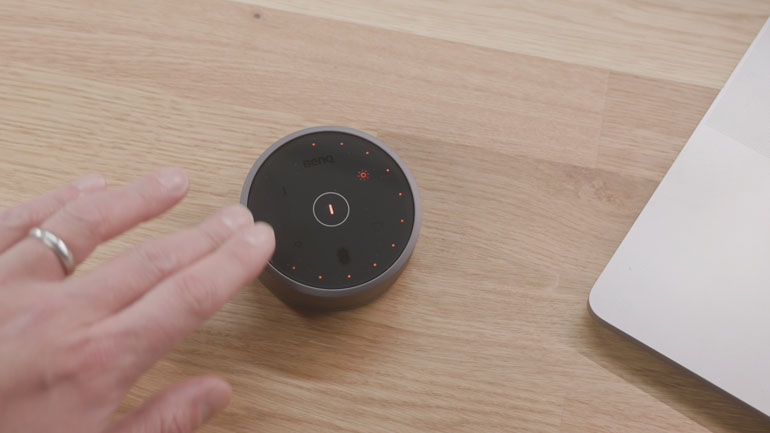
You get a wireless dial with a screen that shows your brightness percentage, color temperature, and the level of the rear light right under your thumb.
You can change these settings with a quick turn, which feels very smooth and fast. This remote control is much better than reaching for the top of the monitor every single time. The desk-side dial makes adjustments quick without reaching over the monitor.
With a 4.7-star rating from over a thousand buyers, it clearly satisfies most people upgrading their desk setup. Most owners find that it makes their workspace feel cozy, and it's a big plus for long nights. You'll notice the difference in eye strain, since you use the dual lights at night.
Design and Build Quality
The premium build feels solid right out of the box because the counterweighted clip needs no screws to stay in place, and the whole kit comes fully assembled for your desk.
You won't worry about loose parts, since the hardware stays put on the screen. The remote looks sleek, though some buyers find the cost too high. It feels like a tool built to last years.
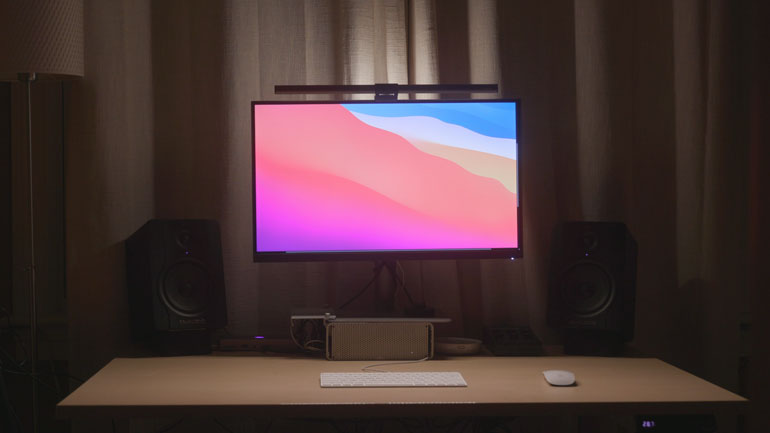
While the front light hits your keyboard without causing glare, the beam is somewhat narrow and creates stark bright pools that might annoy you if you want even light across the desk. The rear projection adds ambient balance, which helps reduce eye strain when you work in a dark room. That removes the need for a separate bias light behind the monitor.
Using the wireless controller dial lets you adjust the brightness and color temperature easily, while the motion sensor turns the light on when you sit down.
Cheaper bars fail due to crude temperature steps and a high brightness floor. Skip this if your monitor has zero top clearance, or a weird clip edge. It is worth the money if you edit at night without any glare.
The Editing and Color Grading Experience
The rear bias light helps calm a dark wall in your edit bay without needing to buy a separate fixture, which makes the space feel cozy, while you work late at night. Keep the bias light neutral and dim when you're judging color, so your eyes stay sharp for the project. This back projection stops the wall from distracting you with a soft glow behind the screen.
BenQ's lighting pages cover the whole ScreenBar line. It's a smart way to manage eye strain, since the light balances the dark corners.
While the front bar lights your papers and keyboards, it does not light your walls neutrally, which keeps your desk area clear, while the monitor remains untouched.
One owner has noted it lights their Cherry keyboard perfectly, from above the monitor, without any glare on the glass. You'll find it useful for reading notes while editing, because the beam lands where you need it. It works well.
For night editing, this is better than a cheap bar, because those often have nasty glare or crude temperature steps that ruin your color work.
You should skip this if your monitor has zero top clearance, or a weird clip edge that won't fit. The motion sensor adds quality of life, turning the light on when you sit down. This setup is worth it for those who need a clean environment, even if the cost feels a bit high.
Auto-Dimming and the Motion Sensor
The motion sensor turns the light on the moment you sit down at your desk, which means you won't have to fumble for the dial when the room is still dark. It tracks the ambient light in your room, so the brightness stays just right without you needing to change settings manually. This feature feels smart because it adapts as the sun goes down or changes while you work through the day.
You'll love how it makes the space feel cozy the moment you arrive to start your tasks.
An unusual desk shape or a strange monitor edge can block the sensor, which would stop the light from turning on when you need it.
Check your setup first. If the sensor can't see you, the auto-on feature fails and you end up using the wireless controller manually anyway. A small shift in your chair could break the flow, if the sensor is hidden behind the screen.
Comparison to Cheaper Alternatives
A buyer returned to this BenQ model because the cheaper bar they bought before caused annoying glare on both the screen and in their eyes while they worked late at night. That cheap unit had crude temperature steps that felt too yellow when they wanted clean white light.
The brightness floor was also too high, so they couldn't dim the light enough for dark rooms. These basic bars work fine for simple daytime task lighting, but they fail when the environment changes.
While a budget option might provide enough light for a desk during the day, it often lacks the fine control needed by people who spend long hours working in a dim space.
The BenQ solves the glare issue by directing the light away from the glass surface perfectly. You might find that the color shifts on cheaper models are jarring, which ruins your focus. It's worth the difference.
You should skip this tool if your monitor has no top clearance for the clip or if the edge is too unusual for the standard metal mounting bracket. If you only need light to see your keyboard during the morning, a cheaper bar from B&H's lighting section will save you money. If you edit at night, the lack of control on cheap units causes eye strain, and a poor light makes every project feel more tiring.
Frequently Asked Questions
Is the Halo 2 worth it over a cheap light bar?
For night work, yes. A buyer tried an eighty-dollar bar first: it glared on the screen and in their eyes, stepped crudely between temperatures, and could not dim low enough for dark rooms. They came back to the BenQ.
Does it cause screen glare?
No - owners report the bar lights the desk without glare on the glass, because it sits above the screen aiming down and the counterweight keeps it clear of the panel.
Will it fit my monitor?
The counterweighted clip needs a flat top edge and some clearance. Curved panels and zero-clearance stands are the risk cases, so check before ordering.
How does the auto-dimming work?
An ambient sensor tracks the room and adjusts brightness as light changes through the day, and the motion sensor turns the bar on when you sit down.
Do I need the wireless remote?
The puck-style dial is the main control and lives on your desk, showing brightness, Kelvin and rear-light level on its display.
Is it good for a color-grading desk?
Yes as bias lighting: the rear projection calms a dark wall behind the display. Keep it neutral and dim when judging color, and check the wall with a color-accurate monitor before final passes - B&H's lighting category lists the alternatives.