
iPhone Accessories That Actually Matter for Filmmaking
There's an increasing number of high-quality video applications coming out for iPhones. For example, you can now log video with ProRes recording, use cinematic mode that works as advertised. However, the iPhone alone is only half the equation. What sets phone-based video footage that looks like it came from a phone apart from being able to integrate that footage into a professional video production is what you connect to the back of the phone. There are many bad products vying for your money.
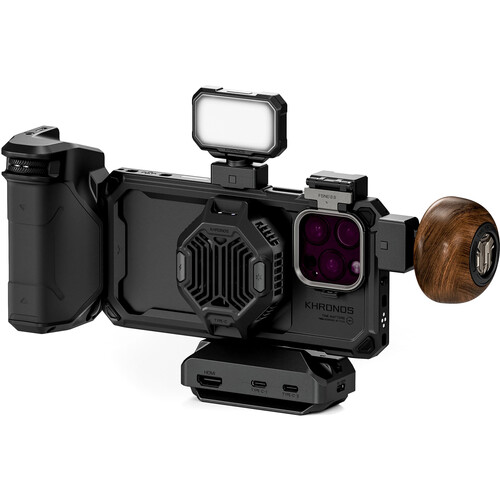
So, let's ignore the novelty products and discuss what really matters. If you're putting together an iPhone-based filmmaking package, you'll want to consider several categories including cages or grip systems, audio equipment, stabilization devices, lenses and storage. The Tilta Khronos iPhone 16 Pro Max Ultimate Kit is likely the most comprehensive cage system currently available and is a great product to build your filmmaking package around. Although, the amount of value you get from a cage system will depend upon what type of productions you plan on creating.
The Cage: Why Do You Need a Real Grip System for Your iPhone?
The largest improvement you can make to your iPhone-based filming is to provide your iPhone with a true grip system. Trying to pull focus, listen to audio and stabilize your shot while holding a flat glass slab is the formula for producing low-quality, unstable film. A cage provides mounting points, allows you to hold onto your phone securely and converts your flat glass slab into something that truly resembles a camera.
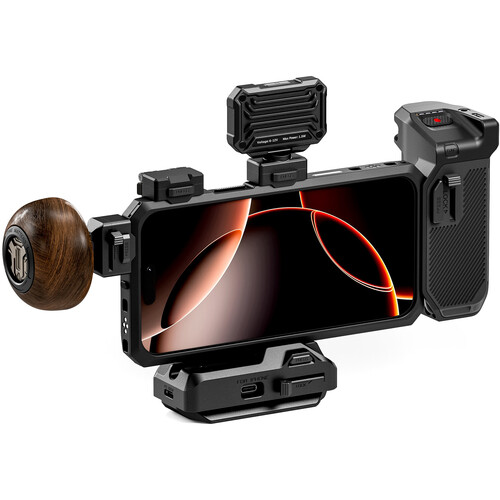
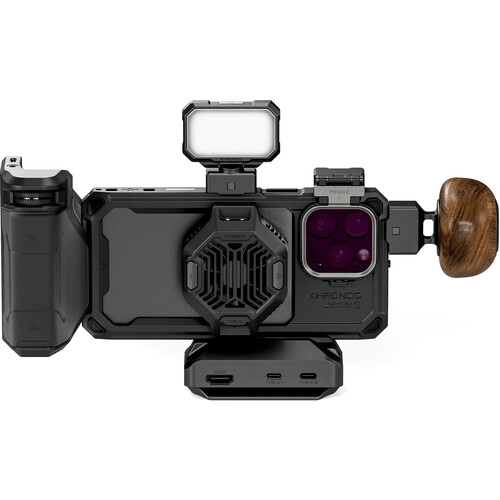
Tilta's Khronos cage system is currently dominating the market. The aluminum alloy used to create the cage weighs approximately 2.36 oz and is roughly 15% lighter than the prior version. You install the cage using a tool-free quick release mechanism and the cage leaves access to the capacitive camera control button on the iPhone. There are nine mounting points on the cage along with an embedded circuit board allowing you to add handles, lights, monitors and/or external storage without complicated adapters or chain link attachments.
Reviews of the Khronos Cage
Reviewers at B&H are largely pleased with the product although identify several issues that may be important to know. One reviewer reported that a rubber side-button pad broke loose from the case housing after approximately seven days of use. It could be repaired however, required significant additional effort and if you lost the small rubber piece on set you would then be left with nothing. Additionally, one reviewer stated he uses the cage system with the Blackmagic Camera app, a monitor made by Atomos, a microphone manufactured by DJI (DJI Mic 2) and an external SSD containing 4TB of memory all mounted to the cage. This reviewer states that you should purchase the optional Cold Shoe Quick Release Adapter and Nato mount if you intend to hang heavy accessories off of the cage because once the weight gets distributed across the entire length of the Focus PD Handle's locking clamp connection, it will loosen under load unless the attachment point is precisely aligned.
Grip System Handles and Focus Controls
The Focus PD Handle should receive special mention. It connects to your iPhone using USB-C and utilizes Bluetooth technology to enable physical zoom/focus control dials. While tapping on-screen to change focus mid-scene is one of those things that instantly makes your footage look like it came from a phone, having physical dials enables smooth, controlled zooms and focus pulls. In addition to providing focus and zoom functionality, the handle also contains an internal battery capable of powering any attached accessories and has a record button enabling you to begin recording without releasing the grip.
Audio Accessories: The Overlooked Category for iPhone Filmmakers
While audiences may often forgive minor shortcomings such as lackluster focus, mild white balance error and slight camera shake due to poor handholding techniques in favor of engaging storylines or characters, they rarely tolerate poor audio. The built-in microphones on iPhones are somewhat better suited for everyday usage and casual video capture than higher-end microphones however, they are still prone to picking up unwanted ambient sounds including wind noise, handling noises, echo/room reflections etc. Furthermore, due to their relatively short pickup range (typically within a couple feet), they fail miserably when attempting to capture audio in environments with greater distances.
The Rode Wireless GO II has rapidly emerged as the preferred wireless microphone solution for iPhone filmmakers and there are many reasons why. The Wireless GO II utilizes dual transmitters making it possible to record simultaneous two person interviews right out-of-the-box. Each transmitter features a built-in omnidirectional microphone and records continuously for 7 hours per transmitter using internal SD card memory as a backup. Having internal backups has saved far more shoots than anyone would care to admit. Should your wireless connection drop at any time (even momentarily), the onboard recorded material will catch whatever missed material occurred.
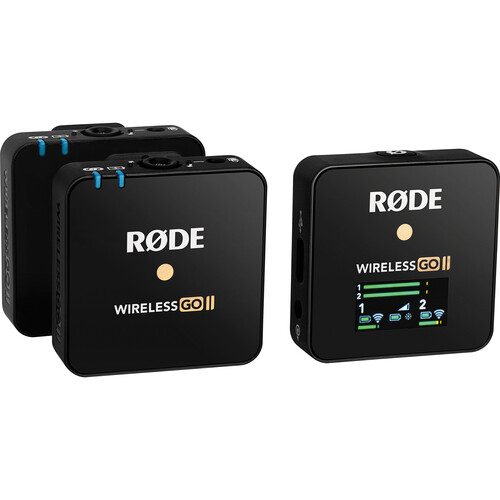
As evidenced by over 480 reviews on B&H, users have extensively tested the Wireless GO II in various environments and conditions. Reviewers frequently complimented its reliability and small size. However, users did comment that connecting the receiver requires using a 3.5mm TRS cable and therefore requires an adapter cable dependent upon whether you have a Lightning or USB-C equipped iPhone. As previously noted, Rode offers these types of adapter cables but they sell them separately which caught some reviewers off-guard. If you've purchased a Rode Wireless GO previously in conjunction with another setup, you'll find that you can utilize existing transmitters with the new Wireless GO II receiver.
In addition to utilizing wireless solutions for interviews involving multiple subjects, a wired approach is ideal for interviews requiring minimal setup. Rode's SC6-L Mobile Interview Kit offers dual input wired connections that plug directly into your iPhone. Finally, if you require only a basic wire-direct-to-phone interface for solo-shooting purposes, Rode's VideoMic Me-L is difficult to match at the price point.
Handheld Stabilization: Gimbals Versus Handheld Cages
At this juncture in time, many people overcomplicate their choice of stabilizer. You do not always require a gimbal. Depending on how well-designed your cage is and how well-equipped your handle is, you can obtain excellent handheld footage with your iPhone's native image stabilization capabilities. However, should you decide to execute walk-and-talk scenes, follow subjects or produce any form of moving shot requiring that silky-smooth motion created by a gimbal, then adding a gimbal will significantly alter your experience.
Currently considered one of the top choices is DJI's Osmo Mobile 8. The Osmo Mobile 8 supports phones weighing up to 10.6 oz and operates for ten hours per charge utilizing its rechargeable batteries. Additionally, DJI's ActiveTrack function automatically locks onto your subject without requiring your intervention in framing or focusing your shot. Magnetic phone clamps allow rapid swapping between gimbal and handheld modes, which is critical when transitioning quickly between different shooting styles during actual shoots.
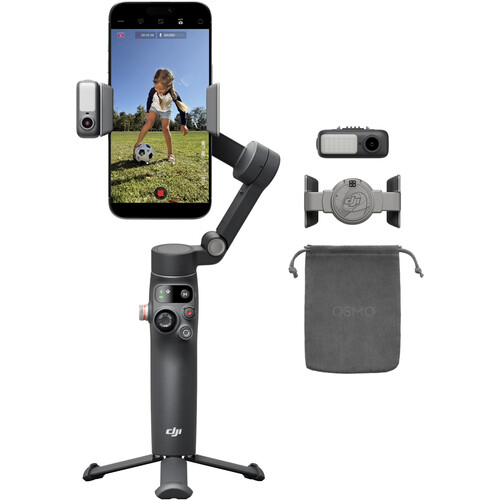
Something else worth noting is that you cannot effectively combine a cage system with a consumer-grade gimbal in terms of total weight and bulkiness. Therefore, think of these as two different configurations: cage + handle = controlled shooting with stationary or handheld shots. Gimbal = for capturing movement shots with or without a minimalist cage system.
If you wish to enjoy both worlds (cage with gimbal), then consider purchasing DJI's RS line of larger gimbals that support phone cages (and associated weights). However, this will put you into a different cost category and size class. Another alternative is the Osmo Pocket, an ultra-portable all-in-one gimbal. While this is smaller and easier to carry than any of DJI's larger gimbals (or cage+gimbal combo), you sacrifice the iPhone's larger optical lens system.
Lenses and Filters: Beyond Using Just Stock iPhone Lens Systems
Apple has produced an incredibly high-quality native lens system. The wide-angle camera, the telephoto lens and the ultra-wide angle lens on newer Pro models offer an incredible amount of coverage for almost any potential need. However, there are certain visual effects that you simply can't recreate with software alone, nor can you realistically duplicate those effects using only stock hardware lens systems. That's where additional lenses come into play, particularly where Moment T-Series lenses earn their keep.
Anamorphic: The Cinematic Look
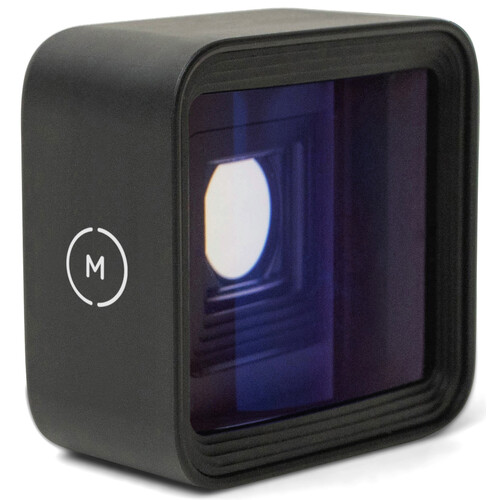
Moment's 1.33x Anamorphic lens produces a real anamorphic squeeze, unlike any realistic attempt by software filters to mimic that effect convincingly. The resulting horizontal lens flares, oval-shaped bokeh shapes and wider-than-widescreen aspect ratios scream cinema. Simply set it to 2.40:1 and you're recording your scene(s) in exactly the same aspect ratio as nearly all theatrical releases. The Moment T-Series mount is solid, does not cause excessive vignetting and incorporates a multi-layer anti-reflective coating to minimize ghosting problems.
To take advantage of this anamorphic lens you'll first need a Moment case featuring the T-Series drop-in mount designed for your specific iPhone model (they're only about five bucks) along with the Moment app capable of real-time de-squeezing footage captured using this lens. Blackmagic Camera app also performs anamorphic de-squeezing should you be using that app.
ND Filters: Exposing Correctly for Cinematic Motion Blur
Every iPhone filmmaker needs an ND filter regardless of whether they're shooting in Apple Log or manual mode. Controlling shutter speed independent of exposure levels is essential. Without an ND filter in bright lighting situations you'll either expose excessively or increase your shutter speed dramatically which will yield that jittery, soap-opera type motion blur instead of silky-smooth cinematic motion blur.
Included with Tilta's Khronos cage system is a magnetic filter tray featuring two ND filter options (2-stop and 4-stop) or Moment makes a variable ND QuickLock filter adjustable from 2-stops through 7-stops. Alternatively the PolarPro Iris ND Filter also represents a viable option if you're looking for third-party alternatives not limited to either ecosystem. You can also compare Rode Wireless GO II prices on Amazon if you want to bundle audio gear purchases.
Storage and Power: The Basics Behind Saving Your Entire Production
Regardless of format, ProRes or Apple Log, eating through storage is a major concern when shooting long-form video. A one-minute ProRes clip at 4K can consume as much as 6GB. Before lunchtime, your 256GB or 512GB iPhone will fill up faster than ever.
That's where Tilta's included USB-C Hub comes into play. By providing two USB-C ports for charging/power/data transfer along with HDMI output for attaching external displays/wireless transmitters as well as a 3.5mm audio jack for monitoring purposes, you can capture limitless amounts of footage provided you supply sufficient storage media via external SSD using Apple Log, thus bypassing internal storage limitations entirely.
Some reviewers on B&H indicated that establishing external SSD recording involves research and documentation lacking clarity regarding setup procedures, so expect some trial-and-error time to establish SSD recording operation.
Finally, another component worthy of consideration if conducting extended interview/take sequences involves using an active cooling device (The Cooling System V2) to mitigate thermal throttling exhibited by iPhones during prolonged continuous recording sessions, primarily related to ProRes or 4K formats. The Cooling System V2 incorporates a 22W variable-frequency heat dissipator capable of maintaining your phone operating temperature throughout extended interview/event recordings utilizing MagSafe attachment. You can also find the Tilta Khronos kit on Amazon if you want to compare prices.
Frequently Asked Questions
Do I need a cage system if I'm just beginning my journey into iPhone filmmaking?
No, not necessarily. A cage becomes necessary when you wish to attach several peripheral accessories like external mics, lights, or monitors. If you're just starting out with iPhone videography, then your first priority will likely be acquiring good quality wireless mics and possibly a gimbal, both will have substantially more immediate positive impacts on your overall video quality than acquiring a full-fledged cage system.
Can I use the Rode Wireless GO II directly connected to my iPhone?
Yes, however you will require an adapter cable. The Wireless GO II receiver outputs audio via 3.5mm TRS therefore, depending on which iPhone model you possess, you'll need either a Lightning-to-3.5mm adapter or a USB-C-to-3.5mm adapter cable. Rode sells specific SC15 (Lightning) and SC16 (USB-C) cables for direct digital connection which provide cleaner audio than analog routes.
Is the DJI Osmo Mobile 8 compatible with iPhone cases?
Most standard iPhone cases will accommodate the magnetic clamp utilized on DJI's Osmo Mobile 8 gimbals. However, cases such as the Tilta Khronos filmmaking cage are overly large/bulky for use with consumer-grade gimbals. You'll want to only operate the gimbal using either bare iPhones or very thin cases only.
Which is the best app for iPhone-based filmmaking?
Blackmagic Camera app remains your go-to app for serious filmmaking work providing full manual control settings for Apple Log, shutter speed, exposure, ISO, LUT preview, false color, focus peaking, and native de-squeeze functionality for anamorphic lenses. It's free, which seems absurd considering all the capabilities included. FiLMiC Pro is another popular option offering similar manual control functions.
How can I prevent my iPhone from overheating during extended periods of video recording?
Thermal throttling occurs during prolonged ProRes/4K captures. To combat this issue, Tilta offers its Cooling System V2 as part of its cage system, attaching via MagSafe to actively cool down your iPhone. Even if you do not opt for Tilta's cooling unit, carrying your iPhone outside direct sunlight, reducing bulk/weight of any casing, and offloading recording responsibilities from internal memory utilizing an external SSD can all aid in preventing thermal throttling.
Is it worth purchasing Moment lenses for iPhone filmmaking?
If you desire aesthetic effects unobtainable by software, yes. Moment's anamorphic lens creates an authentic cinematographic aesthetic effect impossible to replicate with filters or software. Wide-angle/telephoto lens options offered by Moment represent additional creative possibilities albeit less dramatic since the iPhone native lens systems already encompass those focal ranges fairly adequately. View Moment lenses as creative tools rather than quality upgrades.