
Best Cameras for Video Blogging in 2026: What Actually Works
The best camera for a video blog is not based on how many megapixels it has, nor is it based on how fancy its codec is. The best camera for a video blog is simply the one that you will actually use. That may seem simple, yet it is why so many filmmakers find themselves with very expensive equipment and never take it out of their closet.
As a result, they have to film their vlogs on a smartphone. In the world of 2026, most single person video creators do not have a problem finding a camera that fits all of the above criteria. The Sony ZV-1 II is a prime example of a camera that is relatively inexpensive and does a good job of producing high-quality video that is capable of being used on a regular basis, without having to carry multiple accessories.
However, the Sony ZV-1 II is not the only option available to vloggers, and there are many trade-offs that occur depending on how you plan to use the camera.
Four Things to Consider When Purchasing a Video Blogging Camera
Before you begin comparing sensor sizes or frame rates, consider how you plan to create the majority of your video blog content. Do you spend most of your time at a desk? Walking around a city? Filming in your car? The way you create content determines what features matter most.
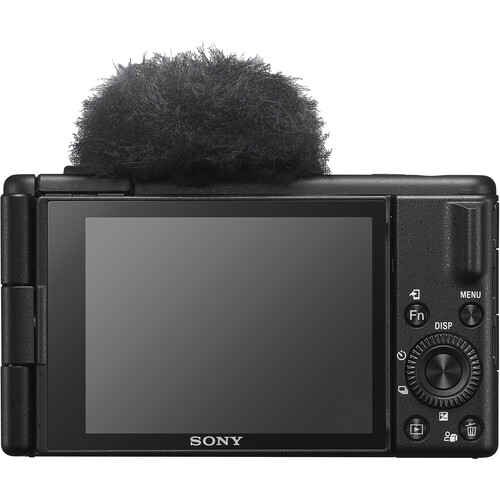
There are four things that matter much more than the resolution or dynamic range of the video camera that you purchase as a single creator:
Side Flip-Out Screen. If you plan to record yourself, you need to be able to view yourself while you are recording. A side flip-out screen (versus a tilt screen) allows you to view the area in front of you while you are recording and adjust your framing accordingly. A flip-out screen is an absolute necessity when you are planning to create a walk-and-talk style video blog.
Auto-Focus That Tracks. Hunting for auto-focus is a sure-fire way to kill a video blog. Eye-AF is a must-have feature for video bloggers. You need auto-focus that will lock onto the subject and remain locked as long as you continue to move, turn your head, or raise objects in front of the camera.
Built-In Or Easy Audio. While viewers will likely forgive you for slightly soft video, they will not forgive you for poor audio. Having a camera with a decent built-in microphone, plus a 3.5mm input to connect an external microphone to the camera, will save you from the audio disasters that ruin so many video blogs. A budget-friendly option such as the Rode VideoMic GO II is a great pair for any vlogging setup.
Size And Weight. If the camera is too heavy or difficult to hold at arm's length for an extended period of time, you will not use it. A camera for vlogging purposes must be light enough to allow you to shoot one-handed for extended periods of time.
Why the Sony ZV-1 II is the Go-To Option
Sony essentially created this camera after observing what vloggers needed and then built that exact camera. The ZV-1 II weighs approximately 9.4 ounces. That is lighter than most smart phones with cases. With the Sony ZV-1 II you can shoot at arm's length for hours and days without causing injury to your arm.
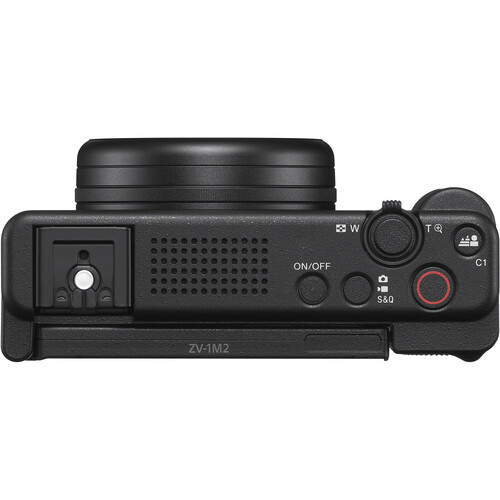
A significant improvement over the original ZV-1 was the addition of an 18-50mm equivalent f/1.8-4 lens. The wider-angle lens allows you to capture yourself in the frame at arm's length without needing to use a selfie-stick.
Additionally, the wider-angle lens provides improved performance in tight spaces. So, if you are a vlogger who films in a small apartment or a hotel room, you will not feel forced to continually back-up against a wall to capture enough of the scene in frame.
Video Quality Specifications For Vlogging
The 1-inch Exmor RS sensor, with 20.1 megapixels, provides acceptable low-light performance with a maximum native ISO of 12800. The Sony ZV-1 II provides UHD 4K at 30fps with S-Log3 and HLG profiles, as well as 1080p at 120fps for slow-motion.
The Sony ZV-1 II includes Real-Time Eye AF and Real-Time Tracking, both of which are effective for face-tracking, which is effectively the entire purpose of auto-focus for vloggers.
The 3-inch side flip-out touchscreen is vital for viewing the area in front of you while you are recording. You can perform touch AF, touch tracking, and touch shutter functions on the camera using the touchscreen.
Additionally, Sony has included a Product Showcase Setting that automatically focuses from your face to the object you raise up to the lens. This setting is perfect for vloggers that create product review videos or unboxing videos.
Reviewers from B&H state that the camera is suitable for run-and-gun shooting. One reviewer described the camera as a companion camera to action cameras and pocket gimbals, utilizing the ZV-1 II for B-roll due to the quality of the images captured.
Reviewers report that the point-and-shoot simplicity of the camera make it ideal for situations where you do not have time to stop and assemble a complete rig.
Built-In Mic Situation
Sony has installed a three-capsule directional mic inside the camera, and it performs fairly well. In auto-mode, the camera utilizes face and object detection to position the mic towards the speaker. Windscreen is provided in the box for capturing audio outside.
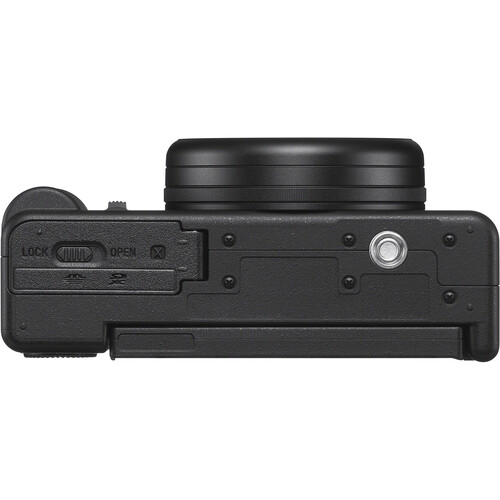
However, if you are serious about the quality of the audio (you should be serious about it), there is a 3.5mm mic input, as well as a Multi Interface Shoe for attaching digital microphones from Sony. Attach the Rode Wireless GO or a small shotgun mic to the camera and you are good-to-go.
The only drawback to the built-in mic is the lack of a headphone monitoring port. Without a headphone monitoring port, you cannot monitor the audio in real-time, except for through your external microphone.
Image Stabilization: Very Good But Far From Magical
The Sony ZV-1 II only uses digital stabilization. The original ZV-1 utilized optical stabilization, so the ZV-1 II is considered a step down from the original (one of the things Sony loves to avoid discussing).
According to Sony, the ZV-1 II will provide up to 11 times the amount of shake reduction for HD, and up to 8 times the amount of shake reduction for 4K when utilizing Active Mode. In actuality, the image stabilization is sufficient for walking shots if you maintain smooth motion, but it will not serve as a substitute for a gimbal for any type of fast-paced motion. There is a slight cropping of the image when Active stabilization is activated, particularly when filming in 4K.
Mirrorless Cameras for Vlogging?
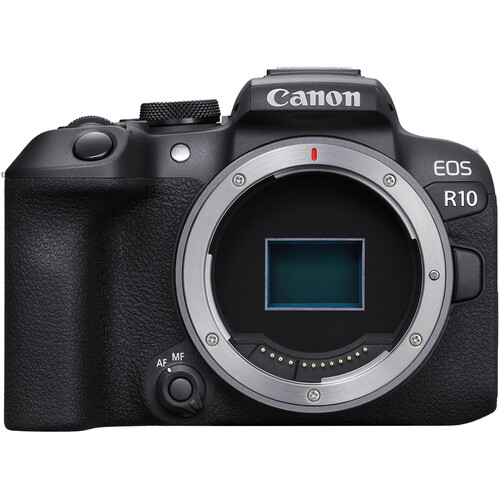
At this point, many vloggers begin to question whether they would be better off with mirrorless cameras, such as the Canon EOS R10, Nikon Z50 II, or Fujifilm X-M5. The answer to that question is completely dependent upon whether you wish to remain portable or grow into a more versatile system.
When you consider filming, the benefits of a mirrorless camera for filmmaking become apparent. Swapping lenses. Need to shoot wider angles? Switch the lens. Want a lot of background blur? Throw a fast prime lens on it.
However, swapping lenses comes with its own trade-offs. Mirrorless cameras are larger and heavier. You will be buying lenses individually and quality video lenses are expensive. As you add equipment to your package, it will quickly become large.
If you are vlogging and may dabble in other areas of filmmaking (i.e., interviews, product photography), a compact camera is likely the better choice. If you are creating a channel that will require different approaches to filming, a mirrorless camera provides you the ability to expand your capabilities. The Sony a6400 is a mid-level option that allows you to swap lenses and still maintain a compact size.
Compact vs. Mirrorless: The Real Trade-Offs
| Feature | Compact (ZV-1 II) | Mirrorless (EOS R10, Z50 II) |
|---|---|---|
| Weight | ~9 oz body | ~14-17 oz body + lens |
| Lens flexibility | Fixed zoom | Interchangeable |
| Low light | Good (1-inch sensor) | Better (APS-C sensor) |
| Autofocus | Excellent | Excellent |
| Audio input | 3.5mm mic | 3.5mm mic + headphone out |
| One-handed use | Easy | Awkward with larger lenses |
Other Cameras to Consider Based on Budget and Needs
While the ZV-1 II is the top-rated camera of its type, it is not the only option available. Listed below are a few alternative options based on budget and needs.
Canon EOS R10 is likely one of the closest competitors to the Sony ZV-1 II in terms of offering vlogging functionality with the quality of an APS-C camera. This camera offers a vari-angle flip screen, Canon's dual pixel AF technology, and you have access to Canon's RF-S lenses.
While the Canon EOS R10 is larger and heavier than the Sony, the quality of the images is notably better in difficult lighting conditions. Look at Canon EOS R10 options at B&H.
Fujifilm X-M5 is a new player in the space, and was designed specifically for content creation. This camera is compact compared to other mirrorless cameras, and includes Fuji's well-regarded film simulation technology along with 6K video capability.
If you value the color science of Fuji and do not wish to heavily grade your colors, this is worth considering. View Fujifilm X-M5 options at B&H.
DJI Pocket 3 is not a "camera" in the classical sense, but many vloggers utilize it. The DJI Pocket 3 is a tiny gimbal-stabilized camera that fits in your pocket. The camera has mechanical stabilization, so it provides much smoother footage than a camera with only digital stabilization.
The downside is that it has a smaller sensor and fewer manual controls. B&H reviewers of the ZV-1 II mentioned utilizing the DJI Osmo Pocket in conjunction with the ZV-1 II for walk-and-talk shots, indicating that these types of tools can be used together effectively.
Building Out Your Vlogging Kit
Your camera is merely the first piece of your kit. Below are some items that will make up a practical vlogging setup in 2026:
Audio. Even though the ZV-1 II has a decent internal mic, a wireless mic system will improve your audio quality dramatically. The Rode Wireless GO or the Rode Lavalier GO are two common systems that pair well with compact cameras. Note that the ZV-1 II has a 3.5mm input (not USB-C) for connecting an external microphone.
Lighting. While natural light is ideal, a small LED panel makes a world of difference for indoor vlogs. Please see our article on the best lights for filmmaking for information on panels that can be used at a desk or on-location.
Support. A small tabletop tripod with a phone-style grip works perfectly for the ZV-1 II. Try a Joby GorillaPod or Sony's own GP-VPT2BT shooting grip. B&H reviewers complained that the included strap does not fit the camera body correctly, and that you need a cage to attach a strap. So if you plan to carry the camera around your neck, budget for a small cage accessory.
Storage. The ZV-1 II uses SD cards in a single slot. When recording at high bitrate 4K, a V30 or faster card ensures that you don't experience dropped frames during recording.
Using the ZV-1 II as a WebCam/Stream
Another feature of the ZV-1 II is its ability to be used as a USB webcam. Simply connect it to your computer via the USB-C port and it will output as both a video and audio source without requiring additional software.
According to B&H Q&A, the ZV-1 II streams video at 720p 30fps when used as a webcam, which is adequate for Zoom meetings, but not particularly impressive. Nonetheless, the image quality from the 1 inch sensor is significantly better than any other dedicated webcam, regardless of the resolution.
Additionally, the camera is capable of live streaming directly to YouTube, Twitch, etc., using Sony's Creator's App on iOS and Android.
Frequently Asked Questions
Can I change lenses on the Sony ZV-1 II?
No. The ZV-1 II has a fixed 18-50mm equivalent zoom lens. It is a point-and-shoot camera, not a camera with interchangeable lenses. If you need lens flexibility, you may want to look at the Sony ZV-E10 II or Canon EOS R10 instead.
Does the Sony ZV-1 II include image stabilization?
Yes. The Sony ZV-1 II has a digital-only version of stabilization called Active Mode. The original ZV-1 had both optical and digital stabilization, so the lack of optical stabilization is a regression. Active Mode is suitable for casual walking shots, but it crops the image slightly, especially in 4K.
Is 4K cropped on the ZV-1 II?
There is no cropping when recording in 4K. There is a small crop when using Active Stabilization Mode.
What microphone would you recommend I use with the ZV-1 II for vlogging?
The built-in three-capsule mic of the ZV-1 II is surprisingly effective for everyday use, especially with the provided windscreen. For improved results, connect an external mic to the 3.5mm input. The Rode Videomic GO II is a cost-effective option, or a wireless mic system such as a Rode Wireless GO system. Just keep in mind there is no headphone jack to monitor.
Is the Sony ZV-1 II worth the investment compared to using a smartphone for vlogging?
If you are simply experimenting with whether vlogging is right for you, a smartphone is sufficient. If you intend to take vlogging seriously, the ZV-1 II offers a larger sensor with better low-light performance, actual bokeh in the background, better autofocus tracking, a dedicated microphone input, and the Cinematic Vlog mode that records 2.35:1 at 24fps.
The dedicated camera format also handles better for prolonged periods of shooting. You can find the current pricing for the ZV-1 II at B&H.
How long can I record with the ZV-1 II?
With the Auto Power OFF Temperature set to High, the ZV-1 II will allow extended recording. Battery life is approximately 290 exposures or roughly 45-55 minutes of continuous 4K video per battery charge. The USB-C port enables charging while recording, so you can hook the camera up to a power bank and continue recording.